Tutorial: build a bulk file-rename tool with a live preview
In this tutorial you build a small admin tool with the NativeHTMLKit Python SDK: pick a folder, type a find/replace rule (plain text or regular expression), see a live preview of the new names with conflicts flagged, confirm in a dialog, rename, and undo. It takes about 30 minutes.
You will learn how to split an app into index.html, style.css and app.py, keep decisions in
a pure function, update a preview live from input events, render file names safely, use the
native folder picker with a fallback, confirm with an HTML dialog, handle errors per file, and
test the whole thing without a screen.
The finished app is
examples/bulk_rename:
app.py, index.html and style.css. Every app.py excerpt below is copied from that file,
which the repository's test suite runs against the real native host.
You need uv on Linux x64 (glibc 2.39+) or Windows x64, and a desktop session.
Step 1: create the project
uvx --from nativehtmlkit nativehtmlkit-new BulkRename --name "Bulk rename"
cd BulkRename
uv run app.py               # installs nativehtmlkit into the project on first run
A window with a name field and an Add item button opens. Close it. You now have app.py,
index.html, style.css, pyproject.toml and app.toml (see
project scaffolding). Read lifecycle
if you want to know why app.py runs twice.
Step 2: the page
Replace index.html and style.css with the files from
examples/bulk_rename.
The page has four parts, each addressed by element ids that the Python code uses:
- a header with the folder box (
folder), Browse... (browse) and Load (load); - the rule form
rulewithfind,replaceand the checkboxesregexandcase; - the preview table body
preview; - a footer with the summary line
summary, Undo last rename (undo) and Rename (apply), plus a<dialog id="confirm">withconfirm-text,confirm-noandconfirm-yes.
All behaviour lives in Python; the page has no scripts. style.css uses
prefers-color-scheme, so the tool follows the desktop's light or dark mode, and a flex column
layout in which only the table scrolls (see styling and layout).
Step 3: the skeleton
Replace app.py with this skeleton. It loads the page from the script's folder; relative URLs in
index.html (the stylesheet) resolve against that folder.
from __future__ import annotations

import sys
from pathlib import Path

from nativehtmlkit import Application

HERE = Path(__file__).resolve().parent


class BulkRename:
    def __init__(self, app: Application, window):
        self.app, self.window, self.document = app, window, window.document
        # Steps 5-8 add state, methods and event handlers here.


def build(app: Application, folder: str | None = None) -> BulkRename:
    window = app.open_file(HERE / "index.html", title="Bulk rename", width=900, height=620,
                           min_width=640, min_height=400)
    return BulkRename(app, window)


def main() -> None:
    with Application.start(name="Bulk rename") as app:
        build(app, sys.argv[1] if len(sys.argv) > 1 else None)
        app.run()


if __name__ == "__main__":
    main()
Run it: the window shows the empty tool. The launcher passes your command-line arguments to the
backend run, so uv run app.py ~/Pictures will reach build() as folder in step 5.
build(app, ...) returns the object that owns the window. main() uses it, and so will the test
in step 9.
Step 4: plan the renames without any UI
Keep the logic that decides new names separate from the window. A pure function, with no SDK calls and no file system access, is easy to reason about and to test. The finished file starts with these imports and constants:
from __future__ import annotations

import html
import os
import re
import sys
from dataclasses import dataclass
from pathlib import Path

from nativehtmlkit import Application, Document, RpcError

HERE = Path(__file__).resolve().parent
WINDOWS = sys.platform == "win32"
INVALID_CHARACTERS = set('<>:"/\\|?*' + "".join(map(chr, range(32)))) if WINDOWS else {"/", "\0"}
Add the planning code below them:
@dataclass
class Row:
    old: str
    new: str
    status: str = "unchanged"     # unchanged | rename | conflict | invalid | error
    note: str = ""


def plan_renames(names: list[str], find: str, replace: str, *, regex: bool, match_case: bool) -> list[Row]:
    """One row per file name; never touches the disk."""
    rows = [Row(name, name) for name in names]
    if not find:
        return rows
    try:
        pattern = re.compile(find if regex else re.escape(find), 0 if match_case else re.IGNORECASE)
        # Plain-text mode: the replacement is literal text (a function bypasses \1 processing).
        replacement = replace if regex else (lambda _match: replace)
        new_names = [pattern.sub(replacement, name) for name in names]
    except (re.error, IndexError) as error:          # bad pattern, or \3 with only two groups
        for row in rows:
            row.status, row.note = "error", f"Invalid pattern: {error}"
        return rows

    def key(name: str) -> str:                       # Windows file names are case-insensitive
        return name.casefold() if WINDOWS else name

    existing = {key(name) for name in names}
    claimed: set[str] = set()
    for row, new in zip(rows, new_names):
        row.new = new
        if new == row.old:
            continue
        if not new or new in (".", "..") or INVALID_CHARACTERS & set(new):
            row.status, row.note = "invalid", "Not a valid file name"
        elif (key(new) in existing and key(new) != key(row.old)) or key(new) in claimed:
            row.status, row.note = "conflict", "Name already used"
        else:
            row.status = "rename"
            claimed.add(key(new))
    return rows
It escapes the find text in plain-text mode and uses a function as the replacement, so $, \
and \1 in the replacement stay literal text. It reports an invalid regular expression on every
row instead of raising, refuses names with characters the file system does not allow (only /
on Linux; <>:"/\|?* and control characters on Windows), and flags a conflict when the new name
already exists or two files would get the same name (case-insensitively on Windows).
In regular-expression mode the replacement uses Python's syntax: \1 or \g<1> for groups.
Try it in a Python console (paste the imports and the planning code first):
for row in plan_renames(["IMG_0001.jpg", "IMG_0002.jpg", "notes.txt"], "IMG_", "photo-",
                        regex=False, match_case=False):
    print(row)
Step 5: list files and preview live
Now fill in the class. Its __init__ holds the state and connects every event of the page; the
handlers for Browse..., Rename, the dialog buttons and Undo call methods you add in
steps 6 to 8:
class BulkRename:
    def __init__(self, app: Application, window):
        self.app, self.window, self.document = app, window, window.document
        self.folder: Path | None = None
        self.names: list[str] = []
        self.plan: list[Row] = []
        self.undo_steps: list[tuple[str, str]] = []
        doc = self.document
        # The top-level flag says whether the host offers native dialogs in this session.
        # (features["file_dialogs"]["available"] is None, "not observed", on a native desktop.)
        if not app.capabilities().get("file_dialogs"):
            doc.set_attribute("browse", "disabled", "")
        # Live preview: every keystroke or checkbox change in the rule form.
        doc.on("input", lambda _event: self.update_preview(), element="rule")
        doc.on("change", lambda _event: self.update_preview(), element="rule")
        # Enter in a rule field submits the form: treat it as "update preview", nothing else.
        doc.on("submit", lambda _event: self.update_preview(), element="rule")
        doc.on("click", lambda _event: self.open_folder(doc.get_value("folder")), element="load")
        doc.on("click", lambda _event: self.browse(), element="browse")
        doc.on("click", lambda _event: self.ask_confirmation(), element="apply")
        # Decide in the button handlers, not in the dialog's close event: a <dialog> keeps its
        # previous return value when the user dismisses it with Escape.
        doc.on("click", lambda _event: self.confirm(False), element="confirm-no")
        doc.on("click", lambda _event: self.confirm(True), element="confirm-yes")
        doc.on("click", lambda _event: self.undo(), element="undo")
input fires on every keystroke in the rule form (the handler sits on the form and receives
events from all its fields), change when a checkbox toggles, and submit when the user presses
Enter in a field. All three only update the preview.
The preview methods read the rule, plan, and render:
    def set_summary(self, text: str) -> None:
        self.document.set_text("summary", text)

    def set_enabled(self, element: str, enabled: bool) -> None:
        if enabled:
            self.document.remove_attribute(element, "disabled")
        else:
            self.document.set_attribute(element, "disabled", "")

    def update_preview(self) -> None:
        doc = self.document
        self.plan = plan_renames(self.names, doc.get_value("find"), doc.get_value("replace"),
                                 regex=doc.get_checked("regex"), match_case=doc.get_checked("case"))
        # File names are untrusted text: escape every cell. The status class comes from a fixed set.
        cells = "".join(f'<tr class="{row.status}"><td>{html.escape(row.old)}</td><td>{html.escape(row.new)}</td>'
                        f'<td>{html.escape(row.note or row.status)}</td></tr>' for row in self.plan)
        count = sum(row.status == "rename" for row in self.plan)
        blocked = sum(row.status in ("conflict", "invalid", "error") for row in self.plan)
        summary = f"{len(self.names)} file(s), {count} to rename" + (f", {blocked} skipped" if blocked else "")
        doc.batch([
            {"op": "replace_children_html", "element": "preview", "html": cells},
            {"op": "set_text", "element": "summary", "text": summary},
            {"op": "set_text", "element": "apply", "text": f"Rename {count}"},
        ])
        self.set_enabled("apply", count > 0)

    def update_file_list(self) -> None:
        self.names = sorted(entry.name for entry in self.folder.iterdir() if entry.is_file())
        self.update_preview()

    def open_folder(self, path: str) -> None:
        if not path or not Path(path).is_dir():
            self.set_summary("That folder does not exist.")
            return
        self.folder = Path(path).resolve()
        self.document.set_value("folder", str(self.folder))
        self.set_undo([])
        self.update_file_list()
    def set_undo(self, steps: list[tuple[str, str]]) -> None:
        self.undo_steps = steps
        self.set_enabled("undo", bool(steps))
Everything shown in the table is a file name, which is untrusted text, so each cell goes through
html.escape. The status class (rename, conflict, ...) comes from a fixed set and styles the
row. The table, the summary and the button label change in one batch, so the user never sees a
half-updated view. A disabled button is an HTML attribute: set_attribute(id, "disabled", "")
turns it on, remove_attribute turns it off.
Finally, open the folder passed on the command line. Replace build() with the finished version:
def build(app: Application, folder: str | None = None) -> BulkRename:
    # Relative URLs in index.html (style.css) resolve against the file's folder.
    window = app.open_file(HERE / "index.html", title="Bulk rename", width=900, height=620,
                           min_width=640, min_height=400)
    tool = BulkRename(app, window)
    if folder:
        tool.open_folder(folder)
    return tool


def main() -> None:
    with Application.start(name="Bulk rename") as app:
        build(app, sys.argv[1] if len(sys.argv) > 1 else None)
        app.run()


if __name__ == "__main__":
    main()
Run uv run app.py <a folder with some files>. Type IMG_ in Find and photo- in
Replace with: the preview updates while you type, and the summary counts the files that would
be renamed.
Step 6: choose the folder with the native dialog
The capability check in __init__ disables Browse... where the host cannot show native
dialogs (for example in headless test runs):
        # The top-level flag says whether the host offers native dialogs in this session.
        # (features["file_dialogs"]["available"] is None, "not observed", on a native desktop.)
        if not app.capabilities().get("file_dialogs"):
            doc.set_attribute("browse", "disabled", "")
The button's handler opens the folder picker without blocking the event thread
(wait=False) and handles the answer in a done-callback:
    def browse(self) -> None:
        def done(future) -> None:
            try:
                result = future.result()
            except RpcError as error:        # -32001: no dialog service in this session
                self.set_summary("Native file dialogs are not available in this session."
                                 if error.code == -32001 else f"The folder dialog failed (error {error.code}).")
                return
            if not result["cancelled"]:
                self.open_folder(result["paths"][0])
        # wait=False keeps the event thread free while the dialog is open.
        self.window.choose_folder(title="Folder with files to rename", wait=False).add_done_callback(done)
A cancelled dialog returns {"cancelled": True, "paths": []}. Without a dialog service the future
raises RpcError -32001 and the summary says so. See file dialogs.
Step 7: confirm and rename
Renaming is destructive, so ask first in an HTML <dialog>. Rename fills the dialog text and
opens it modally; the dialog's buttons close it and decide. Escape closes the dialog without a
click, which counts as "no".
    def ask_confirmation(self) -> None:
        count = sum(row.status == "rename" for row in self.plan)
        self.document.set_text("confirm-text", f"Rename {count} file(s) in {self.folder}?")
        self.document.show_dialog("confirm")

    def confirm(self, yes: bool) -> None:
        self.document.close_dialog("confirm", "")
        if yes:
            self.rename()

    def rename(self) -> None:
        done, failed = [], 0
        for row in (r for r in self.plan if r.status == "rename"):
            source, target = self.folder / row.old, self.folder / row.new
            try:
                # os.rename silently replaces an existing file on Linux: refuse that ourselves.
                if target.exists() and not (WINDOWS and row.old.casefold() == row.new.casefold()):
                    raise FileExistsError(target)
                os.rename(source, target)
                done.append((row.old, row.new))
            except OSError:                   # in use, permission denied, or changed since the preview
                failed += 1
        self.set_undo(done)
        self.update_file_list()
        message = f"Renamed {len(done)} file(s)."
        if failed:
            message += f" {failed} failed (in use, permission denied or changed)."
        self.set_summary(message)
The decision is made in the button handlers rather than in the dialog's close event because a
<dialog> keeps its previous return value when it is dismissed with Escape (see
HTML dialogs).
rename() renames each planned file on its own: one locked file does not stop the others, and
the summary reports how many failed. os.rename replaces an existing target silently on Linux,
so the method refuses that itself (the file may have appeared after the preview). Each success
is recorded for undo.
Step 8: undo
undo() renames the recorded files back in reverse order:
    def undo(self) -> None:
        if not self.undo_steps:
            return
        restored = 0
        # Reverse order, so chains such as a->b, b->c are undone correctly.
        for old, new in reversed(self.undo_steps):
            try:
                os.rename(self.folder / new, self.folder / old)
                restored += 1
            except OSError:
                pass
        self.set_undo([])
        self.update_file_list()
        self.set_summary(f"Restored {restored} file name(s).")
Your app now matches examples/bulk_rename/app.py.
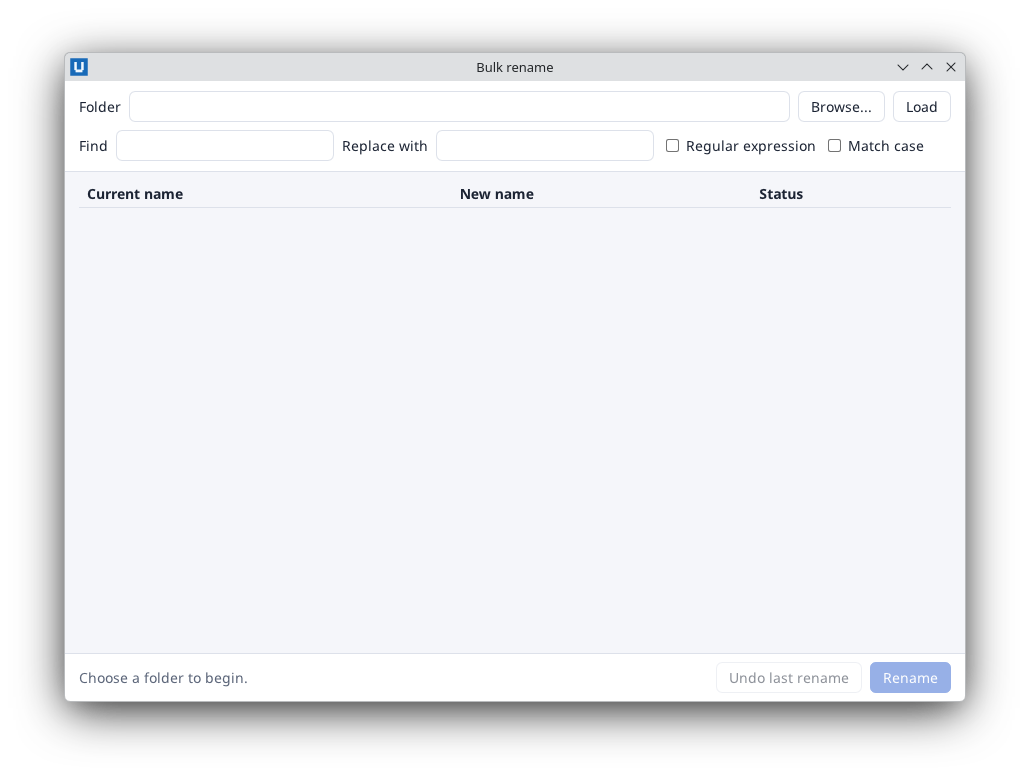
Real capture on KDE Plasma 6.6 Wayland with the released packages.
Step 9: test it without a screen
Headless mode (NATIVEHTMLKIT_TEST_MODE=1) runs the real host without windows on screen, but it
has no mouse or keyboard input. Call the same methods the handlers call and read the page back.
Save this as check_rename.py next to app.py:
import tempfile
import threading
from pathlib import Path

import app as bulk_rename


def check(application):
    folder = Path(tempfile.mkdtemp())
    for name in ("IMG_0001.jpg", "IMG_0002.jpg", "img_0003.JPG", "notes.txt"):
        (folder / name).write_text(name, encoding="utf-8")
    tool = bulk_rename.build(application, str(folder))
    doc = tool.document
    doc.set_value("find", r"^img_(\d+)")
    doc.set_value("replace", r"photo-\1")
    doc.set_checked("regex", True)
    tool.update_preview()                 # set_value does not fire input events
    assert doc.get_text("summary") == "4 file(s), 3 to rename", doc.get_text("summary")
    tool.ask_confirmation()
    tool.confirm(True)                    # what the dialog's Rename button does
    assert (folder / "photo-0003.JPG").is_file()
    tool.undo()
    assert doc.get_text("summary") == "Restored 3 file name(s)."
    assert (folder / "img_0003.JPG").is_file()
    print("check passed")
    threading.Timer(0.5, application.request_quit).start()
NATIVEHTMLKIT_TEST_MODE=1 uv run -m nativehtmlkit run check_rename:check # prints: check passed
set_value and set_checked do not fire input/change events, so the test calls
update_preview() itself. A failed assert ends the run with exit status 1 and a traceback. The
repository's tests/integration/example_checks.py runs a longer version of this check (conflicts,
invalid names, a failed rename, the dialog fallback). Try the real clicks once in a desktop
session.
Where next
- Ship it: packaging and distribution.
- Make it faster on big folders: list the files in a background thread.
- The process dashboard tutorial refreshes data in the background.
- Browse the other examples and the API reference.
Source: nativehtmlkit-python/docs/tutorials/bulk-rename.md · edit the page there.