Getting started with the PowerShell SDK
The NativeHTMLKit module turns a PowerShell script into a desktop application: the window and its
HTML/CSS page are drawn by a native host that ships inside the module, and your script reacts to
clicks, typing and form submissions. There is no browser, no JavaScript and no local web server.
This page takes about ten minutes: install the module, write a first window, run it, and test it without a desktop.
Requirements
- PowerShell 7.2 or later on Linux x64 or Windows x64, or Windows PowerShell 5.1 on Windows x64.
- A desktop session to see windows (on Linux: KDE Plasma on Wayland is the qualified desktop). Automated tests run without one, see below.
Install
Install-Module NativeHTMLKit -Scope CurrentUser
# or, with PSResourceGet:
Install-PSResource NativeHTMLKit -Scope CurrentUser
Check the installed version and the bundled host:
Import-Module NativeHTMLKit
(Get-Module NativeHTMLKit).Version          # 0.1.2
Get-NativeHTMLKitHostPath                     # path of the verified native host binary
Your first window
Save this as hello.ps1:
$ErrorActionPreference = 'Stop'
Import-Module NativeHTMLKit

# The host runs this script a second time as its backend; everything below runs in that backend.
$app = Start-NativeHTMLKitScript -Name 'Hello'
try {
    $window = New-NativeHTMLKitWindow -Application $app -Title 'Hello' -Width 480 -Height 260
    $doc = Open-NativeHTMLKitHtml -Window $window -Html @'
<!doctype html>
<html><head><style>
  body { font-family: sans-serif; margin: 24px; }
  form { display: flex; gap: 8px; }
  #name { flex: 1; padding: 6px; }
</style></head>
<body>
  <h1>Hello</h1>
  <form id="greet"><input id="name" placeholder="Your name" required><button>Greet</button></form>
  <p id="message" role="status">Type your name and press Enter.</p>
</body></html>
'@
    $null = Register-NativeHTMLKitDocumentEvent -Document $doc -Type submit -Element greet -Callback {
        $name = (Get-NativeHTMLKitValue -Document $doc -Element name).Trim()
        # Set-NativeHTMLKitDocumentText never parses markup: any name is shown as plain text.
        Set-NativeHTMLKitDocumentText -Document $doc -Element message -Text "Hello, $name!"
    }
    Set-NativeHTMLKitReady -Application $app
    Wait-NativeHTMLKit -Application $app -UntilShutdown
} finally {
    Close-NativeHTMLKit -Application $app
}
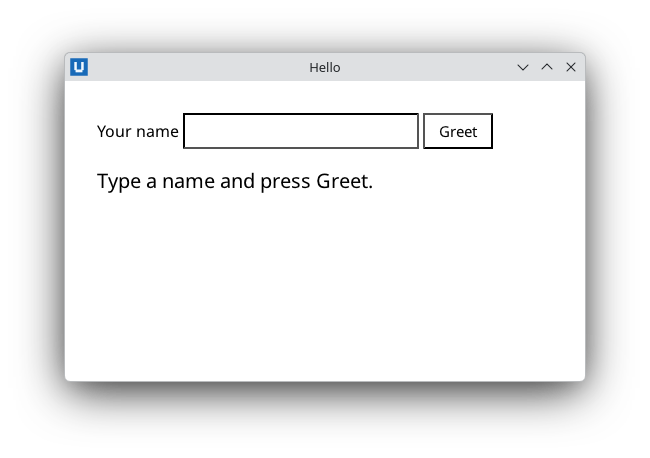
Real capture on KDE Plasma 6.6 Wayland with the released packages.
Run it:
pwsh -File ./hello.ps1 # Windows PowerShell: powershell.exe -NoProfile -File .\hello.ps1
A native window opens. Type a name and press Enter (or click Greet); the greeting appears. Close the window to end the script.
What happened
Start-NativeHTMLKitScriptstarted the native host, and the host ranhello.ps1again as its supervised backend. In the first run the call never returns (the launcher waits for the host and exits with its exit code); in the backend run it returns the connected application. Keep side effects such as writing files below this call.New-NativeHTMLKitWindowandOpen-NativeHTMLKitHtmlcreated the window and loaded the page.Register-NativeHTMLKitDocumentEventsubscribed a scriptblock to the form'ssubmitevent. Pressing Enter in the field submits the form;requiredstops an empty submission before your code sees it.Set-NativeHTMLKitReadytold the host the first screen is ready.Wait-NativeHTMLKit -UntilShutdownis the event loop: callbacks run inside it, on this runspace. It returns when the last window closes.Close-NativeHTMLKitinfinallyreleases everything, whatever happened.
The lifecycle guide explains each step and the mistakes that break it.
Test without a desktop
The host has a headless mode for automated tests. It runs the whole protocol without windows (and without any user input), so your script can drive the page itself and read it back:
$env:NATIVEHTMLKIT_TEST_MODE = '1'
pwsh -File ./hello.ps1
The examples accept -SelfTest, which submits forms with Submit-NativeHTMLKitForm, reads the
document with Get-NativeHTMLKitDocumentText, prints a PASS line and quits with
Request-NativeHTMLKitQuit. Native dialogs, the clipboard and opening links need a real desktop;
in headless mode they throw NativeHTMLKit.RpcException code -32001.
Where next
- Learn step by step: the todo app tutorial (forms, lists, editing, saving), then the process dashboard tutorial (background refresh) and the bulk rename tutorial (a multi-file project).
- Solve a task: the how-to guides.
- Read and run complete apps: the examples (by task).
- Look up a cmdlet: the cmdlet reference, or
Get-Help <command>in PowerShell. - Start your own project:
New-NativeHTMLKitProject -Path ./MyApp(project scaffolding).
Source: nativehtmlkit-powershell/docs/getting-started.md · edit the page there.