Tutorial: a live process dashboard
You will build Process Dashboard: a native window with a table of running processes that refreshes itself in the background, can be filtered and sorted, paused, and copied to the clipboard. It works the same on Linux (PowerShell 7) and Windows (PowerShell 7 or Windows PowerShell 5.1).
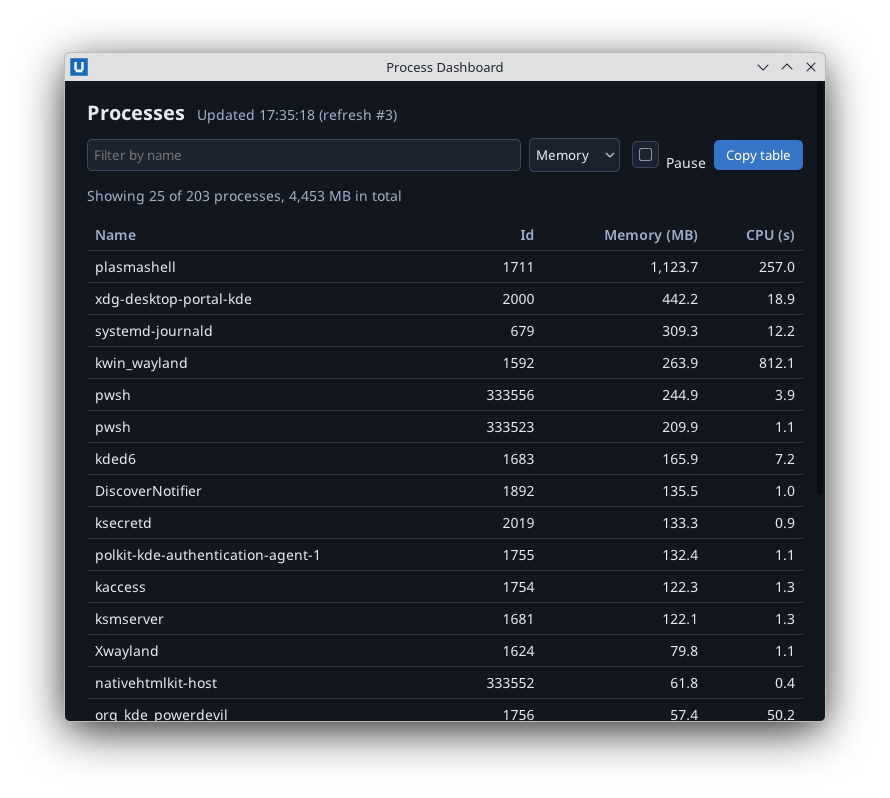
Real capture on KDE Plasma 6.6 Wayland with Core 1.0.3 and PowerShell SDK 0.1.2 on PowerShell 7.7.
Time: about 30 minutes. You need: the NativeHTMLKit module and the first window from
getting started. The three scripts are in
examples/process-dashboard/;
the final app is app.ps1. All three are run against the real host by this
repository's tests.
Real capture on KDE Plasma 6.6 Wayland with the released packages.
Step 1: a table from Get-Process
# Process dashboard tutorial, step 1: show a table of the busiest processes in a native window.
#
# Teaches: Start-NativeHTMLKitScript, New-NativeHTMLKitWindow, Open-NativeHTMLKitHtml, building
#          HTML rows from objects with HtmlEncode, Set-NativeHTMLKitDocumentHtml, Wait-NativeHTMLKit.
# Run:     pwsh -File step1-snapshot.ps1      (Windows PowerShell 5.1: powershell.exe -File step1-snapshot.ps1)
# Guide:   docs/tutorials/process-dashboard.md (step 1 of 3)
$ErrorActionPreference = 'Stop'
Import-Module NativeHTMLKit -ErrorAction Stop
# The host runs this script again as its backend: everything below this line runs in that backend.
$app = Start-NativeHTMLKitScript -Name 'Process Dashboard'

$page = @'
<!doctype html>
<html><head><meta charset="utf-8"><style>
  body { font: 14px sans-serif; margin: 0; background: #11161f; color: #e6ebf3; }
  main { padding: 18px 22px; }
  h1 { font-size: 20px; margin: 0 0 12px; }
  table { border-collapse: collapse; width: 100%; }
  th, td { text-align: left; padding: 6px 8px; border-bottom: 1px solid #2a3445; }
  th { color: #9fb0c8; font-weight: 600; }
  td.num, th.num { text-align: right; }
</style></head>
<body><main>
  <h1>Top processes by memory</h1>
  <table>
    <thead><tr><th>Name</th><th class="num">Id</th><th class="num">Memory (MB)</th><th class="num">CPU (s)</th></tr></thead>
    <tbody id="rows"></tbody>
  </table>
</main></body></html>
'@

function ConvertTo-HtmlText([string]$Text) { return [System.Net.WebUtility]::HtmlEncode($Text) }

function Get-ProcessRowsHtml([int]$Top) {
    $rows = Get-Process | Sort-Object WorkingSet64 -Descending | Select-Object -First $Top | ForEach-Object {
        '<tr><td>{0}</td><td class="num">{1}</td><td class="num">{2:N1}</td><td class="num">{3:N1}</td></tr>' -f `
            (ConvertTo-HtmlText $_.ProcessName), $_.Id, ($_.WorkingSet64 / 1MB), [double]$_.CPU
    }
    return ($rows -join '')
}

try {
    $window = New-NativeHTMLKitWindow -Application $app -Title 'Process Dashboard' -Width 720 -Height 560
    $doc = Open-NativeHTMLKitHtml -Window $window -Html $page
    Set-NativeHTMLKitDocumentHtml -Document $doc -Element rows -Html (Get-ProcessRowsHtml -Top 15)
    Set-NativeHTMLKitReady -Application $app
    Wait-NativeHTMLKit -Application $app -UntilShutdown
} finally {
    Close-NativeHTMLKit -Application $app
}
Run pwsh -File step1-snapshot.ps1.
- The page lives in a single-quoted here-string (
@' ... '@), so PowerShell does not expand$or backticks inside the HTML. Get-ProcessRowsHtmlbuilds<tr>rows with the-fformat operator. Process names are not under your control, so each one goes through[System.Net.WebUtility]::HtmlEncodebefore it becomes markup.Set-NativeHTMLKitDocumentHtml -Element rowsreplaces the children of<tbody id="rows">.Set-NativeHTMLKitReadycomes after the first content is in place, so the window opens with a filled table.
Step 2: filter and sort
# Process dashboard tutorial, step 2: filter and sort the table.
#
# Teaches: Register-NativeHTMLKitDocumentEvent for "input" and "submit" events, reading controls with
#          Get-NativeHTMLKitValue, keeping view state in one object that callbacks can change,
#          Set-NativeHTMLKitDocumentText for untrusted text.
# Run:     pwsh -File step2-filter.ps1        (Windows PowerShell 5.1: powershell.exe -File step2-filter.ps1)
# Guide:   docs/tutorials/process-dashboard.md (step 2 of 3)
$ErrorActionPreference = 'Stop'
Import-Module NativeHTMLKit -ErrorAction Stop
$app = Start-NativeHTMLKitScript -Name 'Process Dashboard'

$page = @'
<!doctype html>
<html><head><meta charset="utf-8"><style>
  body { font: 14px sans-serif; margin: 0; background: #11161f; color: #e6ebf3; }
  main { padding: 18px 22px; }
  h1 { font-size: 20px; margin: 0 0 12px; }
  form { display: flex; gap: 8px; margin-bottom: 10px; }
  input, select { background: #1b2331; color: #e6ebf3; border: 1px solid #3a475c; border-radius: 5px; padding: 6px; }
  #filter { flex: 1; }
  button { background: #3574c6; color: white; border: 0; border-radius: 5px; padding: 6px 12px; }
  table { border-collapse: collapse; width: 100%; }
  th, td { text-align: left; padding: 6px 8px; border-bottom: 1px solid #2a3445; }
  th { color: #9fb0c8; font-weight: 600; }
  td.num, th.num { text-align: right; }
  #summary { color: #9fb0c8; }
</style></head>
<body><main>
  <h1>Processes</h1>
  <form id="view-form">
    <input id="filter" type="search" placeholder="Filter by name" aria-label="Filter by name">
    <select id="sort" aria-label="Sort by">
      <option value="memory">Memory</option><option value="cpu">CPU time</option><option value="name">Name</option>
    </select>
    <button id="apply">Refresh</button>
  </form>
  <p id="summary"></p>
  <table>
    <thead><tr><th>Name</th><th class="num">Id</th><th class="num">Memory (MB)</th><th class="num">CPU (s)</th></tr></thead>
    <tbody id="rows"></tbody>
  </table>
</main></body></html>
'@

function ConvertTo-HtmlText([string]$Text) { return [System.Net.WebUtility]::HtmlEncode($Text) }

function Update-View {
    $filter = (Get-NativeHTMLKitValue -Document $doc -Element filter).Trim()
    $sort = Get-NativeHTMLKitValue -Document $doc -Element sort
    $all = @(Get-Process)
    $shown = @($all | Where-Object { $filter -eq '' -or $_.ProcessName.IndexOf($filter, [StringComparison]::OrdinalIgnoreCase) -ge 0 })
    $sorted = switch ($sort) {
        'cpu'  { $shown | Sort-Object { [double]$_.CPU } -Descending }
        'name' { $shown | Sort-Object ProcessName }
        default { $shown | Sort-Object WorkingSet64 -Descending }
    }
    $html = @($sorted | Select-Object -First 25 | ForEach-Object {
        '<tr><td>{0}</td><td class="num">{1}</td><td class="num">{2:N1}</td><td class="num">{3:N1}</td></tr>' -f `
            (ConvertTo-HtmlText $_.ProcessName), $_.Id, ($_.WorkingSet64 / 1MB), [double]$_.CPU
    }) -join ''
    Set-NativeHTMLKitDocumentHtml -Document $doc -Element rows -Html $html
    Set-NativeHTMLKitDocumentText -Document $doc -Element summary -Text ("Showing {0} of {1} processes" -f [Math]::Min(25, $shown.Count), $all.Count)
}

try {
    $window = New-NativeHTMLKitWindow -Application $app -Title 'Process Dashboard' -Width 720 -Height 600
    $doc = Open-NativeHTMLKitHtml -Window $window -Html $page
    # Callbacks run later, inside Wait-NativeHTMLKit, and can call the functions defined above.
    $null = Register-NativeHTMLKitDocumentEvent -Document $doc -Type input -Element filter -Callback { param($eventObject) Update-View }
    $null = Register-NativeHTMLKitDocumentEvent -Document $doc -Type change -Element sort -Callback { param($eventObject) Update-View }
    $null = Register-NativeHTMLKitDocumentEvent -Document $doc -Type submit -Element 'view-form' -Callback { param($eventObject) Update-View }
    Update-View
    Set-NativeHTMLKitReady -Application $app
    Wait-NativeHTMLKit -Application $app -UntilShutdown
} finally {
    Close-NativeHTMLKit -Application $app
}
- Three subscriptions call the same
Update-Viewfunction:inputon the search field (every keystroke),changeon the sort<select>, andsubmiton the form (Enter or the Refresh button). - Callbacks run later, inside
Wait-NativeHTMLKit, and can call functions and read variables ($doc) defined in the script. - The filter uses
IndexOf(..., OrdinalIgnoreCase)rather than-like "*$filter*", so characters like[typed by the user are not treated as wildcards. Set-NativeHTMLKitDocumentTextfor the summary: text is never parsed as HTML.
Step 3: background refresh, pause and copy
Calling Get-Process inside a callback blocks the window while it runs. The final version collects
processes in a background task and refreshes every few seconds. The page gains a status line, a
Pause checkbox and a Copy table button (see app.ps1 for the full markup).
The script now takes a parameter, and -SelfTest lets the test suite drive it headless:
param([ValidateRange(1, 3600)][int]$RefreshSeconds = 3, [switch]$SelfTest)
$ErrorActionPreference = 'Stop'
Import-Module NativeHTMLKit -ErrorAction Stop
$app = Start-NativeHTMLKitScript -Name 'Process Dashboard'
The data collection runs in a separate runspace:
# Runs in a separate runspace: no access to $app, $doc or this script's variables and functions.
$collect = {
    param([int]$DelayMilliseconds)
    if ($DelayMilliseconds -gt 0) { Start-Sleep -Milliseconds $DelayMilliseconds }
    Get-Process | ForEach-Object {
        [pscustomobject]@{ Name = $_.ProcessName; Id = $_.Id
            MemoryMB = [Math]::Round($_.WorkingSet64 / 1MB, 1); Cpu = [Math]::Round([double]$_.CPU, 1) }
    }
}
Everything the callbacks change lives in one object, and Update-View now renders the cached
snapshot instead of calling Get-Process:
# Everything the callbacks change lives in one object, so they never need to assign script variables.
$view = [pscustomobject]@{ Rows = @(); Refreshes = 0; Task = $null; Shown = @() }

function ConvertTo-HtmlText([string]$Text) { return [System.Net.WebUtility]::HtmlEncode($Text) }

function Update-View {
    $filter = (Get-NativeHTMLKitValue -Document $doc -Element filter).Trim()
    $shown = @($view.Rows | Where-Object { $filter -eq '' -or $_.Name.IndexOf($filter, [StringComparison]::OrdinalIgnoreCase) -ge 0 })
    $sorted = switch (Get-NativeHTMLKitValue -Document $doc -Element sort) {
        'cpu'  { $shown | Sort-Object Cpu -Descending }
        'name' { $shown | Sort-Object Name }
        default { $shown | Sort-Object MemoryMB -Descending }
    }
    $view.Shown = @($sorted | Select-Object -First 25)
    $html = @($view.Shown | ForEach-Object {
        '<tr><td>{0}</td><td class="num">{1}</td><td class="num">{2:N1}</td><td class="num">{3:N1}</td></tr>' -f `
            (ConvertTo-HtmlText $_.Name), $_.Id, $_.MemoryMB, $_.Cpu
    }) -join ''
    $total = ($view.Rows | Measure-Object MemoryMB -Sum).Sum
    Set-NativeHTMLKitDocumentHtml -Document $doc -Element rows -Html $html
    Set-NativeHTMLKitDocumentText -Document $doc -Element summary -Text ("Showing {0} of {1} processes, {2:N0} MB in total" -f $view.Shown.Count, $view.Rows.Count, $total)
}
Start-Refresh starts the task and schedules the next one when it completes:
function Start-Refresh([int]$DelayMilliseconds) {
    $view.Task = Start-NativeHTMLKitTask -Application $app -ScriptBlock $collect -ArgumentList @($DelayMilliseconds) -OnCompleted {
        param($rows)
        $view.Task = $null
        $view.Rows = @($rows)
        $view.Refreshes++
        Update-View
        Set-NativeHTMLKitDocumentText -Document $doc -Element status -Text ("Updated {0:HH:mm:ss} (refresh #{1})" -f (Get-Date), $view.Refreshes)
        if (-not (Get-NativeHTMLKitChecked -Document $doc -Element paused)) { Start-Refresh ($RefreshSeconds * 1000) }
    } -OnFailed {
        param($failure)
        $view.Task = $null
        Set-NativeHTMLKitDocumentText -Document $doc -Element status -Text ('Refresh failed: ' + $failure.Message)
    }
}
Copying the visible rows as tab-separated text:
function Copy-Table {
    $lines = @("Name`tId`tMemoryMB`tCpu") + @($view.Shown | ForEach-Object { "$($_.Name)`t$($_.Id)`t$($_.MemoryMB)`t$($_.Cpu)" })
    try {
        Set-NativeHTMLKitClipboard -Application $app -Text ($lines -join [Environment]::NewLine)
        Set-NativeHTMLKitDocumentText -Document $doc -Element status -Text "Copied $($view.Shown.Count) rows"
    } catch {
        Set-NativeHTMLKitDocumentText -Document $doc -Element status -Text 'The clipboard is not available in this session'
    }
}
Finally the window, the subscriptions and the first refresh:
try {
    $window = New-NativeHTMLKitWindow -Application $app -Title 'Process Dashboard' -Width 760 -Height 640
    $doc = Open-NativeHTMLKitHtml -Window $window -Html $page
    $null = Register-NativeHTMLKitDocumentEvent -Document $doc -Type input -Element filter -Callback { param($eventObject) Update-View }
    $null = Register-NativeHTMLKitDocumentEvent -Document $doc -Type change -Element sort -Callback { param($eventObject) Update-View }
    $null = Register-NativeHTMLKitDocumentEvent -Document $doc -Type submit -Element 'view-form' -Callback { param($eventObject) Update-View }
    $null = Register-NativeHTMLKitDocumentEvent -Document $doc -Type change -Element paused -Callback {
        param($eventObject)
        if ([bool]$eventObject.checked) {
            Set-NativeHTMLKitDocumentText -Document $doc -Element status -Text 'Paused'
        } elseif ($null -eq $view.Task) {
            Start-Refresh 0
        }
    }
    $null = Register-NativeHTMLKitDocumentEvent -Document $doc -Type click -Element copy -Callback { param($eventObject) Copy-Table }
    Start-Refresh 0
    Set-NativeHTMLKitReady -Application $app
In the file, the -SelfTest block comes next; the script ends with the event loop:
    Wait-NativeHTMLKit -Application $app -UntilShutdown
} finally {
    Close-NativeHTMLKit -Application $app
}
Start-NativeHTMLKitTask -ScriptBlock $collect -ArgumentList @($delay)runs$collectin a separate runspace. It cannot see$app,$docor your functions, and it must not receive SDK objects; pass plain data in and return plain objects (here[pscustomobject]rows).-OnCompleted { param($rows) ... }runs back on the main runspace, duringWait-NativeHTMLKit, where it is safe to update the page. It stores the rows, re-renders and starts the next task: a self-scheduling timer that never blocks the window.-OnFailedreceives the exception if the task throws, times out or is stopped.- Everything the callbacks change lives in one object,
$view. Assigning$x = ...inside a scriptblock would only create a local variable; setting$view.Rowschanges the shared object. - The pause checkbox reads
$eventObject.checkedfrom thechangeevent. Unpausing starts a new refresh immediately if none is pending. - Copy table uses
Set-NativeHTMLKitClipboardinsidetry/catch: some sessions (for example headless test runs) have no clipboard. -RefreshSecondsis a normal script parameter:pwsh -File app.ps1 -RefreshSeconds 10. The host re-runs the script with the same arguments.Close-NativeHTMLKitinfinallyalso requests cancellation of a task that is still sleeping; no callback runs after it.
Test it headless: $env:NATIVEHTMLKIT_TEST_MODE = '1'; pwsh -File app.ps1 -SelfTest waits for two
refreshes, filters, sorts, pauses, copies (or reports that there is no clipboard) and prints
SELFTEST PASS process-dashboard.
What you learned
- Render tables from objects with encoded values; subscribe to
input,changeandsubmit. - Keep slow work off the event loop with
Start-NativeHTMLKitTask, and update the page in-OnCompleted. - Share state between callbacks through one object; pass parameters through the re-executed script.
Where next
- Background work: cancellation with
Stop-NativeHTMLKitTask, timeouts and several jobs at once. - Live bitmaps: draw a memory chart next to the table.
- Cmdlet reference.
Source: nativehtmlkit-powershell/docs/tutorials/process-dashboard.md · edit the page there.