Clipboard and desktop services
All of these talk to the native desktop. They raise RpcError -32001 in headless mode and where
the platform lacks the service, so handle that error.
Clipboard (text)
from nativehtmlkit import RpcError

def copy_result(_event):
    try:
        app.set_clipboard_text(document.get_value("output"))     # at most 1 MiB
        document.set_text("status", "Copied")
    except RpcError as error:
        document.set_text("status", "Clipboard unavailable" if error.code == -32001 else f"Failed ({error.code})")

def paste(_event):
    try:
        document.set_value("input", app.clipboard_text())
    except RpcError:
        document.set_text("status", "Clipboard unavailable")
Inside text controls the native editor handles Ctrl+C/Ctrl+V itself. To trigger it from a button,
use document.edit("copy", "editor") / edit("paste", "editor"); the transfer completes
asynchronously and accepted does not guarantee that the OS accepted it.
Open links and files
Links in a document never navigate. Activating one sends link_activated:
def on_link(event):
    url = event.get("url") or ""
    if url.startswith("https://"):
        app.open_external(url, window=window)      # default browser

document.on("link_activated", on_link)
open_external(target) accepts http, https, mailto and file URIs or an absolute path and
opens it with the default application; other schemes are refused (-32003), as are executable file
types on Windows. reveal_file(path) shows a file in the file manager. Both return
{"accepted", "cancelled", "parent_forwarded", "presented"}; accepted means the desktop took
the request, not that an application window appeared.
Follow the desktop theme
prefs = app.desktop_preferences()
# {"color_scheme": "dark" | "light" | None, "reduced_motion": ..., "high_contrast": ..., "available": bool, "source": ...}
app.on_desktop_preferences(lambda prefs: document.set_text("scheme", prefs["color_scheme"] or "unknown"))
You rarely need this for styling: CSS @media (prefers-color-scheme: dark) and
(prefers-reduced-motion: reduce) follow the desktop automatically. Override per document with
document.set_environment(color_scheme="dark") and return to the desktop value with
set_environment(color_scheme="system").
Per-application directories
paths = app.rpc.call("desktop.paths")      # {"config", "data", "cache", "state", "runtime"}
store = Path(paths["data"]) / "todos.json"
store.parent.mkdir(parents=True, exist_ok=True)
The directories are derived from the application id (pass a stable app_id to
Application.start), using the XDG directories on Linux and AppData on Windows. They are not
created automatically.
Attention
window.request_attention("informational") (or "critical") asks the window manager to flag the
window, e.g. when a long job finished in the background. Unsupported in headless mode and limited
on Wayland.
Check before offering a feature
features = app.capabilities()["features"]
if features["clipboard_text"]["available"] is False:
    document.set_attribute("copy", "disabled", "")
available is None when the host has not observed the service yet; treat that as "try it".
Example: text_toolbox.py.
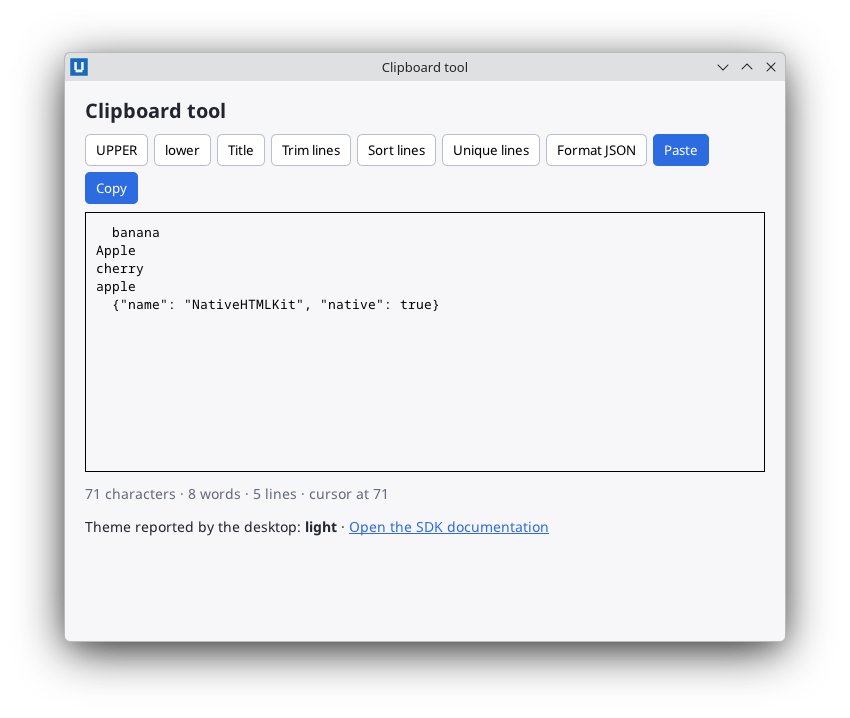
Real capture on KDE Plasma 6.6 Wayland with the released packages.
Source: nativehtmlkit-python/docs/guides/clipboard-and-desktop.md · edit the page there.