Project scaffolding
How to start a new NativeHTMLKit application project with the nativehtmlkit-new command, what
the generated files do, and how to grow the project into a real tool. Reference:
nativehtmlkit-new. A complete multi-file app in
this shape:
examples/bulk_rename
(see the bulk rename tutorial).
Generate a project
uvx --from nativehtmlkit nativehtmlkit-new InventoryTool --name "Inventory tool"
cd InventoryTool
uv run app.py                      # creates .venv and installs nativehtmlkit on first run
uvx runs the generator without installing anything; the generated pyproject.toml makes the
folder a uv project. The generator's own closing message still says python app.py; use
uv run app.py.
A window with a name field and an Add item button opens. The command prints the files it created and refuses to write into a directory that is not empty (exit status 2). Options:
| Option | Meaning |
|---|---|
DIRECTORY |
New or empty project directory. |
--name NAME |
Display name; defaults to the directory name. It also forms the application id. |
--python INTERPRETER |
Interpreter written into the optional app.toml (default: the one running the command; under uvx a temporary one in uv's cache, so set program in app.toml to .venv's interpreter if you use the manifest). |
The folder contains:
| File | Purpose |
|---|---|
app.py |
The backend: Application.start(name=..., app_id=...), app.open_file(HERE / "index.html"), a click handler that uses set_text, an error handler, app.run(). |
index.html |
The page: a heading, a name field, an Add item button and a status line. |
style.css |
Styles for the page, referenced from index.html with a relative URL. |
pyproject.toml |
Project metadata; depends on nativehtmlkit>=0.1.1, so uv run app.py installs it. |
app.toml |
Optional manifest for launchers and deployments that start the host themselves. |
The application id is org.nativehtmlkit.examples.<slug> (for "Inventory tool":
org.nativehtmlkit.examples.inventory_tool). Change APP_ID in app.py and id in app.toml
to your own reverse-DNS name before you ship.
How the generated app starts
uv run app.py starts the native host, and the host runs app.py a second time as its backend
(see lifecycle). That is why the generated code keeps all work inside main():
HERE = Path(__file__).resolve().parent

def main() -> None:
    with Application.start(name=APP_NAME, app_id=APP_ID) as app:
        window = app.open_file(HERE / "index.html", title=APP_NAME, width=860, height=560)
        ...
        app.run()

if __name__ == "__main__":
    main()
Resolve files relative to __file__, never the current directory: users start the app from
anywhere.
Grow it
- Markup and styles stay in files. Edit
index.htmlandstyle.css; images and fonts next to them load through relative URLs. See styling and layout. - Give every element you touch from Python an
id, and use one delegated handler for lists (see events and callbacks). - Split logic from the UI. Put decisions in plain functions that take data and return data,
like
plan_renames()in bulk_rename/app.py. They can be unit-tested with pytest without a host. - Wrap the window in a class whose methods are the user's actions (
add,rename,undo). Event handlers call those methods, and so can tests. - Expose a
build(app, ...)function that opens the window and returns that object;main()calls it, and a test can call it inside a headless host. - Helper modules next to
app.pyare importable (from processes import list_processes), because the script's folder is onsys.pathin the backend as well.
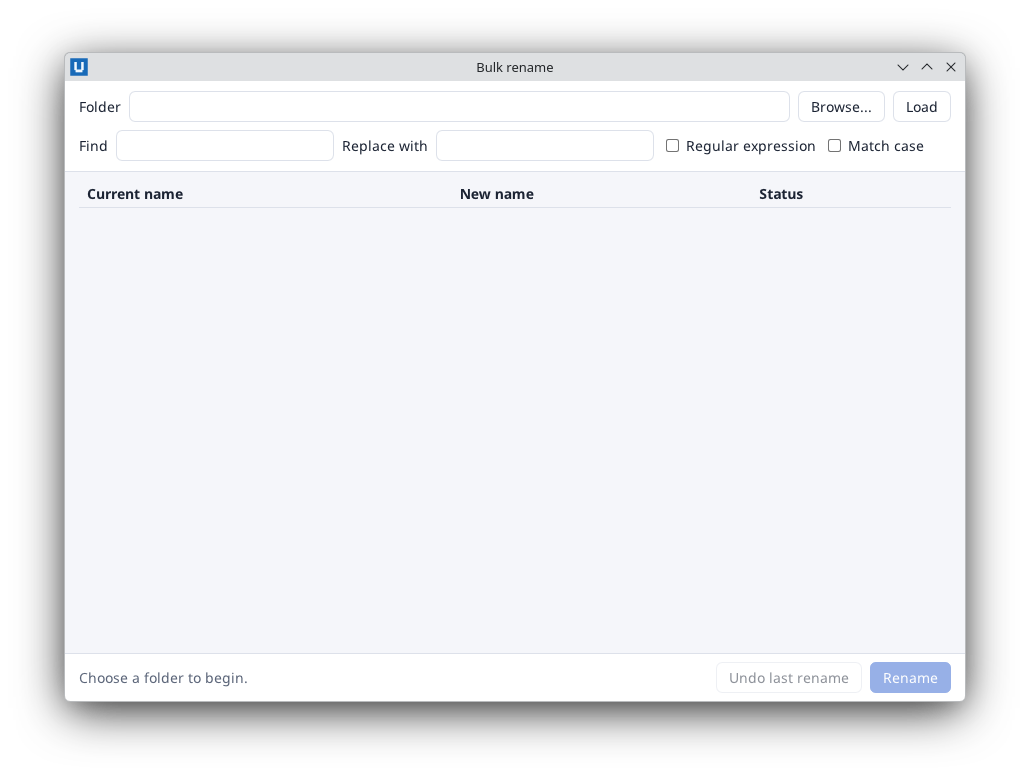
Real capture on KDE Plasma 6.6 Wayland with the released packages.
Test it headless
Move the generated handler out of main() into a build() function, so a test can create the
same window:
# app.py
from pathlib import Path

from nativehtmlkit import Application, Document

HERE = Path(__file__).resolve().parent
APP_NAME = "Inventory tool"
APP_ID = "org.example.InventoryTool"


def add_item(document: Document) -> None:
    title = document.get_value("item-name").strip() or "Untitled"
    document.set_text("status", "Added: " + title)     # set_text never interprets HTML
    document.set_value("item-name", "")


def build(app: Application) -> Document:
    window = app.open_file(HERE / "index.html", title=APP_NAME, width=860, height=560)
    window.document.on("click", lambda _event: add_item(window.document), element="add-item")
    return window.document


def main() -> None:
    with Application.start(name=APP_NAME, app_id=APP_ID) as app:
        build(app)
        app.run()


if __name__ == "__main__":
    main()
Then run the real host without a window and drive the document through the SDK:
# check_app.py, next to app.py
import threading

import app as inventory


def check(application):
    document = inventory.build(application)
    document.set_value("item-name", "<b>Widget</b>")
    inventory.add_item(document)                      # what the click handler calls
    assert document.get_text("status") == "Added: <b>Widget</b>"
    assert document.get_value("item-name") == ""
    print("check passed")
    threading.Timer(0.5, application.request_quit).start()
NATIVEHTMLKIT_TEST_MODE=1 uv run -m nativehtmlkit run check_app:check # prints: check passed
A failed assert ends the run with exit status 1 and the traceback. Headless mode has no pointer
or keyboard input, so call the same functions the handlers call. The repository's
tests/integration/example_checks.py tests every example this way.
The manifest (app.toml)
You do not need the manifest during development. Launchers, desktop entries and installers that should start a fixed interpreter use it:
[app]
id = "org.nativehtmlkit.examples.inventory_tool"
name = "Inventory tool"
version = "1.0.0"

[backend]
program = "/path/to/venv/bin/python"     # the interpreter given with --python
args = ["{app_dir}/app.py"]              # {app_dir} is the manifest's folder
cwd = "{app_dir}"

[host]
startup_timeout_ms = 30000
shutdown_timeout_ms = 5000
max_windows = 4
instance = "single"
Start it with nativehtmlkit-python-host run --app app.toml. The backend's
Application.start() connects to the host that started it. instance = "single" forwards a
second launch to the running copy; "multiple" allows several copies. The complete format is in
the command-line reference.
Ship it
Packaging and distribution explains how to publish the project as
a Python package with a gui-scripts entry point, where to store user data and what to test
before a release.
Source: nativehtmlkit-python/docs/guides/project-scaffolding.md · edit the page there.