LiveBitmap
from nativehtmlkit import LiveBitmap   # type; create with Document.create_bitmap
bitmap = document.create_bitmap("chart", 480, 200)
A live bitmap shows pixels that Python renders, for charts, previews, plots or video-like
surfaces, in an <img> of the document:
<img id="chart" src="ui4me-bitmap://chart" width="480" height="200" alt="Live chart">
(nativehtmlkit-bitmap://chart is an equivalent spelling.) Frames travel through a private
shared-memory file the host creates in its runtime directory; nothing is encoded or sent over the
socket except a small bitmap.present request.
Document.create_bitmap
document.create_bitmap(bitmap_id: str, width: int, height: int, *, slots: int = 2) -> LiveBitmap
| Parameter | Rules |
|---|---|
bitmap_id |
1–64 ASCII letters, digits, _ or - (ValueError otherwise); matches the img URL |
width, height |
1–4096 pixels (ValueError otherwise) |
slots |
2 or 3 frame slots |
Raises StaleDocumentError for a retired document and RpcError -32005 when the host's bitmap
budget is exhausted (per document: 8 bitmaps and 64 MiB of slots; host-wide: 256 MiB).
Attributes
| Attribute | Meaning |
|---|---|
id, width, height |
As created |
stride |
Bytes per row: width * 4 |
slots, slot_bytes |
Slot count and bytes per frame (width * height * 4) |
path |
The host-chosen transport file (informational; the host may unlink it after the first frame) |
Frame format
Straight (non-premultiplied) alpha RGBA8, row-major, top row first, tightly packed: byte
(y * width + x) * 4 is the red value of pixel (x, y). Pass bytes, bytearray or any
buffer whose memoryview has exactly slot_bytes bytes.
Methods
present
bitmap.present(pixels) -> dict. Write one frame and return after the host copied it:
{"sequence": int, "presented_to_engine": bool, "slot_released": True}. Raises ValueError for a
wrong length, RuntimeError if the bitmap is closed, StaleDocumentError if its document is
retired. Thread-safe; concurrent calls are serialised. Do not modify the buffer during the call.
try_present
bitmap.try_present(pixels) -> dict | None. Like present, but returns None immediately when
another present of this bitmap is still in progress. Use it from a producer loop to drop a frame
instead of queueing.
close
bitmap.close() -> None. Release the bitmap (idempotent). Bitmaps are also released
automatically when their document is retired (reload, unload, window closed, shutdown). Usable as a
context manager: with document.create_bitmap(...) as bitmap:.
Example
WIDTH, HEIGHT = 256, 64
bitmap = document.create_bitmap("gradient", WIDTH, HEIGHT)
frame = bytearray(WIDTH * HEIGHT * 4)
for y in range(HEIGHT):
    for x in range(WIDTH):
        i = (y * WIDTH + x) * 4
        frame[i:i + 4] = bytes((x, 64, 255 - x, 255))
bitmap.present(frame)
Pure-Python per-pixel loops are slow; draw a background once and copy it
(bytearray(background)), then touch only the pixels that change. The
live chart example renders 480×200 at 30 frames per second this way.
See also the live bitmaps guide.
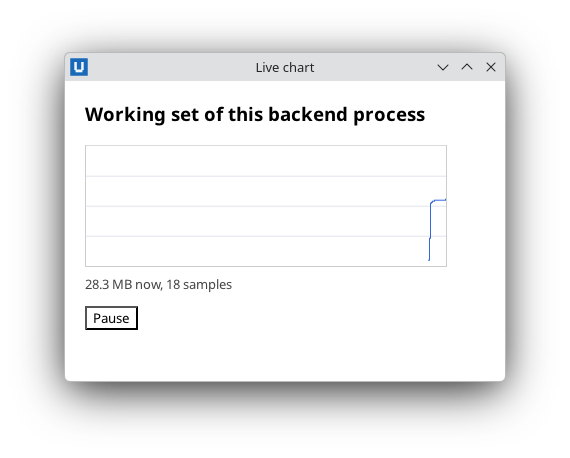
Real capture on KDE Plasma 6.6 Wayland with the released packages.
Source: nativehtmlkit-python/docs/reference/live-bitmap.md · edit the page there.