How to style and lay out the page
Reference: documents (stylesheets, computed style, environment).
What HTML and CSS the host supports, in detail:
HTML and CSS support in Core.
Examples: 04-todo-list.ps1 (light and dark palette),
09-settings-dialog.ps1 (theme switch, replaceable stylesheet),
15-data-table.ps1 (app shell with a sticky table header),
bulk-rename/ (separate index.html and style.css).
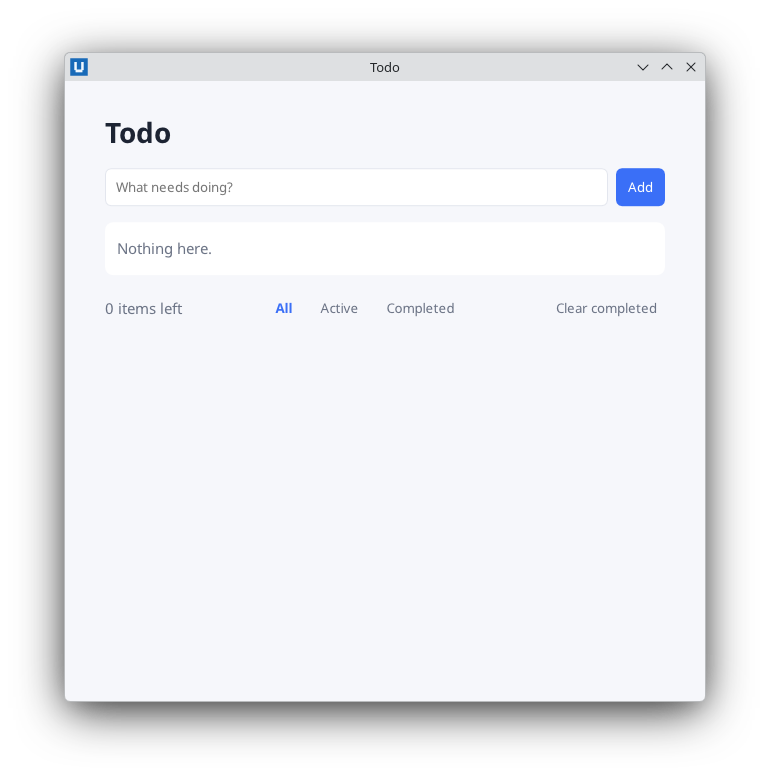
Real capture on KDE Plasma 6.6 Wayland with the released packages.
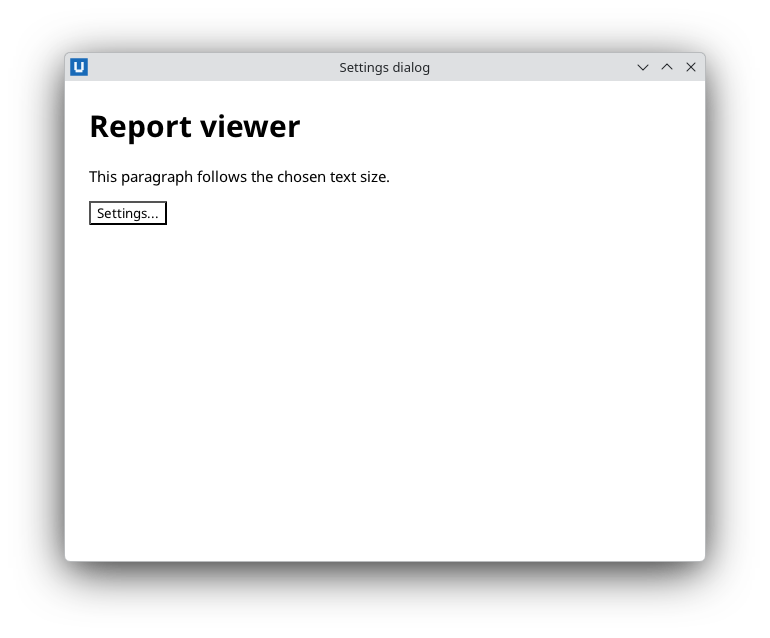
Real capture on KDE Plasma 6.6 Wayland with the released packages.
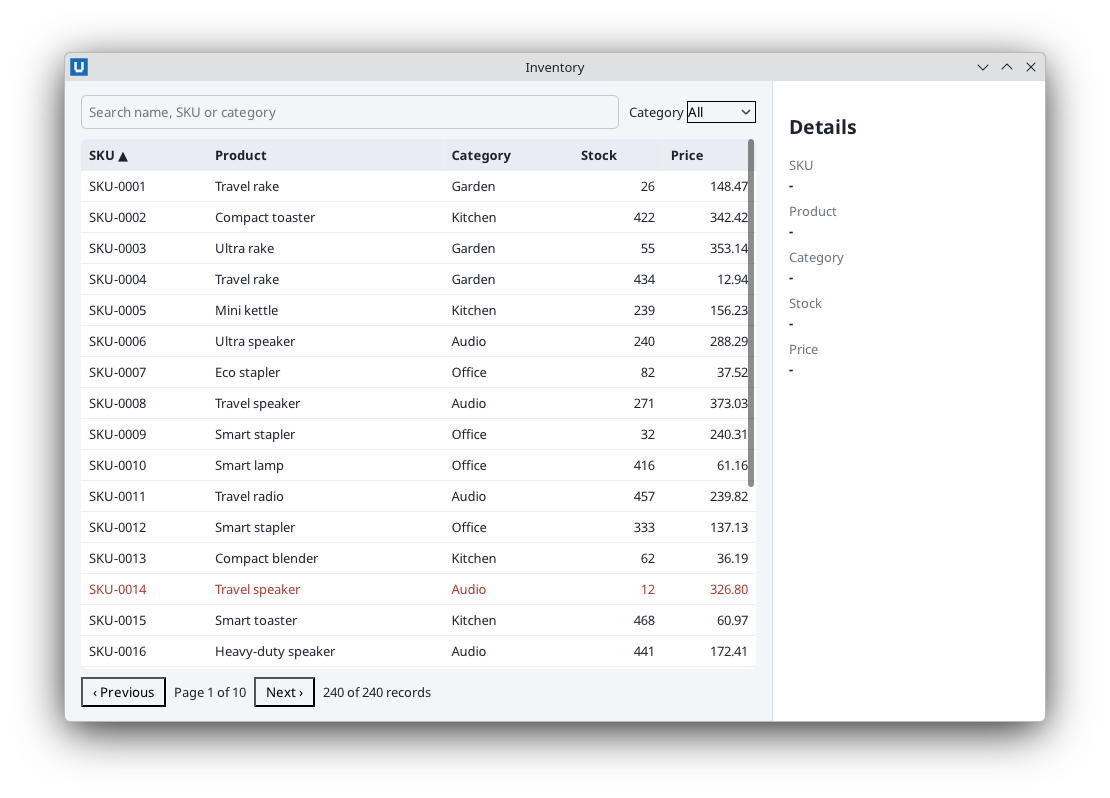
Real capture on KDE Plasma 6.6 Wayland with the released packages.
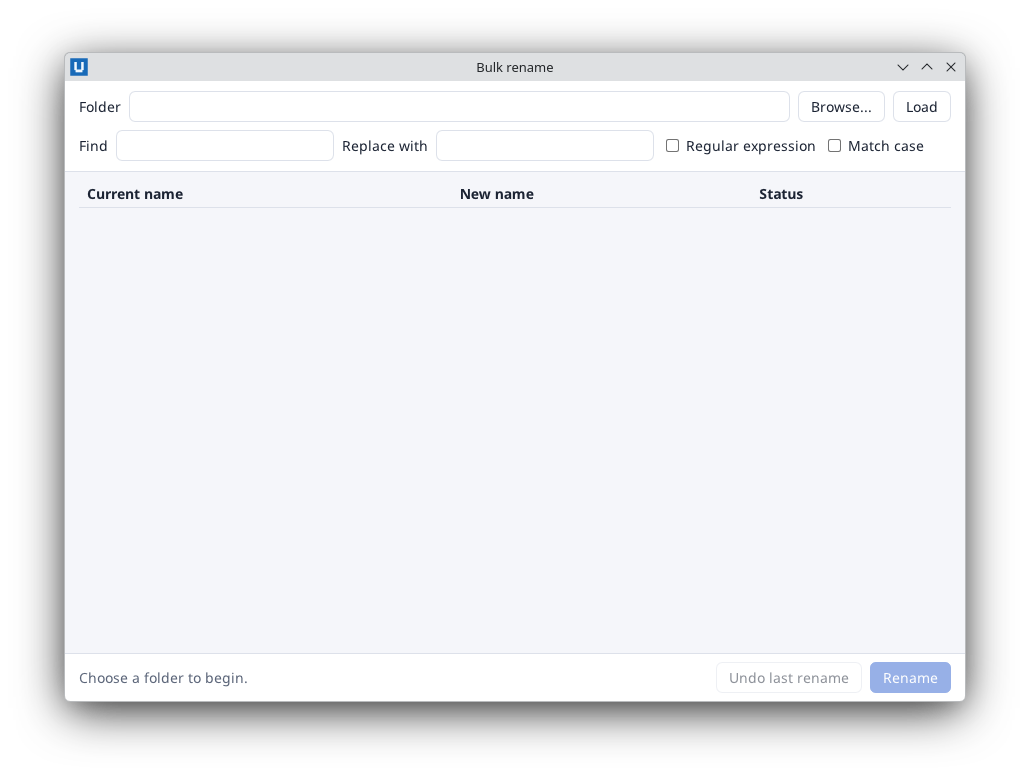
Real capture on KDE Plasma 6.6 Wayland with the released packages.
The page is rendered by the NativeHTMLKit Core host with its own native engine, not by a browser. It understands modern HTML and CSS (flexbox, grid, custom properties, media queries, transitions) but runs no JavaScript and loads nothing from the network. Everything interactive is a PowerShell callback.
Where the CSS lives
| Approach | Use it for |
|---|---|
<style> inside the HTML here-string |
Small single-file apps, like most examples. |
index.html + style.css loaded with Open-NativeHTMLKitFile |
Larger apps. Relative URLs (style.css, images, fonts) resolve against the HTML file's folder. |
Add-NativeHTMLKitStylesheet / Set-NativeHTMLKitStylesheet |
CSS that changes at run time: user font size, themes, generated rules. |
$doc = Open-NativeHTMLKitFile -Window $window -Path (Join-Path $PSScriptRoot 'index.html')

# A placeholder sheet that the app replaces later.
$userSheet = (Add-NativeHTMLKitStylesheet -Document $doc -Css '').sheet
$null = Set-NativeHTMLKitStylesheet -Document $doc -Sheet $userSheet -Css 'body { font-size: 18px; }'
Use single-quoted here-strings (@' ... '@) for HTML and CSS so PowerShell leaves $ and
backticks alone. If you need to insert values, use .Replace('%TOKEN%', $value) or the -f
operator on a here-string whose literal braces are doubled.
An application layout
Desktop windows are usually an app shell: fixed toolbars, one scrolling region, maybe a side panel. Flexbox on a full-height body does that:
body { margin:0; height:100vh; display:flex; font:13px sans-serif; }
.main { flex:1; display:flex; flex-direction:column; min-width:0; padding:14px 16px; }
.tools { display:flex; gap:10px; align-items:center; margin-bottom:10px; }
.scroll { flex:1; overflow:auto; }                 /* only this region scrolls */
th { position:sticky; top:0; background:#e9ecf2; } /* the header row stays visible */
aside { width:240px; border-left:1px solid #dde1e8; }
That is the layout of 15-data-table.ps1. Grid works too
(grid-template-columns, named areas, gap), as do tables, position: sticky/fixed,
multi-column text and container queries. Give windows a minimum size that fits the layout:
New-NativeHTMLKitWindow ... -MinWidth 420 -MinHeight 360.
State as classes
Keep presentation in CSS and let PowerShell switch classes:
Set-NativeHTMLKitClass -Document $doc -Element body -Name running            # add
Set-NativeHTMLKitClass -Document $doc -Element body -Name running -Remove    # remove
.running #clock { color: #8ef0b6; }
tr.low td { color: #b03a2e; }
li.done .text { text-decoration: line-through; }
Class and attribute changes for many elements belong in one Invoke-NativeHTMLKitBatch
(updating the page). Attribute selectors and ARIA attributes work well
together: th[aria-sort=ascending]::after { content: " \25B2"; }.
Light and dark
prefers-color-scheme follows the desktop setting. Define colours once as custom properties and
switch the palette in a media query:
:root { --bg:#f6f7fb; --card:#fff; --text:#1d2433; --accent:#3a6ff7; }
@media (prefers-color-scheme: dark) {
  :root { --bg:#141923; --card:#1d2433; --text:#e8ecf5; --accent:#7aa2ff; }
}
body { background:var(--bg); color:var(--text); }
To offer a Light / Dark / System choice in the app, override the media query per document:
$null = Set-NativeHTMLKitEnvironment -Document $doc -ColorScheme dark      # light, dark or system
$null = Set-NativeHTMLKitEnvironment -Document $doc -ReducedMotion reduce  # reduce, no-preference or system
system removes the override. prefers-reduced-motion works the same way; honour it in your
transitions and animations.
Images, fonts and icons
Resources load only from the document's asset root (the HTML file's folder, or -AssetRoot),
from data: URLs (up to 4 MiB) and from in-memory bundles. http: and https: URLs are refused.
# An inline page that references files next to the script:
$doc = Open-NativeHTMLKitHtml -Window $window -Html $page -AssetRoot $PSScriptRoot

# Generated or embedded bytes, without temporary files:
$png = [IO.File]::ReadAllBytes((Join-Path $PSScriptRoot 'logo.png'))
$null = Register-NativeHTMLKitResources -Document $doc -Name brand -Entries @{ 'logo.png' = @{ Bytes = $png; Mime = 'image/png' } }
# <img src="nativehtmlkit-res://brand/logo.png" alt="Logo">
PNG, JPEG, GIF (first frame), WebP, BMP and static SVG are supported. @font-face loads TTF, OTF
and WOFF/WOFF2 from the same places; the generic families (sans-serif, monospace,
system-ui) use the desktop's fonts. For pixels you compute (charts, previews) use a
live bitmap.
What is not there
Markup with <script>, <iframe>, on... attributes or contenteditable is refused: loading
it, or inserting it with Set-NativeHTMLKitDocumentHtml, throws NativeHTMLKit.RpcException
-32602 (for example INVALID_ARGUMENT: Unsupported active element: script) and the document stays
as it was. Date, time and colour inputs are refused too (no native picker); use text inputs with a
pattern. <canvas>, <video> and <audio> show empty boxes. Links never navigate; the host
sends a link_activated event and your script decides (for example Open-NativeHTMLKitExternal).
The Core guide
lists the CSS features and selectors that are off in Core 1.0.3.
When something looks wrong
# What did the engine compute?
(Get-NativeHTMLKitComputedStyle -Document $doc -Element title -Properties @('color', 'font-size')).properties.'font-size'.value

# Why does a declaration have no effect?
Invoke-NativeHTMLKitDocumentCommand -Document $doc -Operation explain -Parameters @{ element = 'title'; property = 'top' }
# -> status 'not_applicable', reason 'position is static: offsets only apply to positioned elements'

# What did the engine drop or refuse in this document?
(Invoke-NativeHTMLKitDocumentCommand -Document $doc -Operation get_diagnostics).diagnostics

# CSS you add at run time is checked on the spot:
(Add-NativeHTMLKitStylesheet -Document $doc -Css 'h1 { colr: red }').diagnostics
# -> category 'unknown-property', excerpt 'colr', line 1, column 6
These calls work in headless mode, so a -SelfTest can assert on computed styles. Fonts, colours
and the final look still need one check on each real desktop.
Source: nativehtmlkit-powershell/docs/guides/styling-and-layout.md · edit the page there.