How to troubleshoot: diagnostics levels, counters and support bundles
Reference: diagnostics. Example: 14-diagnostics.ps1 (an About/Support window).
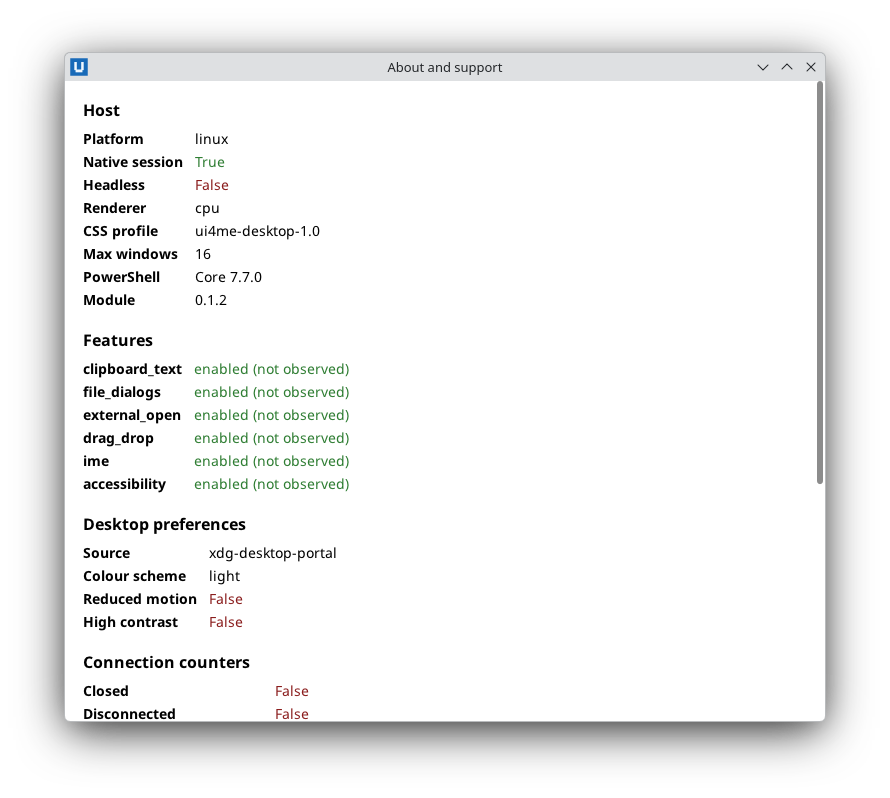
Real capture on KDE Plasma 6.6 Wayland with the released packages.
First steps when "nothing happens"
- Look at the console you started the app from. Backend output and errors are relayed there.
A failing callback prints
NativeHTMLKit: document_event callback failed: <type>: <message> (<file>:<line>)and the app keeps running. An error that escapes the script prints the PowerShell error andnativehtmlkit-host error: application failed (...); the launcher exits with code 1. - Check that the handler is registered on the current document. Loading a new document
retires the old handlers.
Register-NativeHTMLKitDocumentEventmust be called with the$docreturned by the latestOpen-NativeHTMLKit*. - Check the element id and event type. Ids are case-sensitive; delegated handlers match the
target's nearest id or any id on the path.
submitfires on the form, not on the button, and only after native validation passed. - Check that something pumps. Callbacks only run inside
Wait-NativeHTMLKitor another waiting SDK command. A script blocked inStart-Sleepor a long loop on the UI runspace delays every event: use a background task. - Check variable scope in callbacks created in functions or loops (closures).
Turn on more detail
$app = Start-NativeHTMLKitScript -Name 'My tool' -Diagnostics Trace
or set NATIVEHTMLKIT_DIAGNOSTICS=trace before starting (debug for less). The level applies to
the SDK, the host and the backend. NATIVEHTMLKIT_VERBOSE=1 additionally relays the host's
informational records to the console (nativehtmlkit-host info: ...).
At trace, the SDK records every request with its duration, every host notification and the start
and end of every callback, correlated by request id and the diagnostic session id. That is how
you see, for example, that a submit event arrived, which callback ran, which commands it sent and
how long each took.
Counters at run time
$report = Get-NativeHTMLKitDiagnosticReport -Application $app
$report.Connection.CallbackFailures      # callbacks that threw
$report.Connection.DeferredDropped       # notifications dropped while a callback was too slow
$report.Connection.DroppedNotifications  # notifications the SDK queue dropped
$report.HostCounters.dropped_notifications
Nonzero drop counters mean the UI runspace was blocked for long stretches while events kept coming (for example pointer moves during a long callback).
Support bundles
$bundle = Export-NativeHTMLKitSupportBundle -Path (Join-Path $env:TEMP 'mytool-support.zip') -Application $app
The ZIP contains manifest.json (module, PowerShell edition and version, diagnostics level,
counters, whether records were dropped) and timeline.jsonl (redacted SDK records). It never
contains form values, document text, HTML, file paths, URLs, tokens, exception messages or raw
host/backend output, so it is reasonable to attach to a public bug report. Nothing is uploaded.
Record at trace for the most useful timeline; the history holds the last 2048 records.
Document problems
Get-NativeHTMLKitDiagnostics -Document $doc lists renderer notes: unsupported CSS features,
resources still pending or failed, layout notes. Get-NativeHTMLKitComputedStyle shows what a
property resolved to. Images that never appear usually point to a wrong relative URL: relative
URLs resolve against -AssetRoot (Open-NativeHTMLKitHtml) or the HTML file's folder
(Open-NativeHTMLKitFile).
Environment checks
Get-NativeHTMLKitHostPath                         # which host binary, verified against HOST-MANIFEST.json
$caps = Get-NativeHTMLKitCapabilities -Application $app
$caps.platform; $caps.headless; $caps.file_dialogs; $caps.clipboard_text
Get-NativeHTMLKitPreferences -Application $app    # observed colour scheme / reduced motion
Source: nativehtmlkit-powershell/docs/guides/diagnostics-and-troubleshooting.md · edit the page there.