Tutorial: build a todo app
In five steps you build a complete desktop todo list with the NativeHTMLKit PowerShell SDK: a native window with HTML and CSS, adding items with a form, completing and deleting them, editing in place with keyboard support, and saving everything to a JSON file.
Every step is a complete script in
examples/todo-tutorial/;
the final result is
examples/04-todo-list.ps1.
All of them are started and checked by this repository's test suite against the real native host,
with PowerShell 7 on Linux and Windows and with Windows PowerShell 5.1.
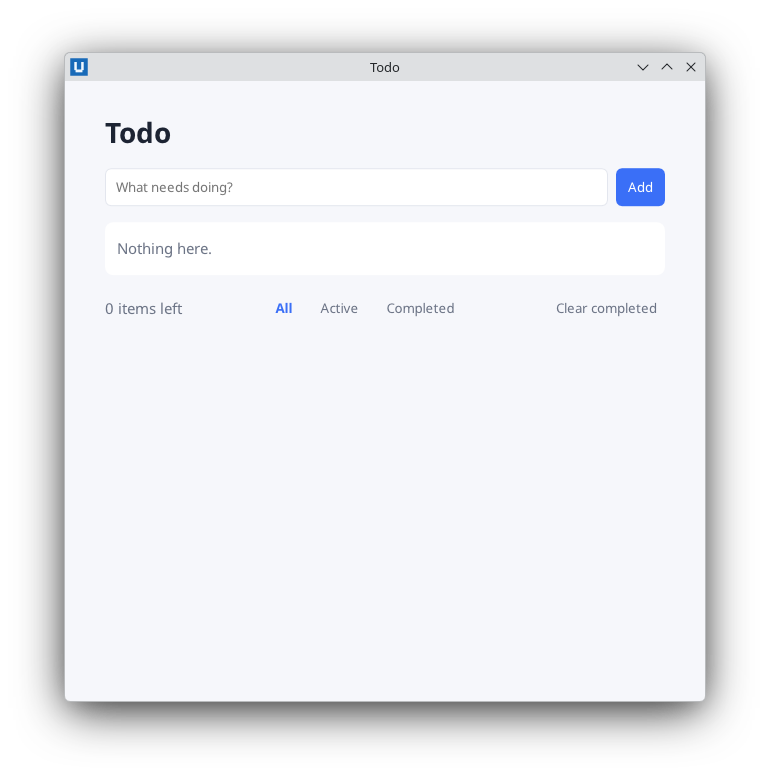
Real capture on KDE Plasma 6.6 Wayland with the released packages.
You need PowerShell 7.2+ (Linux x64 or Windows x64) or Windows PowerShell 5.1, and about 30 minutes.
Install-Module NativeHTMLKit -Scope CurrentUser
Import-Module NativeHTMLKit; (Get-Module NativeHTMLKit).Version     # 0.1.2
Step 1: a window with HTML and CSS
Create todo.ps1 (the tested copy in the repository is step1-window.ps1):
$ErrorActionPreference = 'Stop'
Import-Module NativeHTMLKit

$page = @'
<!doctype html>
<html><head><meta charset="utf-8"><style>
  body { margin:0; background:#f6f7fb; color:#1d2433; font:15px/1.4 sans-serif; }
  main { max-width:560px; margin:32px auto; padding:0 20px; }
  ul { list-style:none; padding:0; background:#fff; border-radius:8px; }
  li { padding:10px 12px; border-bottom:1px solid #e3e6ee; }
</style></head>
<body><main>
  <h1>Todo</h1>
  <ul id="todos"><li>Learn NativeHTMLKit</li><li>Build an app</li></ul>
</main></body></html>
'@

$app = Start-NativeHTMLKitScript -Name 'Todo'
try {
    $window = New-NativeHTMLKitWindow -Application $app -Title 'Todo' -Width 640 -Height 480
    $doc = Open-NativeHTMLKitHtml -Window $window -Html $page
    Set-NativeHTMLKitReady -Application $app
    Wait-NativeHTMLKit -Application $app -UntilShutdown     # returns when the user closes the window
} finally {
    Close-NativeHTMLKit -Application $app
}
Run it with pwsh -File ./todo.ps1 (Windows PowerShell: powershell.exe -NoProfile -File .\todo.ps1).
A native window appears; the HTML and CSS are rendered by the native host. There is no browser and
no JavaScript.
What happened:
Start-NativeHTMLKitScriptstarted the native host, and the host rantodo.ps1a second time as its supervised backend. In that second run the call returned a connected application. That is why side effects (files, prompts) belong below this line: anything above it runs twice. Assigning the page to$pageabove it is harmless. (Lifecycle explains the details.)- The page is a single-quoted here-string (
@' ... '@): PowerShell does not expand$or backticks inside it. New-NativeHTMLKitWindowandOpen-NativeHTMLKitHtmlcreated the window and loaded the page.Set-NativeHTMLKitReadytold the host the app is ready;Wait-NativeHTMLKit -UntilShutdownruns the event loop until the window is closed.Close-NativeHTMLKitinfinallycleans up.
Full file: step1-window.ps1.
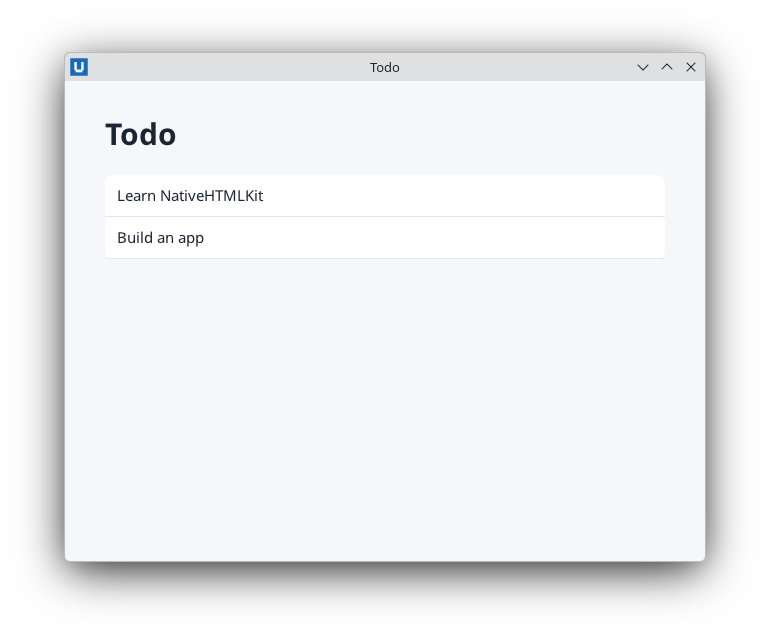
Real capture on KDE Plasma 6.6 Wayland with the released packages.
Step 2: add items with a form
Replace the static list with a form and an empty list:
<form id="new-form">
  <input id="new-title" type="text" placeholder="What needs doing?" required>
  <button id="add" type="submit">Add</button>
</form>
<ul id="todos"></ul>
<p id="count">0 items</p>
and handle the form's submit event below Open-NativeHTMLKitHtml:
$titles = New-Object System.Collections.Generic.List[string]

function Update-Todos {
    # HtmlEncode: a title such as "<b>" is shown as text, never parsed as markup.
    $html = ($titles | ForEach-Object { '<li>' + [Net.WebUtility]::HtmlEncode($_) + '</li>' }) -join ''
    Set-NativeHTMLKitDocumentHtml -Document $doc -Element todos -Html $html
    Set-NativeHTMLKitDocumentText -Document $doc -Element count -Text "$($titles.Count) items"   # never parses markup
}

# Clicking Add, or pressing Enter in the field, submits the form.
$null = Register-NativeHTMLKitDocumentEvent -Document $doc -Type submit -Element new-form -Callback {
    $title = (Get-NativeHTMLKitValue -Document $doc -Element new-title).Trim()
    if ($title) {
        $titles.Add($title)
        Set-NativeHTMLKitDocumentValue -Document $doc -Element new-title -Value ''
        Update-Todos
    }
}
New ideas:
- Events.
Register-NativeHTMLKitDocumentEvent -Type submit -Element new-formruns the scriptblock whenever that form is submitted: by clicking Add or by pressing Enter in the field (HTML implicit submission).requiredmakes the host refuse an empty submission before PowerShell sees it. - Callbacks run later. The scriptblock runs inside
Wait-NativeHTMLKit, on this runspace. It can read script variables ($doc,$titles) and call script functions (Update-Todos). - Reading and writing controls.
Get-NativeHTMLKitValuereads what the user typed;Set-NativeHTMLKitDocumentValueclears it. - Rendering. The PowerShell list is the source of truth;
Update-Todosrebuilds the<ul>from it withSet-NativeHTMLKitDocumentHtml. - Escaping.
Set-NativeHTMLKitDocumentHtmlparses HTML, so every piece of user text goes through[Net.WebUtility]::HtmlEncode.Set-NativeHTMLKitDocumentTextandSet-NativeHTMLKitDocumentValuenever parse markup and need no escaping. (Security)
Full file: step2-add.ps1.
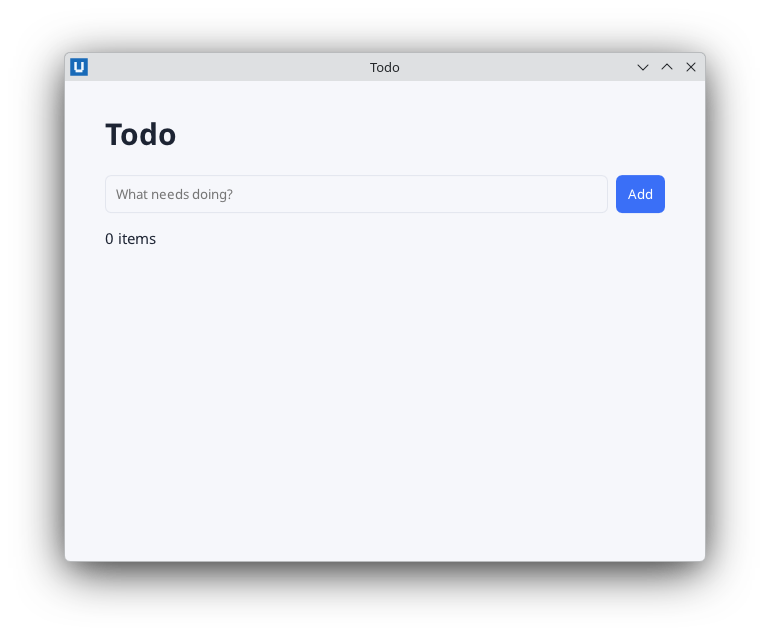
Real capture on KDE Plasma 6.6 Wayland with the released packages.
Step 3: complete and delete items
Each item becomes a small structure with a checkbox and a Delete button. The ids encode the item number and the action:
function Get-TodoRow($Todo) {
    $n = $Todo.Id; $class = ''; $checked = ''
    if ($Todo.Done) { $class = 'done'; $checked = ' checked' }
    return ('<li id="todo-{0}" class="{1}"><input id="todo-{0}-done" type="checkbox"{2}>' -f $n, $class, $checked) +
        ('<span class="text">{0}</span><button id="todo-{1}-delete" class="plain">Delete</button></li>' -f [Net.WebUtility]::HtmlEncode($Todo.Title), $n)
}
The handlers now change more than one value, so the state moves into one hashtable. A callback
that assigned $nextId++ would only change a local copy; changing an entry of a shared
hashtable changes it for everybody:
$state = @{ Todos = New-Object System.Collections.ArrayList; NextId = 1 }
Instead of subscribing to every checkbox and button, subscribe once to the list:
$null = Register-NativeHTMLKitDocumentEvent -Document $doc -Type change -Element todos -Callback {
    param($evt)
    if ($evt.element -match '^todo-(\d+)-done$') {
        (Find-Todo ([int]$Matches[1])).Done = [bool]$evt.checked
        Update-Todos
    }
}
$null = Register-NativeHTMLKitDocumentEvent -Document $doc -Type click -Element todos -Callback {
    param($evt)
    if ($evt.element -match '^todo-(\d+)-delete$') {
        $state.Todos.Remove((Find-Todo ([int]$Matches[1])))
        Update-Todos
    }
}
-Element todos also matches events whose target is inside the list. Every event names the
nearest element with an id in $evt.element and lists all identified ancestors in $evt.path, so
a click on the Delete button of item 7 arrives with element = 'todo-7-delete'. The checkbox
reports its new state in $evt.checked. Because the subscription lives on the list, re-rendering
the items never requires subscribing again. Name the parameter $evt: $event is a PowerShell
automatic variable.
A little CSS strikes through completed items:
li.done .text { text-decoration:line-through; color:#6b7385; }
Full file: step3-complete-delete.ps1.
More on delegation in events and callbacks.
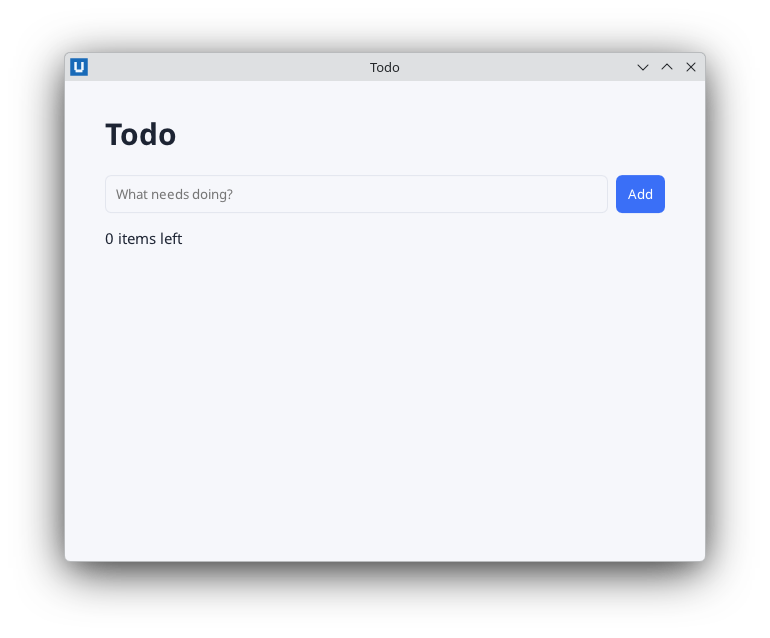
Real capture on KDE Plasma 6.6 Wayland with the released packages.
Step 4: edit in place, with the keyboard
An Edit button switches one row into an inline form. The state gets an Editing entry, and the
row function renders the form for that row:
$title = [Net.WebUtility]::HtmlEncode($Todo.Title)    # also escapes quotes for value="..."
if ($n -eq $state.Editing) {
    # Enter in this field submits its form; Escape is handled by the keydown handler.
    return '<li id="todo-{0}"><form id="edit-form-{0}"><input id="edit-title" type="text" value="{1}"></form></li>' -f $n, $title
}
HtmlEncode also protects the value="..." attribute, because it escapes quotes. One submit
handler, registered without -Element, serves both forms; $evt.element says which one was
submitted:
$null = Register-NativeHTMLKitDocumentEvent -Document $doc -Type submit -Callback {
    param($evt)
    if ($evt.element -eq 'new-form') {
        $title = (Get-NativeHTMLKitValue -Document $doc -Element new-title).Trim()
        if ($title) {
            [void]$state.Todos.Add(@{ Id = $state.NextId; Title = $title; Done = $false })
            $state.NextId++
            Set-NativeHTMLKitDocumentValue -Document $doc -Element new-title -Value ''
        }
    } elseif ($evt.element -like 'edit-form-*') {
        $title = (Get-NativeHTMLKitValue -Document $doc -Element edit-title).Trim()
        if ($title) { (Find-Todo $state.Editing).Title = $title }
        $state.Editing = $null
    }
    Update-Todos
}
Starting an edit renders the input and moves the keyboard focus into it:
$state.Editing = $id
Update-Todos
Set-NativeHTMLKitFocus -Document $doc -Element edit-title
And Escape cancels, via a keydown subscription on the list:
# keydown events carry `key` (for example "Enter", "Escape", "a") and modifier flags.
$null = Register-NativeHTMLKitDocumentEvent -Document $doc -Type keydown -Element todos -Callback {
    param($evt)
    if ($evt.key -eq 'Escape' -and $null -ne $state.Editing) {
        $state.Editing = $null
        Update-Todos
    }
}
Full file: step4-edit-keyboard.ps1.
More in keyboard and focus.
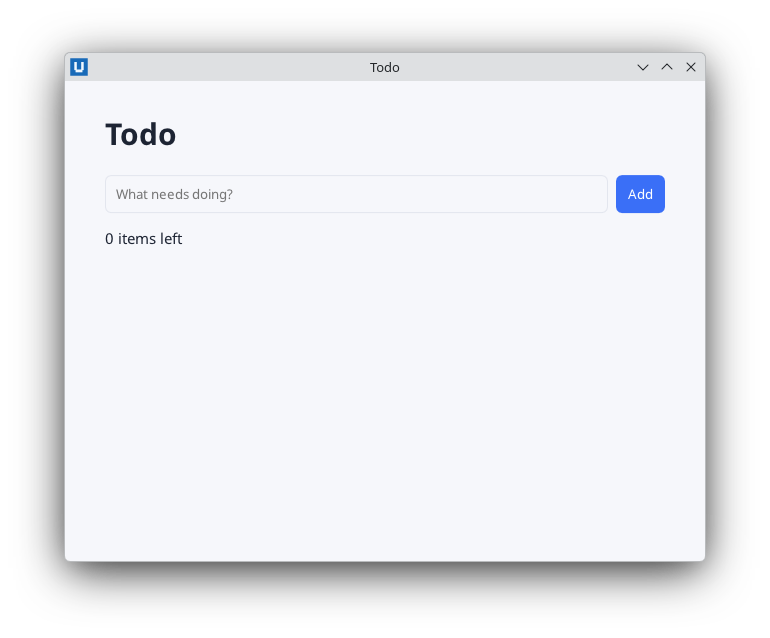
Real capture on KDE Plasma 6.6 Wayland with the released packages.
Step 5: save to a JSON file and polish
The finished app,
examples/04-todo-list.ps1,
adds persistence, filters, "Clear completed", an empty state and a theme that follows the
desktop's dark mode.
Where to store data. The host knows per-application folders. Give the app a stable id, then ask for its data folder:
$app = Start-NativeHTMLKitScript -Name 'Todo' -AppId 'org.nativehtmlkit.examples.powershell.todo'
# desktop.paths is a public Core v1 method: per-application config/data/cache folders.
$DataPath = Join-Path (Invoke-NativeHTMLKitRpc -Application $app -Method 'desktop.paths').data 'todos.json'
desktop.paths returns XDG folders on Linux and AppData folders on Windows, named after the app id.
The host does not create them.
Load and save safely. A missing or broken file starts an empty list; writes go to a temporary file first, which then replaces the old one, so a crash never leaves half a file:
# Write atomically: a crash mid-write never leaves a truncated file.
function Save-Todos([string]$Path, $Todos) {
    $folder = Split-Path -Parent $Path
    if (-not (Test-Path -LiteralPath $folder)) { $null = New-Item -ItemType Directory -Path $folder }
    $json = ConvertTo-Json -InputObject @($Todos | ForEach-Object { [ordered]@{ id = $_.Id; title = $_.Title; done = $_.Done } })
    $temporary = $Path + '.tmp'
    [IO.File]::WriteAllText($temporary, $json, (New-Object Text.UTF8Encoding($false)))
    if (Test-Path -LiteralPath $Path) { [IO.File]::Replace($temporary, $Path, [NullString]::Value) } else { [IO.File]::Move($temporary, $Path) }
}
ConvertTo-Json -InputObject @(...) writes an array even for one item, and [NullString]::Value
tells File.Replace "no backup file" (a plain $null would arrive as an empty string). Every
action ends in Complete-Change, which saves and re-renders.
Testable actions. The handlers only translate events into calls such as Add-Todo,
Set-TodoDone, Rename-Todo and Remove-Todo. Those functions can be called directly, which is
how the app's -SelfTest drives it headless: it submits the form with Submit-NativeHTMLKitForm,
calls the actions, and reads the result back with Get-NativeHTMLKitDocumentText,
Find-NativeHTMLKitElement and the saved JSON file.
Styling with the desktop theme. CSS custom properties plus a media query switch the palette when the desktop is in dark mode:
:root { --bg:#f6f7fb; --card:#fff; --text:#1d2433; --accent:#3a6ff7; }
@media (prefers-color-scheme: dark) {
  :root { --bg:#141923; --card:#1d2433; --text:#e8ecf5; --accent:#7aa2ff; }
}
body { background:var(--bg); color:var(--text); }
Run the finished app:
pwsh -File ./04-todo-list.ps1 # Windows PowerShell: powershell.exe -NoProfile -File .\04-todo-list.ps1
Test it without a desktop
The host has a headless mode for automated tests. It runs the whole protocol without native windows (and without user input):
$env:NATIVEHTMLKIT_TEST_MODE = '1'
pwsh -File ./04-todo-list.ps1 -SelfTest       # prints SELFTEST PASS 04-todo-list
Combine it with Submit-NativeHTMLKitForm, Set-NativeHTMLKitDocumentValue and the read-back
cmdlets to test behaviour in CI.
Where next
- How-to guides: forms and validation, several windows, file dialogs, background work, live bitmaps, packaging.
- The process dashboard tutorial: refresh data in the background.
- Examples: nineteen more applications.
- Cmdlet reference.
Source: nativehtmlkit-powershell/docs/tutorials/todo-app.md · edit the page there.