Getting started with the Python SDK
Build a native desktop window from Python, HTML and CSS in about ten minutes. This page covers
installing nativehtmlkit 0.1.2, writing and running a first application, testing it without a
screen, and where to go next.
What you get
NativeHTMLKit draws windows with a native host written in Rust (Core 1.0.3). Your page is local HTML and CSS; your logic is ordinary Python that reacts to events and changes the page. There is no browser, no JavaScript and no web server. The host and your Python code run as two processes that talk over a private local connection.
Install
You need uv on Linux x64 (glibc 2.39 or newer) or Windows x64, and a desktop session to see windows. uv provides a CPython 3.10 to 3.14 for the project if you have none.
uv init --app hello && cd hello         # a project for your app
uv add nativehtmlkit
uv run nativehtmlkit-python version     # prints the SDK, protocol and bundled host versions
The platform wheels bundle the native host and check its SHA-256 on every start. The source
distribution has no host; use a published wheel. uv run nativehtmlkit-python doctor prints the host's
view of your desktop session (display server, paths, renderer) without opening a window.
Your first window
Save this as hello.py in the project folder. It is the repository's
hello.py
example:
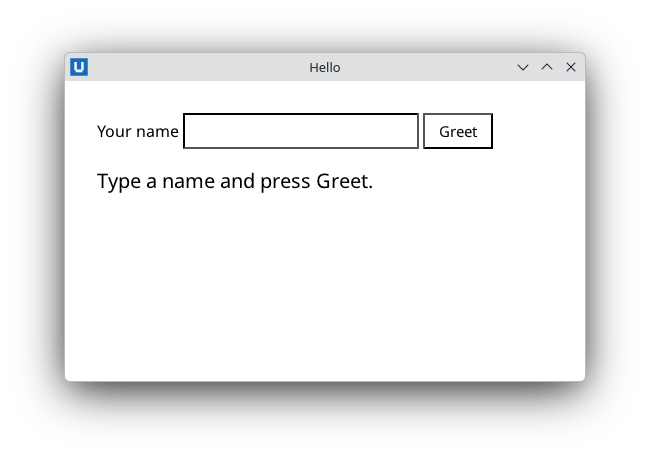
Real capture on KDE Plasma 6.6 Wayland with the released packages.
from nativehtmlkit import Application, Document

PAGE = """<!doctype html>
<html><head><meta charset="utf-8"><style>
  body { font-family: system-ui, sans-serif; margin: 32px; }
  input { padding: 6px 8px; font-size: 15px; }
  button { padding: 6px 14px; font-size: 15px; }
  #greeting { margin-top: 18px; font-size: 20px; }
</style></head>
<body>
  <label for="name">Your name</label>
  <input id="name" autofocus>
  <button id="greet">Greet</button>
  <p id="greeting">Type a name and press Greet.</p>
</body></html>"""


def greet(document: Document) -> None:
    name = document.get_value("name").strip() or "world"
    # Text is never parsed as HTML: '<b>' typed by the user stays visible as '<b>'.
    document.set_text("greeting", f"Hello, {name}!")


def build(app: Application) -> Document:
    window = app.open_html(PAGE, title="Hello", width=520, height=300)
    document = window.document
    document.on("click", lambda _event: greet(document), element="greet")
    return document


def main() -> None:
    # Application.start() runs this script a second time as the host's backend.
    # Keep side effects inside main(), after start().
    with Application.start(name="Hello NativeHTMLKit") as app:
        build(app)
        app.run()   # until the user closes the last window


if __name__ == "__main__":
    main()
Run it:
uv run hello.py
A window titled Hello opens. Type a name and press Greet. Close the window to end the program.
What happened
Application.start()started the native host. The host ranhello.pya second time as its backend; in that runstart()connected and returned theApplication. Code beforestart()runs in both processes, so keep it free of side effects and put your work inmain().app.open_html(PAGE, title=..., width=..., height=...)opened a window and loaded the page. It returns aWindow;window.documentis the loadedDocument.document.on("click", callback, element="greet")subscribed to clicks on the element withid="greet"(and anything inside it). Callbacks receive the event as adict.get_valueread the input field;set_textreplaced the paragraph's text.set_textnever interprets HTML, which makes it safe for anything the user typed.app.run()told the host the application is ready, then dispatched events until the last window closed.
Every element your Python code touches has an id. That is how you address the page.
Other ways to run
uv run -m nativehtmlkit run hello:buildimportshello.pyonly in the backend and callsbuild(app); the runner then callsapp.run()for you. Use it when module-level code must run only once (see lifecycle).nativehtmlkit-new myapp --name "My App"creates a project withapp.py,index.htmlandstyle.css(see project scaffolding).
Run it without a screen
NATIVEHTMLKIT_TEST_MODE=1 runs the real host headless, which is how you test an application in
CI. Native services (file dialogs, clipboard, opening links) are not available there and raise
RpcError with code -32001. A test drives the same functions the handlers call and reads the page
back:
# check_hello.py, next to hello.py
import threading

import hello


def check(app):
    document = hello.build(app)
    document.set_value("name", "<b>Ada</b>")
    hello.greet(document)
    assert document.get_text("greeting") == "Hello, <b>Ada</b>!"
    print("hello works")
    threading.Timer(0.5, app.request_quit).start()
NATIVEHTMLKIT_TEST_MODE=1 uv run -m nativehtmlkit run check_hello:check # prints: hello works
When something does not work
uv run nativehtmlkit-python versionexits with status 1 when no usable host is found: install a platform wheel for Linux x64 or Windows x64.- Nothing happens on a click: check that the
idinelement=matches the HTML. Run withuv run nativehtmlkit-python --diagnostics trace run hello:buildand look fordocument.dispatchrecords withmatched: 0. - More in diagnostics and troubleshooting.
Where next
- Learn step by step: the todo app tutorial, then bulk rename (files, dialogs, undo) and the process dashboard (background refresh).
- Solve a task: the how-to guides, for example events, updating the page and styling and layout.
- Look something up: the API reference.
- Read working code: the
examples,
21 small applications listed in
examples/catalog.toml.
Source: nativehtmlkit-python/docs/getting-started.md · edit the page there.