Forms and validation
The host implements HTML forms natively: controls, constraint validation, implicit submission
(Enter), reset, <select multiple>, checkbox groups and file inputs. Python listens for submit
and reads the values.
Handle a submission
def on_submit(event):
    entries = document.form_data("contact")["entries"]
    values = {}
    for entry in entries:                        # in document order
        values.setdefault(entry["name"], []).append(entry.get("value", ""))
    save_contact(name=values["name"][0], topics=values.get("topic", []))
    document.reset_form("contact")

document.on("submit", on_submit, element="contact")
form_data(form, submitter=None)returns ordered entries{"kind": "text", "name", "value"}; file inputs give{"kind": "file", "name", "filename", "path"}. Repeated names appear once per value; unchecked checkboxes are absent.event["submitter"]is the id of the button that submitted (use several submit buttons for "Save" / "Save as draft").- There is no navigation: the form stays as it is until you change or reset it.
Built-in validation
Use HTML attributes: required, minlength/maxlength, min/max/step, pattern,
type="email"/"number"/"url". On submit the host validates first. If anything is invalid it
fires one invalid event per failing control and no submit.
errors = []
def on_invalid(event):
    errors.append(f'{event["element"]}: {event["validity"]["message"]}')
document.on("invalid", on_invalid)     # "invalid" does not bubble: subscribe document-wide
Inspect a control any time:
document.validity("email")
# {"valid": False, "will_validate": True, "message": "Please enter an email address.",
#  "flags": {"typeMismatch": True, "valueMissing": False, ...}}
document.check_validity("signup")       # {"valid": False, "count": 2, "invalid": ["name", "email"]}
Custom rules
set_custom_validity(element, message) marks a control invalid with your message until you clear
it with "". Re-check on input, and again in the submit handler, because events reach Python
after native dispatch (a quick user can submit before the last input was handled):
def check_passwords(_event=None):
    same = document.get_value("password") == document.get_value("confirm")
    document.set_custom_validity("confirm", "" if same else "The passwords do not match.")

document.on("input", check_passwords, element="password")
document.on("input", check_passwords, element="confirm")
Submit, reset and fill from Python
document.request_submit("signup", submitter="create")   # {"submitted": bool, "default_prevented": bool}
document.reset_form("signup")                           # back to the HTML defaults; fires "reset"
document.set_value("name", "Ada")                       # no input/change events
document.set_selected_values("country", ["fr"])
document.set_checked("terms", True)
document.options("country")     # [{"value", "label", "selected", "disabled"}, ...]
request_submit runs validation exactly like a click, which makes forms easy to test headless
(NATIVEHTMLKIT_TEST_MODE=1). See tests/integration/example_checks.py.
Show results safely
Values typed by the user are untrusted. Put them into the page with set_text/set_value, or
html.escape() them before replace_html/insert_html (see security).
Example: signup_form.py (required fields, email, number range, select, checkbox group, password confirmation, error summary, welcome message).
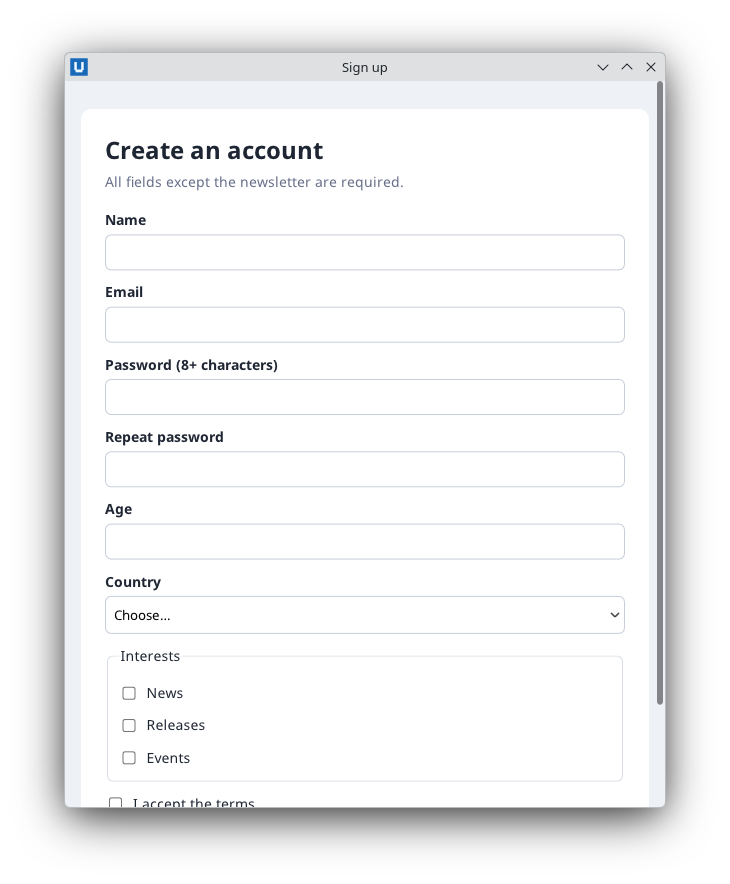
Real capture on KDE Plasma 6.6 Wayland with the released packages.
Source: nativehtmlkit-python/docs/guides/forms-and-validation.md · edit the page there.