Log viewer
Follows a growing log file with highlighting, pause, clear and auto-scroll.
Same example in PowerShell: Log viewer
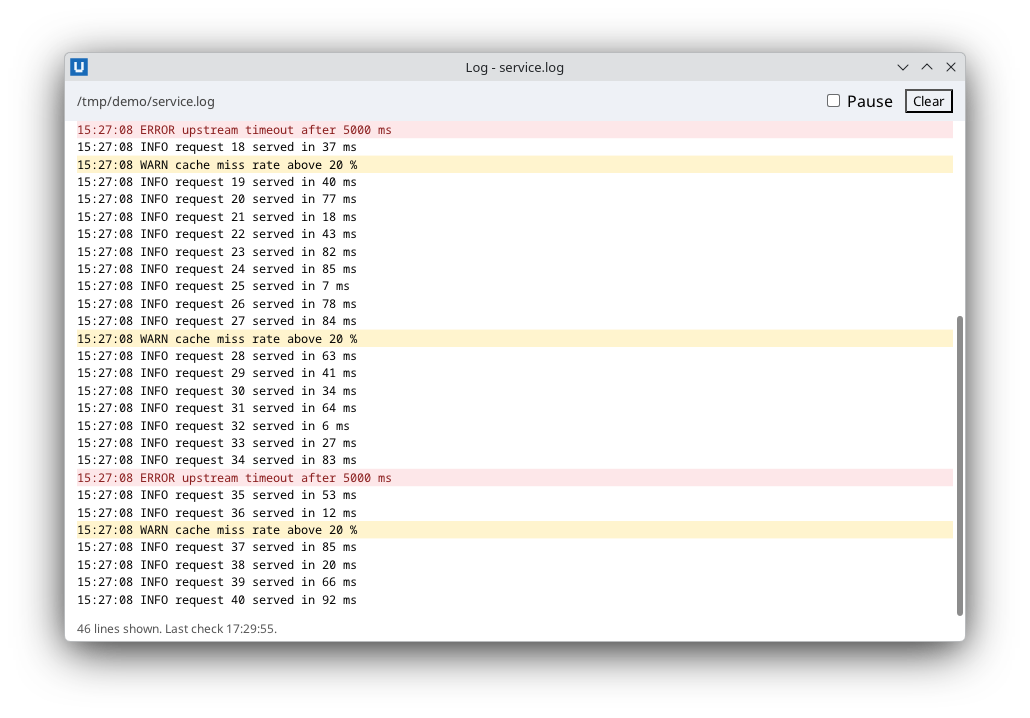
Real capture on KDE Plasma 6.6 Wayland with the released packages.
What it teaches: polling in a background thread; appending lines; trim_children; set_scroll_follow.
Run it
uv init --app myapp && cd myapp    # once: a uv project for your app
uv add nativehtmlkit
# save the example file(s) in the project folder, then:
uv run log_viewer.py FILE
Related guide: background work
Source: log_viewer.py
"""Log viewer: follow a growing log file and highlight warnings and errors.

What it teaches
  * polling without blocking the window: a background thread reads the new bytes of the file
    every half second and appends complete lines (every SDK method is thread-safe)
  * handling a file that is truncated or rotated, and partial last lines
  * appending with ``insert_html`` and bounding the view with ``trim_children``
  * keeping the view scrolled to the end with ``set_scroll_follow``
  * escaping every log line, and stopping the thread cleanly on shutdown (``on_shutdown``)

Run:  uv run log_viewer.py FILE        (for example /var/log/syslog or C:\\Logs\\app.log)
"""
from __future__ import annotations

import html
import re
import sys
import threading
import time
from pathlib import Path

from nativehtmlkit import Application, NativeHTMLKitError, Window

MAX_LINES = 500
ERROR = re.compile(r"\b(ERROR|FATAL|FAIL(ED)?)\b")
WARNING = re.compile(r"\bWARN(ING)?\b")

PAGE = """<!doctype html>
<html><head><style>
  body { font-family: system-ui, sans-serif; margin: 0; display: flex; flex-direction: column; height: 100vh; }
  header { display: flex; gap: 12px; align-items: center; padding: 8px 12px; background: #eef1f6; }
  #file { flex: 1; font-size: 13px; color: #444; overflow: hidden; white-space: nowrap; text-overflow: ellipsis; }
  #log { flex: 1; overflow: auto; margin: 0; padding: 8px 12px; list-style: none; font: 12px/1.45 monospace; }
  #log li { white-space: pre-wrap; }
  #log li.warn { background: #fff4ce; }
  #log li.error { background: #fde7e9; color: #8a1c1c; }
  footer { padding: 4px 12px; font-size: 12px; color: #555; }
</style></head>
<body>
  <header><span id="file"></span><label><input type="checkbox" id="paused"> Pause</label><button id="clear">Clear</button></header>
  <ul id="log"></ul>
  <footer id="status">Waiting for data...</footer>
</body></html>"""


def read_new_text(path: Path, offset: int) -> tuple[int, str]:
    """Return (new offset, complete new lines) from ``offset``; a partial last line is read again later."""
    with path.open("rb") as handle:
        size = handle.seek(0, 2)
        if size < offset:            # the file was truncated or rotated
            offset = 0
        handle.seek(offset)
        data = handle.read()
    end = data.rfind(b"\n")
    if end < 0:
        return offset, ""
    return offset + end + 1, data[:end + 1].decode("utf-8", errors="replace")


class LogViewer:
    def __init__(self, window: Window, path: Path):
        self.document = doc = window.document
        self.path = path
        self.offset = 0
        self.line_count = 0
        self.lock = threading.Lock()           # the poll thread and the Clear button both change the list
        self.stopped = threading.Event()
        doc.set_text("file", str(path))
        # Keep the list pinned to its end while new lines arrive (unless the user scrolls up).
        doc.command("set_scroll_follow", element="log", follow=True)
        doc.on("click", lambda _event: self.clear(), element="clear")

    def add_lines(self, text: str) -> None:
        rows = []
        for line in re.split(r"\r?\n", text):
            if not line:
                continue
            css = ' class="error"' if ERROR.search(line) else ' class="warn"' if WARNING.search(line) else ""
            rows.append(f"<li{css}>{html.escape(line)}</li>")
        if not rows:
            return
        with self.lock:
            operations = [{"op": "insert_html", "element": "log", "position": "beforeend", "html": "".join(rows)}]
            self.line_count += len(rows)
            if self.line_count > MAX_LINES:
                # Drop the oldest lines (from the start) and keep the newest.
                operations.append({"op": "trim_children", "element": "log", "keep": MAX_LINES, "from": "start"})
                self.line_count = MAX_LINES
            self.document.batch(operations)

    def clear(self) -> None:
        with self.lock:
            self.document.replace_html("log", "")
            self.line_count = 0

    def poll_once(self) -> float:
        """Read and show new lines; return the delay before the next poll."""
        try:
            offset, text = read_new_text(self.path, self.offset)
        except OSError as error:
            self.document.set_text("status", f"Cannot read the file: {error.strerror or error} Retrying...")
            return 2.0
        if not self.document.get_checked("paused"):
            self.add_lines(text)
            self.offset = offset
        self.document.set_text("status", f"{self.line_count} lines shown. Last check {time.strftime('%H:%M:%S')}.")
        return 0.5

    def start(self) -> threading.Thread:
        def loop() -> None:
            delay = 0.0
            while not self.stopped.wait(delay):
                try:
                    delay = self.poll_once()
                except NativeHTMLKitError:      # window closed or application shutting down
                    return
        thread = threading.Thread(target=loop, name="log-poll", daemon=True)
        thread.start()
        return thread


def build(app: Application, path: Path) -> LogViewer:
    path = path.resolve()
    viewer = LogViewer(app.open_html(PAGE, title=f"Log - {path.name}", width=900, height=560), path)
    app.on_shutdown(viewer.stopped.set)
    return viewer


def main() -> None:
    # Validate arguments before starting the host, so a usage error is a plain console error.
    if len(sys.argv) != 2:
        sys.exit("Pass the log file to follow: uv run log_viewer.py FILE")
    with Application.start(name="Log tail") as app:
        build(app, Path(sys.argv[1])).start()
        app.run()


if __name__ == "__main__":
    main()