Clipboard tool
Text transforms, copy and paste, a documentation link and the desktop colour scheme.
Same example in Python: Clipboard tool
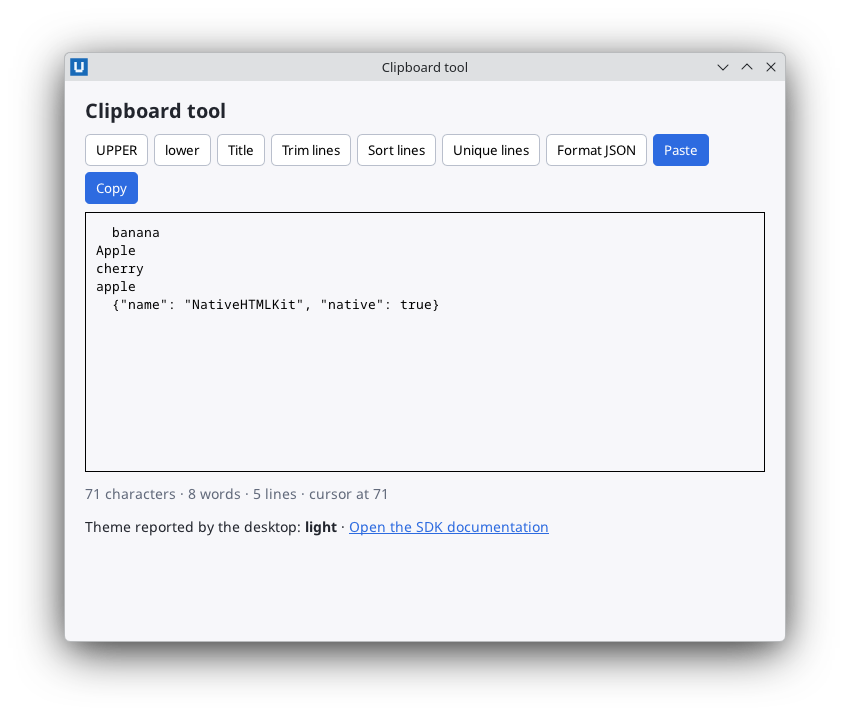
Real capture on KDE Plasma 6.6 Wayland with the released packages.
What it teaches: Get-/Set-NativeHTMLKitClipboard; link_activated and Open-NativeHTMLKitExternal; desktop preferences and capabilities; -32001 fallback; delegated toolbar clicks; UTF-16 selection offsets.
Run it
pwsh -File 10-clipboard-tool.ps1
Related guide: clipboard and desktop
Source: 10-clipboard-tool.ps1
# 10-clipboard-tool.ps1 - transform text and move it through the system clipboard.
#
# Teaches: Get-/Set-NativeHTMLKitClipboard (plain text only). The link_activated event and
# Open-NativeHTMLKitExternal to open a link in the browser. Get-NativeHTMLKitPreferences, the
# desktop.preferences_changed notification and Get-NativeHTMLKitCapabilities. Checking
# capabilities and handling NativeHTMLKit.RpcException -32001 ("unsupported here") gracefully.
# One delegated click handler for a toolbar of buttons. Get-/Set-NativeHTMLKitDocumentValue and
# the UTF-16 based offsets of Get-NativeHTMLKitSelection.
#
# Run:  pwsh -File ./10-clipboard-tool.ps1     (or powershell.exe -NoProfile -File .\10-clipboard-tool.ps1)
# -SelfTest applies the transforms through the public API and quits. In the host's headless test
# mode the clipboard and external open are unavailable, so it checks those messages instead.
param([switch]$SelfTest)
$ErrorActionPreference = 'Stop'
Import-Module NativeHTMLKit

$docsUrl = 'https://github.com/nativehtmlkit/nativehtmlkit-powershell'

# ----- text transforms (plain PowerShell, no SDK calls) -----
function Split-Lines([string]$Text) {
    # Line breaks as in Python's str.splitlines: no empty item after a final line break.
    if ($Text.Length -eq 0) { return , @() }
    $lines = [regex]::Split($Text, '\r\n|[\n\r\v\f\x1c\x1d\x1e\x85

]')
    if ($Text -match '(\r\n|[\n\r\v\f\x1c\x1d\x1e\x85

])\z') { $lines = $lines[0..($lines.Count - 2)] }
    return , @($lines)
}

function ConvertTo-TitleCase([string]$Text) {
    # A letter after a cased letter becomes lower case, every other letter upper case.
    $builder = New-Object Text.StringBuilder($Text.Length)
    $previousCased = $false
    foreach ($c in $Text.ToCharArray()) {
        $upper = [char]::ToUpperInvariant($c); $lower = [char]::ToLowerInvariant($c)
        $cased = $upper -cne $lower
        if ($cased -and $previousCased) { [void]$builder.Append($lower) }
        elseif ($cased) { [void]$builder.Append($upper) }
        else { [void]$builder.Append($c) }
        $previousCased = $cased
    }
    return $builder.ToString()
}

function Get-SortedLines([string]$Text) {
    # Case-insensitive and stable: equal lines keep their order (the index breaks ties).
    $lines = Split-Lines $Text
    $keys = New-Object 'string[]' $lines.Count
    for ($i = 0; $i -lt $lines.Count; $i++) { $keys[$i] = $lines[$i].ToLowerInvariant() + [char]0 + $i.ToString('D10') }
    $sorted = [string[]]$lines.Clone()
    [Array]::Sort($keys, $sorted, [StringComparer]::Ordinal)
    return ($sorted -join "`n")
}

function Get-UniqueLines([string]$Text) {
    $seen = New-Object 'System.Collections.Generic.HashSet[string]' ([StringComparer]::Ordinal)
    $lines = Split-Lines $Text
    return (@($lines | Where-Object { $seen.Add($_) }) -join "`n")
}

function Format-Json([string]$Text) {
    # Re-indents JSON with two spaces, like Python's json.dumps(indent=2, ensure_ascii=False).
    # ConvertTo-Json is not used: its layout differs between PowerShell 5.1 and 7.
    $script:jsonText = $Text; $script:jsonAt = 0
    function Stop-Json([string]$Message, [int]$At) {
        $before = $script:jsonText.Substring(0, $At)
        $line = 1 + ([regex]::Matches($before, "`n")).Count
        $column = $At - $before.LastIndexOf([char]10)
        throw (New-Object FormatException("${Message}: line $line column $column (char $At)"))
    }
    function Skip-Space { while ($script:jsonAt -lt $script:jsonText.Length -and " `t`n`r".IndexOf($script:jsonText[$script:jsonAt]) -ge 0) { $script:jsonAt++ } }
    function Read-JsonString {
        $start = $script:jsonAt; $script:jsonAt++
        $out = New-Object Text.StringBuilder
        while ($true) {
            if ($script:jsonAt -ge $script:jsonText.Length) { Stop-Json 'Unterminated string starting at' $start }
            $c = $script:jsonText[$script:jsonAt]
            if ($c -eq '"') { $script:jsonAt++; return $out.ToString() }
            if ([int]$c -lt 0x20) { Stop-Json 'Invalid control character at' $script:jsonAt }
            if ($c -ne '\') { [void]$out.Append($c); $script:jsonAt++; continue }
            $escape = ''
            if ($script:jsonAt + 1 -lt $script:jsonText.Length) { $escape = [string]$script:jsonText[$script:jsonAt + 1] }
            $simple = @{ '"' = '"'; '\' = '\'; '/' = '/'; 'b' = "`b"; 'f' = "`f"; 'n' = "`n"; 'r' = "`r"; 't' = "`t" }
            if ($escape -and $simple.ContainsKey($escape) -and $escape -cmatch '^["\\/bfnrt]$') { [void]$out.Append($simple[$escape]); $script:jsonAt += 2; continue }
            if ($escape -ceq 'u' -and $script:jsonText.Length -ge $script:jsonAt + 6 -and $script:jsonText.Substring($script:jsonAt + 2, 4) -match '^[0-9A-Fa-f]{4}$') {
                [void]$out.Append([char][Convert]::ToInt32($script:jsonText.Substring($script:jsonAt + 2, 4), 16)); $script:jsonAt += 6; continue
            }
            Stop-Json 'Invalid \escape' $script:jsonAt
        }
    }
    function Read-JsonValue {
        Skip-Space
        if ($script:jsonAt -ge $script:jsonText.Length) { Stop-Json 'Expecting value' $script:jsonAt }
        $c = $script:jsonText[$script:jsonAt]
        if ($c -eq '{') {
            $script:jsonAt++
            $members = New-Object Collections.Specialized.OrderedDictionary   # a repeated key keeps its place, the last value wins
            Skip-Space
            if ($script:jsonAt -lt $script:jsonText.Length -and $script:jsonText[$script:jsonAt] -eq '}') { $script:jsonAt++; return , $members }
            while ($true) {
                Skip-Space
                if ($script:jsonAt -ge $script:jsonText.Length -or $script:jsonText[$script:jsonAt] -ne '"') { Stop-Json 'Expecting property name enclosed in double quotes' $script:jsonAt }
                $key = Read-JsonString
                Skip-Space
                if ($script:jsonAt -ge $script:jsonText.Length -or $script:jsonText[$script:jsonAt] -ne ':') { Stop-Json "Expecting ':' delimiter" $script:jsonAt }
                $script:jsonAt++
                $members[$key] = Read-JsonValue
                Skip-Space
                if ($script:jsonAt -lt $script:jsonText.Length -and $script:jsonText[$script:jsonAt] -eq '}') { $script:jsonAt++; return , $members }
                if ($script:jsonAt -ge $script:jsonText.Length -or $script:jsonText[$script:jsonAt] -ne ',') { Stop-Json "Expecting ',' delimiter" $script:jsonAt }
                $comma = $script:jsonAt; $script:jsonAt++; Skip-Space
                if ($script:jsonAt -lt $script:jsonText.Length -and $script:jsonText[$script:jsonAt] -eq '}') { Stop-Json 'Illegal trailing comma before end of object' $comma }
            }
        }
        if ($c -eq '[') {
            $script:jsonAt++
            $items = New-Object Collections.ArrayList
            Skip-Space
            if ($script:jsonAt -lt $script:jsonText.Length -and $script:jsonText[$script:jsonAt] -eq ']') { $script:jsonAt++; return , $items }
            while ($true) {
                [void]$items.Add((Read-JsonValue))
                Skip-Space
                if ($script:jsonAt -lt $script:jsonText.Length -and $script:jsonText[$script:jsonAt] -eq ']') { $script:jsonAt++; return , $items }
                if ($script:jsonAt -ge $script:jsonText.Length -or $script:jsonText[$script:jsonAt] -ne ',') { Stop-Json "Expecting ',' delimiter" $script:jsonAt }
                $comma = $script:jsonAt; $script:jsonAt++; Skip-Space
                if ($script:jsonAt -lt $script:jsonText.Length -and $script:jsonText[$script:jsonAt] -eq ']') { Stop-Json 'Illegal trailing comma before end of array' $comma }
            }
        }
        if ($c -eq '"') { return (ConvertTo-JsonString (Read-JsonString)) }
        $rest = $script:jsonText.Substring($script:jsonAt)
        foreach ($word in 'true', 'false', 'null', 'NaN', 'Infinity', '-Infinity') {
            if ($rest.StartsWith($word, [StringComparison]::Ordinal)) { $script:jsonAt += $word.Length; return $word }
        }
        $number = [regex]::Match($rest, '^-?(0|[1-9][0-9]*)(\.[0-9]+)?([eE][-+]?[0-9]+)?')
        if (-not $number.Success) { Stop-Json 'Expecting value' $script:jsonAt }
        $script:jsonAt += $number.Length
        if (-not $number.Groups[2].Success -and -not $number.Groups[3].Success) { return ($number.Value -replace '^-0$', '0') }
        try { $double = [double]::Parse($number.Value, [Globalization.CultureInfo]::InvariantCulture) }
        catch [OverflowException] { $double = [double]::PositiveInfinity; if ($number.Value.StartsWith('-')) { $double = [double]::NegativeInfinity } }   # .NET Framework
        return (ConvertTo-PythonFloat $double)
    }
    function ConvertTo-JsonString([string]$Value) {
        $out = New-Object Text.StringBuilder('"')
        foreach ($c in $Value.ToCharArray()) {
            # Compare code points: culture-aware string comparison ignores control characters.
            switch ([int]$c) {
                0x22 { [void]$out.Append('\"') } 0x5C { [void]$out.Append('\\') } 0x0A { [void]$out.Append('\n') }
                0x0D { [void]$out.Append('\r') } 0x09 { [void]$out.Append('\t') } 0x08 { [void]$out.Append('\b') } 0x0C { [void]$out.Append('\f') }
                default { if ([int]$c -lt 0x20) { [void]$out.Append(('\u{0:x4}' -f [int]$c)) } else { [void]$out.Append($c) } }
            }
        }
        return $out.Append('"').ToString()
    }
    function ConvertTo-PythonFloat([double]$Value) {
        # Shortest round-trip digits, laid out as Python's repr(float) does.
        if ([double]::IsPositiveInfinity($Value)) { return 'Infinity' }
        if ([double]::IsNegativeInfinity($Value)) { return '-Infinity' }
        $sign = ''
        if ($Value -lt 0 -or ($Value -eq 0 -and [BitConverter]::DoubleToInt64Bits($Value) -lt 0)) { $sign = '-'; $Value = -$Value }
        if ($Value -eq 0) { return $sign + '0.0' }
        $m = $null
        for ($precision = 1; $precision -le 17; $precision++) {
            $candidate = $Value.ToString('E' + ($precision - 1), [Globalization.CultureInfo]::InvariantCulture)
            if ([double]::Parse($candidate, [Globalization.CultureInfo]::InvariantCulture) -eq $Value) { $m = [regex]::Match($candidate, '^(\d)\.?(\d*)E([-+]\d+)$'); break }
        }
        $digits = ($m.Groups[1].Value + $m.Groups[2].Value).TrimEnd('0')
        if (-not $digits) { $digits = '0' }
        $point = [int]$m.Groups[3].Value + 1          # value = 0.<digits> x 10^point
        if ($point -gt 16 -or $point -lt -3) {
            $mantissa = $digits.Substring(0, 1)
            if ($digits.Length -gt 1) { $mantissa += '.' + $digits.Substring(1) }
            $exponent = $point - 1
            $expSign = '+'
            if ($exponent -lt 0) { $expSign = '-' }
            return $sign + $mantissa + 'e' + $expSign + ([Math]::Abs($exponent)).ToString('00')
        }
        if ($point -le 0) { return $sign + '0.' + ('0' * (-$point)) + $digits }
        if ($point -ge $digits.Length) { return $sign + $digits + ('0' * ($point - $digits.Length)) + '.0' }
        return $sign + $digits.Substring(0, $point) + '.' + $digits.Substring($point)
    }
    function Write-JsonValue($Node, [string]$Indent) {
        $inner = $Indent + '  '
        if ($Node -is [Collections.Specialized.OrderedDictionary]) {
            if ($Node.Count -eq 0) { return '{}' }
            $parts = foreach ($key in $Node.Keys) { $inner + (ConvertTo-JsonString $key) + ': ' + (Write-JsonValue $Node[$key] $inner) }
            return "{`n" + (@($parts) -join ",`n") + "`n$Indent}"
        }
        if ($Node -is [Collections.ArrayList]) {
            if ($Node.Count -eq 0) { return '[]' }
            $parts = foreach ($item in $Node) { $inner + (Write-JsonValue $item $inner) }
            return "[`n" + (@($parts) -join ",`n") + "`n$Indent]"
        }
        return [string]$Node
    }
    $tree = Read-JsonValue
    Skip-Space
    if ($script:jsonAt -lt $script:jsonText.Length) { Stop-Json 'Extra data' $script:jsonAt }
    return (Write-JsonValue $tree '')
}

$transforms = @{
    upper = { param($t) $t.ToUpperInvariant() }
    lower = { param($t) $t.ToLowerInvariant() }
    title = { param($t) ConvertTo-TitleCase $t }
    trim = { param($t) $lines = Split-Lines $t; (@($lines | ForEach-Object { $_.Trim() }) -join "`n") }
    sort = { param($t) Get-SortedLines $t }
    unique = { param($t) Get-UniqueLines $t }
    json = { param($t) Format-Json $t }
}

$app = Start-NativeHTMLKitScript -Name 'Clipboard tool'
try {
    $window = New-NativeHTMLKitWindow -Application $app -Title 'Clipboard tool' -Width 720 -Height 560
    $doc = Open-NativeHTMLKitHtml -Window $window -Html @'
<!doctype html>
<html><head><meta charset="utf-8"><style>
  body { margin:0; padding:16px 20px; font:14px sans-serif; background:#f7f7fa; color:#22252d; }
  h1 { font-size:20px; margin:0 0 10px; }
  .toolbar { display:flex; flex-wrap:wrap; gap:6px; margin-bottom:8px; }
  button { padding:6px 10px; border:1px solid #b9bfcc; border-radius:5px; background:#fff; cursor:pointer; }
  button.primary { background:#2d6be0; color:#fff; border-color:#2d6be0; }
  textarea { width:100%; height:260px; box-sizing:border-box; padding:10px; font:13px monospace; }
  footer { display:flex; justify-content:space-between; color:#61697a; margin-top:8px; }
  a { color:#2d6be0; }
</style></head>
<body>
  <h1>Clipboard tool</h1>
  <div class="toolbar" id="toolbar">
    <button id="t-upper">UPPER</button><button id="t-lower">lower</button><button id="t-title">Title</button>
    <button id="t-trim">Trim lines</button><button id="t-sort">Sort lines</button>
    <button id="t-unique">Unique lines</button><button id="t-json">Format JSON</button>
    <button id="paste" class="primary">Paste</button><button id="copy" class="primary">Copy</button>
  </div>
  <textarea id="text" spellcheck="false">  banana
Apple
cherry
apple
  {"name": "NativeHTMLKit", "native": true}</textarea>
  <footer><span id="stats"></span><span id="status"></span></footer>
  <p>Theme reported by the desktop: <b id="scheme">unknown</b> ·
     <a id="docs" href="https://github.com/nativehtmlkit/nativehtmlkit-powershell">Open the SDK documentation</a></p>
</body></html>
'@

    $features = (Get-NativeHTMLKitCapabilities -Application $app).features
    # 'available' is $true/$false once observed and $null when not known yet.
    $script:clipboardKnownUnavailable = $false
    if ($null -ne $features -and $null -ne $features.clipboard_text) { $script:clipboardKnownUnavailable = $features.clipboard_text.available -is [bool] -and -not $features.clipboard_text.available }

    function Set-Status([string]$Text) { Set-NativeHTMLKitDocumentText -Document $doc -Element status -Text $Text }

    function Get-UnsupportedMessage([string]$What, [NativeHTMLKit.RpcException]$RpcError) {
        if ($RpcError.Code -eq -32001 -or $script:clipboardKnownUnavailable) { return "$What is not available in this session." }
        return "$What failed (code $($RpcError.Code))."
    }

    function Update-Stats {
        $text = Get-NativeHTMLKitValue -Document $doc -Element text
        $selection = Get-NativeHTMLKitSelection -Document $doc -Element text    # offsets are UTF-16 code units
        $characters = $text.Length - [regex]::Matches($text, '[\uDC00-\uDFFF]').Count   # code points
        $words = @($text -split '\s+' | Where-Object { $_ }).Count
        $lines = (Split-Lines $text).Count
        Set-NativeHTMLKitDocumentText -Document $doc -Element stats -Text "$characters characters · $words words · $lines lines · cursor at $($selection.start)"
    }

    function Invoke-Transform([string]$Name) {
        $text = Get-NativeHTMLKitValue -Document $doc -Element text
        try {
            Set-NativeHTMLKitDocumentValue -Document $doc -Element text -Value ([string](& $transforms[$Name] $text))
            Set-Status ('Applied “' + $Name + '”.')   # PowerShell reads curly double quotes as string delimiters, so concatenate
        } catch [FormatException] {
            # Invalid JSON is a user error, not an application failure.
            Set-Status ('Cannot apply “' + $Name + '”: ' + $_.Exception.Message)
        }
        Update-Stats
    }

    function Invoke-Copy {
        try {
            Set-NativeHTMLKitClipboard -Application $app -Text (Get-NativeHTMLKitValue -Document $doc -Element text)
            Set-Status 'Copied to the clipboard.'
        } catch [NativeHTMLKit.RpcException] {
            Set-Status (Get-UnsupportedMessage 'Clipboard' $_.Exception)
        }
    }

    function Invoke-Paste {
        try {
            Set-NativeHTMLKitDocumentValue -Document $doc -Element text -Value (Get-NativeHTMLKitClipboard -Application $app)
            Set-Status 'Pasted from the clipboard.'
        } catch [NativeHTMLKit.RpcException] {
            Set-Status (Get-UnsupportedMessage 'Clipboard' $_.Exception)
        }
        Update-Stats
    }

    function Open-Link([string]$Url) {
        if (-not $Url.StartsWith('https://', [StringComparison]::Ordinal)) { Set-Status 'Only https links are opened.'; return }
        try {
            $result = Open-NativeHTMLKitExternal -Application $app -Target $Url -Window $window
            if ($result.accepted) { Set-Status 'Opened the documentation.' } else { Set-Status 'Opening was cancelled.' }
        } catch [NativeHTMLKit.RpcException] {
            Set-Status (Get-UnsupportedMessage 'Opening links' $_.Exception)
        }
    }

    function Show-Preferences($Preferences) {
        $scheme = [string]$Preferences.color_scheme
        if (-not $scheme) { $scheme = 'unknown' }
        Set-NativeHTMLKitDocumentText -Document $doc -Element scheme -Text $scheme
    }

    function Invoke-Toolbar($ClickEvent) {
        $element = [string]$ClickEvent.element
        if ($element.StartsWith('t-', [StringComparison]::Ordinal)) { Invoke-Transform $element.Substring(2) }
        elseif ($element -eq 'copy') { Invoke-Copy }
        elseif ($element -eq 'paste') { Invoke-Paste }
    }

    $null = Register-NativeHTMLKitDocumentEvent -Document $doc -Type click -Element toolbar -Callback { param($evt) Invoke-Toolbar $evt }
    # Links never navigate the document: activating one sends a 'link_activated' event (with
    # 'href' and the resolved 'url') and the application decides what to do.
    $null = Register-NativeHTMLKitDocumentEvent -Document $doc -Type link_activated -Callback {
        param($evt)
        $url = [string]$evt.url
        if (-not $url) { $url = $docsUrl }
        Open-Link $url
    }
    $null = Register-NativeHTMLKitDocumentEvent -Document $doc -Type input -Element text -Callback { Update-Stats }
    Show-Preferences (Get-NativeHTMLKitPreferences -Application $app)
    # Live updates when the desktop changes; the notification carries a preferences snapshot.
    Register-NativeHTMLKitNotification -Application $app -Method 'desktop.preferences_changed' -Callback { param($params) Show-Preferences $params }
    Update-Stats

    Set-NativeHTMLKitReady -Application $app

    if ($SelfTest) {
        function Assert-Value([string]$Expected, [string]$What) {
            $value = Get-NativeHTMLKitValue -Document $doc -Element text
            if ($value -cne $Expected) { throw "${What}: unexpected text '$value'" }
        }
        Set-NativeHTMLKitDocumentValue -Document $doc -Element text -Value "b`na`nB`na"
        Invoke-Transform 'sort'; Assert-Value "a`na`nb`nB" 'sort'
        Invoke-Transform 'unique'; Assert-Value "a`nb`nB" 'unique'
        Invoke-Transform 'upper'; Assert-Value "A`nB`nB" 'upper'
        Set-NativeHTMLKitDocumentValue -Document $doc -Element text -Value '{"x": [1, 2]}'
        Invoke-Transform 'json'; Assert-Value "{`n  `"x`": [`n    1,`n    2`n  ]`n}" 'json'
        Set-NativeHTMLKitDocumentValue -Document $doc -Element text -Value '{not json'
        Invoke-Transform 'json'
        $status = Get-NativeHTMLKitDocumentText -Document $doc -Element status
        if (-not $status.StartsWith('Cannot apply “json”')) { throw "bad JSON should be reported: $status" }
        $stats = Get-NativeHTMLKitDocumentText -Document $doc -Element stats
        if (-not $stats.StartsWith('9 characters · 2 words · 1 lines')) { throw "unexpected stats: $stats" }
        Invoke-Toolbar ([pscustomobject]@{ element = 'copy' })
        $status = Get-NativeHTMLKitDocumentText -Document $doc -Element status
        if ((Get-NativeHTMLKitCapabilities -Application $app).headless) {
            if ($status -ne 'Clipboard is not available in this session.') { throw "unexpected clipboard status: $status" }
            Open-Link $docsUrl
            $status = Get-NativeHTMLKitDocumentText -Document $doc -Element status
            if ($status -ne 'Opening links is not available in this session.') { throw "unexpected open status: $status" }
        }
        Open-Link 'file:///etc/passwd'
        if ((Get-NativeHTMLKitDocumentText -Document $doc -Element status) -ne 'Only https links are opened.') { throw 'a non-https link must be refused' }
        if ((Get-NativeHTMLKitDocumentText -Document $doc -Element scheme) -eq '') { throw 'preferences not shown' }
        [Console]::Out.WriteLine('SELFTEST PASS 10-clipboard-tool')
        $null = Request-NativeHTMLKitQuit -Application $app
    }

    Wait-NativeHTMLKit -Application $app -UntilShutdown
} finally {
    Close-NativeHTMLKit -Application $app
}