Settings dialog
Settings in a modal HTML dialog, saved to JSON: colour scheme, text size and reduced motion.
Same example in PowerShell: Settings dialog
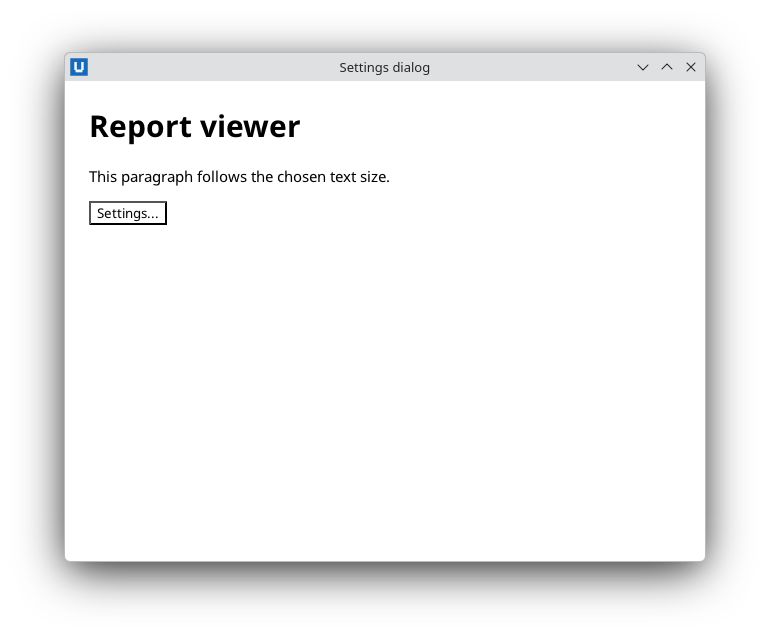
Real capture on KDE Plasma 6.6 Wayland with the released packages.
What it teaches: show_dialog/close_dialog; popovers; set_environment; replaceable stylesheet; form validation.
Run it
uv init --app myapp && cd myapp    # once: a uv project for your app
uv add nativehtmlkit
# save the example file(s) in the project folder, then:
uv run settings_dialog.py [SETTINGS_FILE]
Related guide: dialogs and popovers
Source: settings_dialog.py
"""Settings dialog: a settings dialog that applies and remembers preferences.

What it teaches
  * an HTML ``<dialog>`` opened modally with ``show_dialog`` and closed with a return value
    (``close_dialog``)
  * a popover help tip (``toggle_popover``)
  * reading a form inside the dialog with ``form_data``; native validation (``min``/``max``/
    ``required``) runs before the ``submit`` event is dispatched
  * applying a colour scheme and reduced motion with ``set_environment``
  * replacing one stylesheet in place (``add_stylesheet`` once, then ``replace_stylesheet``)
  * saving settings as JSON

Run:  uv run settings_dialog.py [SETTINGS_FILE]
Default settings file: <config folder>/NativeHTMLKit-Examples/settings.json
(%APPDATA% on Windows, $XDG_CONFIG_HOME or ~/.config on Linux).
"""
from __future__ import annotations

import json
import os
import sys
from pathlib import Path

from nativehtmlkit import Application, Window

DEFAULTS = {"theme": "system", "size": 15, "motion": False}

PAGE = """<!doctype html>
<html><head><style>
  :root { color-scheme: light dark; }
  body { font-family: system-ui, sans-serif; margin: 24px; background: Canvas; color: CanvasText; }
  @media (prefers-color-scheme: dark) { body { background: #1d222b; color: #e7ebf3; } }
  dialog { padding: 20px 24px; border-radius: 10px; min-width: 320px; }
  dialog label { display: block; margin: 10px 0 4px; }
  .actions { display: flex; justify-content: flex-end; gap: 8px; margin-top: 18px; }
  #help-tip { max-width: 260px; padding: 10px; font-size: 13px; }
  #saved { color: #2e7d32; }
</style></head>
<body>
  <h1>Report viewer</h1>
  <p id="sample">This paragraph follows the chosen text size.</p>
  <p><button id="open-settings">Settings...</button> <span id="saved" role="status"></span></p>

  <dialog id="settings" aria-labelledby="settings-title">
    <h2 id="settings-title">Settings</h2>
    <form id="settings-form">
      <label for="theme">Colour scheme <button type="button" id="help" aria-label="Help">?</button></label>
      <select id="theme" name="theme"><option value="system">Follow the system</option><option value="light">Light</option><option value="dark">Dark</option></select>
      <label for="size">Text size (px)</label>
      <input id="size" name="size" type="number" min="11" max="24" required>
      <label><input type="checkbox" id="motion" name="motion" value="reduce"> Reduce motion</label>
      <div class="actions"><button type="button" id="cancel">Cancel</button><button type="submit" id="apply">Save</button></div>
    </form>
  </dialog>
  <div id="help-tip" popover>"Follow the system" uses the desktop colour preference when the host can observe it.</div>
</body></html>"""


def default_settings_path() -> Path:
    if sys.platform == "win32":
        base = Path(os.environ.get("APPDATA") or Path.home() / "AppData" / "Roaming")
    else:
        base = Path(os.environ.get("XDG_CONFIG_HOME") or Path.home() / ".config")
    return base / "NativeHTMLKit-Examples" / "settings.json"


def read_settings(path: Path) -> dict:
    """Saved values over the defaults; an unreadable file is ignored."""
    settings = dict(DEFAULTS)
    try:
        saved = json.loads(path.read_text(encoding="utf-8"))
    except (OSError, ValueError):
        return settings
    if isinstance(saved, dict):
        settings.update({name: saved[name] for name in DEFAULTS if name in saved})
    return settings


class SettingsDialog:
    def __init__(self, window: Window, path: Path):
        self.document = doc = window.document
        self.path = path
        self.settings = read_settings(path)
        self.size_sheet = doc.add_stylesheet("")["sheet"]
        doc.on("click", lambda _event: self.show(), element="open-settings")
        doc.on("click", lambda _event: self.cancel(), element="cancel")
        doc.on("click", lambda _event: doc.toggle_popover("help-tip"), element="help")
        # Native validation (min/max/required) runs before this submit event is dispatched.
        doc.on("submit", lambda _event: self.save(), element="settings-form")
        self.apply(self.settings)

    def apply(self, settings: dict) -> None:
        # "system" removes the app override so the observed desktop preference applies again.
        self.document.set_environment(color_scheme=settings["theme"],
                                      reduced_motion="reduce" if settings["motion"] else "system")
        # Replace one app stylesheet in place instead of adding a new one each time.
        self.document.replace_stylesheet(self.size_sheet, f"body {{ font-size: {int(settings['size'])}px; }}")

    def show(self) -> None:
        doc, s = self.document, self.settings
        doc.set_selected_values("theme", [str(s["theme"])])
        doc.set_value("size", str(s["size"]))
        doc.set_checked("motion", bool(s["motion"]))
        doc.show_dialog("settings")              # modal by default

    def cancel(self) -> None:
        self.document.close_dialog("settings", "cancelled")
        self.document.set_text("saved", "Settings unchanged.")

    def save(self) -> None:
        entries = {e["name"]: e.get("value", "") for e in self.document.form_data("settings-form")["entries"]}
        self.settings = {"theme": entries.get("theme", "system"), "size": int(entries.get("size") or 15),
                         "motion": "motion" in entries}       # unchecked boxes are absent from form data
        self.path.parent.mkdir(parents=True, exist_ok=True)
        self.path.write_text(json.dumps(self.settings, indent=2), encoding="utf-8")
        self.apply(self.settings)
        self.document.close_dialog("settings", "saved")
        # Report here, not in the dialog's close event: a <dialog> keeps its previous return
        # value when the user dismisses it with Escape, so "saved" would be reported again.
        self.document.set_text("saved", f"Settings saved to {self.path}")


def build(app: Application, path: Path) -> SettingsDialog:
    return SettingsDialog(app.open_html(PAGE, title="Settings dialog", width=640, height=480), path)


def main() -> None:
    with Application.start(name="Settings dialog") as app:
        path = Path(sys.argv[1]) if len(sys.argv) > 1 else default_settings_path()
        build(app, path)
        app.run()


if __name__ == "__main__":
    main()