Multiple windows
Note windows managed from a main window, with a close veto for unsaved notes.
Same example in PowerShell: Multiple windows
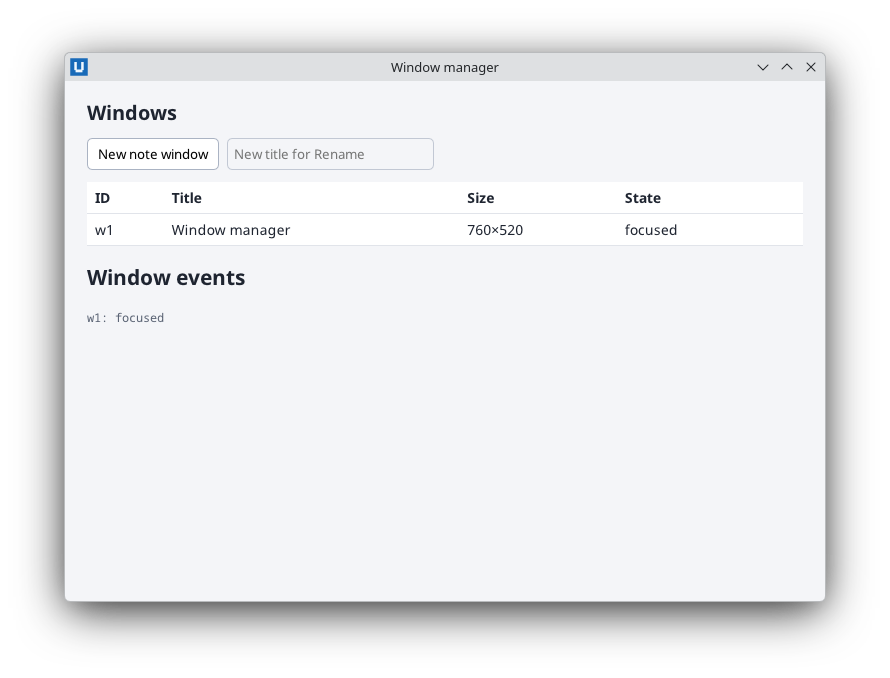
Real capture on KDE Plasma 6.6 Wayland with the released packages.
What it teaches: several windows; window state; on_window_event; on_before_close.
Run it
uv init --app myapp && cd myapp    # once: a uv project for your app
uv add nativehtmlkit
# save the example file(s) in the project folder, then:
uv run window_manager.py
Related guide: windows
Source: window_manager.py
"""Window manager: open note windows and inspect, rename, resize and close them from a main window.

What it teaches
  * several windows in one application, each with its own document and handlers
  * ``Window.state()`` / ``Window.set(...)`` and the live window list
  * ``Application.on_window_event`` (close_requested, closed, resized, focused, ...)
  * ``Window.on_before_close``: veto closing a note with unsaved changes
  * "closing the main window quits the app" even while other windows are open

Run:  uv run window_manager.py
Platform note: Wayland compositors own window placement and focus, so position/focus requests
are refused there (RpcError -32001); size, title, maximize and close work everywhere.
"""
from __future__ import annotations

import html
import itertools

from nativehtmlkit import Application, NativeHTMLKitError, RpcError, Window

INSPECTOR = """<!doctype html>
<html><head><meta charset="utf-8"><style>
  body { margin:0; padding:18px 22px; font:14px sans-serif; background:#f4f5f8; color:#1e2430; }
  h1 { font-size:20px; margin:0 0 12px; }
  .bar { display:flex; gap:8px; margin-bottom:12px; }
  input { padding:6px; border:1px solid #c2c8d4; border-radius:5px; }
  button { padding:6px 10px; border:1px solid #aab3c3; border-radius:5px; background:#fff; cursor:pointer; }
  table { width:100%; border-collapse:collapse; background:#fff; }
  th, td { text-align:left; padding:6px 8px; border-bottom:1px solid #e1e4ea; }
  td.actions button { padding:3px 7px; font-size:12px; }
  #events { font:12px monospace; color:#596273; max-height:120px; overflow:auto; }
</style></head>
<body>
  <h1>Windows</h1>
  <div class="bar">
    <button id="new-note">New note window</button>
    <input id="rename-to" type="text" placeholder="New title for Rename">
  </div>
  <table><thead><tr><th>ID</th><th>Title</th><th>Size</th><th>State</th><th></th></tr></thead>
    <tbody id="rows"></tbody></table>
  <h2>Window events</h2>
  <div id="events"></div>
  <p id="status"></p>
</body></html>"""

NOTE = """<!doctype html>
<html><head><meta charset="utf-8"><style>
  body { margin:0; font:14px sans-serif; display:flex; flex-direction:column; height:100vh; background:#fffbea; }
  #warning { display:none; padding:8px 12px; background:#ffe2b8; }
  #warning.shown { display:block; }
  textarea { flex:1; border:0; padding:12px; background:transparent; font:14px sans-serif; resize:none; }
  footer { padding:6px 12px; display:flex; gap:8px; align-items:center; color:#6f6440; }
  button { padding:4px 10px; }
</style></head>
<body>
  <div id="warning">Unsaved changes. <button id="discard">Discard and close</button></div>
  <textarea id="text" placeholder="Type a note…"></textarea>
  <footer><button id="save">Save</button><span id="note-status">Saved</span></footer>
</body></html>"""


class Note:
    def __init__(self, window: Window):
        self.window, self.document = window, window.document
        self.dirty = False
        self.saved_text = ""
        self.document.on("input", lambda _e: self.mark_dirty(), element="text")
        self.document.on("click", lambda _e: self.save(), element="save")
        self.document.on("click", lambda _e: self.discard_and_close(), element="discard")
        window.on_before_close(self.allow_close)

    def mark_dirty(self) -> None:
        self.dirty = True
        self.document.set_text("note-status", "Edited")

    def save(self) -> None:
        self.saved_text = self.document.get_value("text")
        self.dirty = False
        self.document.remove_class("warning", "shown")
        self.document.set_text("note-status", "Saved")

    def allow_close(self) -> bool:
        """Called by the host before the window closes; return False to keep it open."""
        if self.dirty:
            self.document.add_class("warning", "shown")
            return False
        return True

    def discard_and_close(self) -> None:
        self.dirty = False
        self.window.request_close()


class WindowManager:
    def __init__(self, app: Application):
        self.app = app
        self.notes: dict[str, Note] = {}
        self.numbers = itertools.count(1)
        self.main = app.open_html(INSPECTOR, title="Window manager", width=760, height=520)
        self.document = doc = self.main.document
        doc.on("click", lambda _e: self.new_note(), element="new-note")
        doc.on("click", self._on_row_click, element="rows")
        self.main.on_before_close(self._main_may_close)
        app.on_window_event(self._on_window_event)
        self.refresh()

    def new_note(self) -> Note:
        number = next(self.numbers)
        window = self.app.open_html(NOTE, title=f"Note {number}", width=360, height=300)
        note = self.notes[window.id] = Note(window)
        self.refresh()
        return note

    def windows(self) -> list[Window]:
        return [self.main] + [n.window for n in self.notes.values()]

    def refresh(self) -> None:
        rows = []
        for window in self.windows():
            try:
                state = window.state()
            except NativeHTMLKitError:
                continue                       # closed meanwhile
            observed = state.get("observed") or {}
            flags = [name for name in ("maximized", "minimized", "fullscreen", "focused") if observed.get(name)]
            if state.get("closing"):
                flags.append("closing")
            wid = html.escape(window.id)
            actions = "" if window is self.main else (
                f'<button id="row-{wid}-rename">Rename</button>'
                f'<button id="row-{wid}-grow">640×480</button>'
                f'<button id="row-{wid}-max">Maximize</button>'
                f'<button id="row-{wid}-close">Close</button>')
            rows.append(f"<tr><td>{wid}</td><td>{html.escape(state['title'])}</td>"
                        f"<td>{state['width']}×{state['height']}</td><td>{', '.join(flags) or '-'}</td>"
                        f'<td class="actions">{actions}</td></tr>')
        self.document.replace_html("rows", "".join(rows))

    def _on_row_click(self, event: dict) -> None:
        parts = event["element"].split("-")
        if len(parts) != 3 or parts[1] not in self.notes:
            return
        window, action = self.notes[parts[1]].window, parts[2]
        try:
            if action == "rename":
                title = self.document.get_value("rename-to").strip()
                if title:
                    window.set(title=title)
            elif action == "grow":
                window.set(width=640, height=480)
            elif action == "max":
                maximized = bool((window.state().get("observed") or {}).get("maximized"))
                window.set(maximized=not maximized)
            elif action == "close":
                window.request_close()       # the note may veto (unsaved changes)
        except RpcError as error:
            self.document.set_text("status", f"{action} refused by the platform (code {error.code}).")
        self.refresh()

    def _main_may_close(self) -> bool:
        dirty = [n for n in self.notes.values() if n.dirty]
        if dirty:
            self.document.set_text("status", f"{len(dirty)} note(s) have unsaved changes; save or close them first.")
            return False
        return True

    def _on_window_event(self, params: dict) -> None:
        kind, wid = params.get("type"), params.get("window_id")
        if kind == "closed" and wid == self.main.id:
            # The SDK has already retired the main window's handles; just quit, which
            # closes the remaining note windows too.
            self.app.request_quit()
            return
        if kind == "closed":
            self.notes.pop(wid, None)
        try:
            self.document.insert_html("events", f"<div>{html.escape(str(wid))}: {html.escape(str(kind))}</div>")
            self.document.node("events").trim_children(30)        # keep the 30 newest entries
            if kind in ("closed", "resized", "close_requested", "focused"):
                self.refresh()
        except NativeHTMLKitError:
            pass                                  # the application is shutting down


def build(app: Application) -> WindowManager:
    return WindowManager(app)


def main() -> None:
    with Application.start(name="Window manager") as app:
        build(app)
        app.run()


if __name__ == "__main__":
    main()