Sign-up form
Sign-up form with native constraint validation, a password-match rule, an error summary and a result.
Same example in PowerShell: Sign-up form
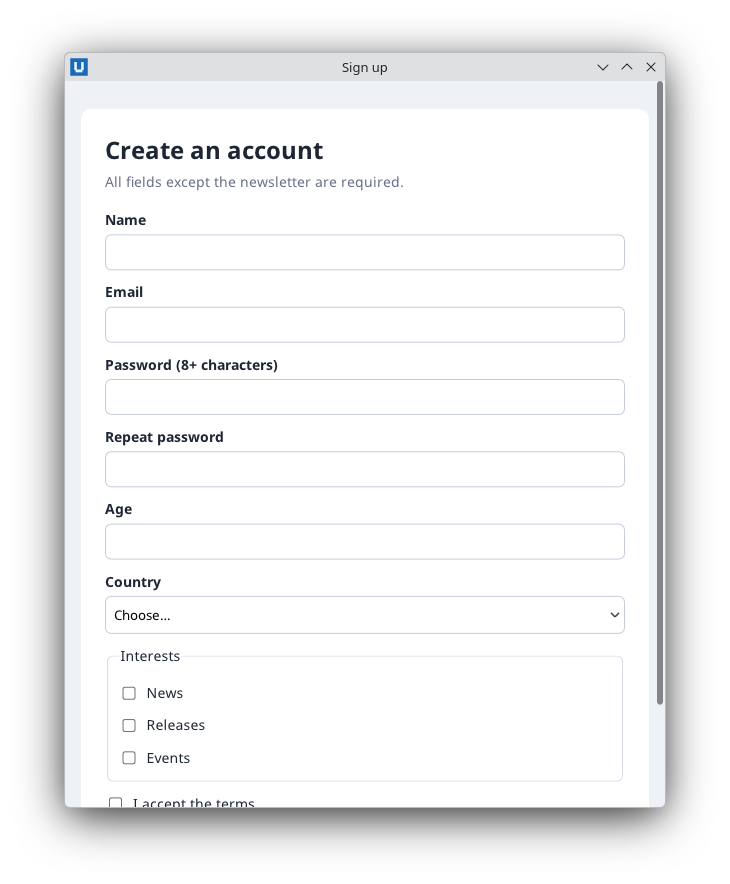
Real capture on KDE Plasma 6.6 Wayland with the released packages.
What it teaches: constraint validation; invalid events; set_custom_validity; form_data; reset_form.
Run it
uv init --app myapp && cd myapp    # once: a uv project for your app
uv add nativehtmlkit
# save the example file(s) in the project folder, then:
uv run signup_form.py
Related guide: forms and validation
Source: signup_form.py
"""Sign-up form: native HTML constraint validation plus a cross-field rule.

What it teaches
  * built-in validation (required, minlength, type=email, min/max) runs on submit;
    an invalid form fires one ``invalid`` event per failing control and no ``submit``
  * ``set_custom_validity`` for a rule HTML cannot express (passwords must match)
  * reading the submitted values with ``form_data`` (ordered entries, repeated names kept)
  * showing an error summary and a result with escaped user text

Run:  uv run signup_form.py
"""
from __future__ import annotations

import html

from nativehtmlkit import Application, Window

PAGE = """<!doctype html>
<html><head><meta charset="utf-8"><style>
  body { margin:0; background:#eef1f6; color:#1f2633; font:14px/1.45 sans-serif; }
  main { max-width:520px; margin:28px auto; padding:24px; background:#fff; border-radius:10px; }
  h1 { margin:0 0 4px; font-size:24px; }
  .hint { color:#68708a; margin:0 0 18px; }
  label { display:block; margin:12px 0 4px; font-weight:bold; }
  input[type=text], input[type=email], input[type=password], input[type=number], select {
    width:100%; box-sizing:border-box; padding:8px; border:1px solid #c7cddb; border-radius:6px; }
  .check { font-weight:normal; display:flex; gap:8px; align-items:center; }
  fieldset { border:1px solid #d8dce6; border-radius:6px; margin-top:12px; }
  button { margin-top:18px; padding:10px 18px; border:0; border-radius:6px; background:#2f6fec; color:#fff; }
  #errors { color:#b3261e; }
  #errors:empty, #result:empty { display:none; }
  #result { background:#e9f6ec; border-radius:6px; padding:10px 14px; margin-top:16px; }
</style></head>
<body><main>
  <h1>Create an account</h1>
  <p class="hint">All fields except the newsletter are required.</p>
  <ul id="errors" role="alert"></ul>
  <form id="signup">
    <label for="name">Name</label>
    <input id="name" name="name" type="text" required minlength="2" maxlength="80">
    <label for="email">Email</label>
    <input id="email" name="email" type="email" required>
    <label for="password">Password (8+ characters)</label>
    <input id="password" name="password" type="password" required minlength="8">
    <label for="confirm">Repeat password</label>
    <input id="confirm" name="confirm" type="password" required>
    <label for="age">Age</label>
    <input id="age" name="age" type="number" required min="13" max="120">
    <label for="country">Country</label>
    <select id="country" name="country" required>
      <option value="">Choose…</option><option value="de">Germany</option>
      <option value="fr">France</option><option value="jp">Japan</option><option value="us">United States</option>
    </select>
    <fieldset><legend>Interests</legend>
      <label class="check"><input type="checkbox" name="topic" value="news"> News</label>
      <label class="check"><input type="checkbox" name="topic" value="releases"> Releases</label>
      <label class="check"><input type="checkbox" name="topic" value="events"> Events</label>
    </fieldset>
    <label class="check"><input id="terms" name="terms" type="checkbox" required> I accept the terms</label>
    <button id="submit" type="submit">Sign up</button>
  </form>
  <div id="result"></div>
</main></body></html>"""

LABELS = {"name": "Name", "email": "Email", "password": "Password", "confirm": "Repeat password",
          "age": "Age", "country": "Country", "terms": "Terms"}


class SignupForm:
    def __init__(self, window: Window):
        self.document = doc = window.document
        self.errors: list[str] = []
        self.accounts: list[dict] = []
        # "invalid" does not bubble: its path holds only the control itself, so subscribe
        # document-wide and keep the controls of this form.
        doc.on("invalid", self._on_invalid)
        doc.on("submit", self._on_submit, element="signup")
        # Re-check the cross-field rule whenever either password changes.
        doc.on("input", lambda _e: self.check_passwords(), element="password")
        doc.on("input", lambda _e: self.check_passwords(), element="confirm")

    def check_passwords(self) -> None:
        """A custom validity message makes the control invalid until it is cleared again."""
        same = self.document.get_value("password") == self.document.get_value("confirm")
        self.document.set_custom_validity("confirm", "" if same else "The passwords do not match.")

    def submit(self) -> dict:
        """Run the same path as clicking "Sign up" (also used by the tests)."""
        self.check_passwords()
        self.errors.clear()
        self.document.replace_html("errors", "")
        return self.document.request_submit("signup", submitter="submit")

    def _on_invalid(self, event: dict) -> None:
        # One event per invalid control, in document order, before (instead of) "submit".
        if event["element"] not in LABELS:
            return
        message = event.get("validity", {}).get("message", "Invalid value")
        self.errors.append(f"{LABELS.get(event['element'], event['element'])}: {message}")
        self.document.replace_html("errors", "".join(f"<li>{html.escape(e)}</li>" for e in self.errors))
        self.document.set_text("result", "")

    def _on_submit(self, _event: dict) -> None:
        # Events reach Python after native dispatch, so a fast typist can submit before the
        # last "input" event updated the custom validity. Validate again here.
        if self.document.get_value("password") != self.document.get_value("confirm"):
            self.check_passwords()
            self.errors[:] = ["Repeat password: The passwords do not match."]
            self.document.replace_html("errors", "<li>Repeat password: The passwords do not match.</li>")
            return
        entries = self.document.form_data("signup")["entries"]
        values: dict[str, list[str]] = {}
        for entry in entries:                   # ordered; checkboxes may repeat a name
            values.setdefault(entry["name"], []).append(entry.get("value", ""))
        account = {"name": values["name"][0], "email": values["email"][0],
                   "country": values["country"][0], "topics": values.get("topic", [])}
        self.accounts.append(account)
        self.errors.clear()
        self.document.replace_html("errors", "")
        topics = ", ".join(account["topics"]) or "none"
        self.document.replace_html("result", (
            f"<strong>Welcome, {html.escape(account['name'])}!</strong><br>"
            f"We will write to {html.escape(account['email'])}. Interests: {html.escape(topics)}."))
        self.document.reset_form("signup")


def build(app: Application) -> SignupForm:
    return SignupForm(app.open_html(PAGE, title="Sign up", width=600, height=820))


def main() -> None:
    with Application.start(name="Sign-up form") as app:
        build(app)
        app.run()


if __name__ == "__main__":
    main()