Clipboard tool
Text transforms, copy and paste, a documentation link and the desktop colour scheme.
Same example in PowerShell: Clipboard tool
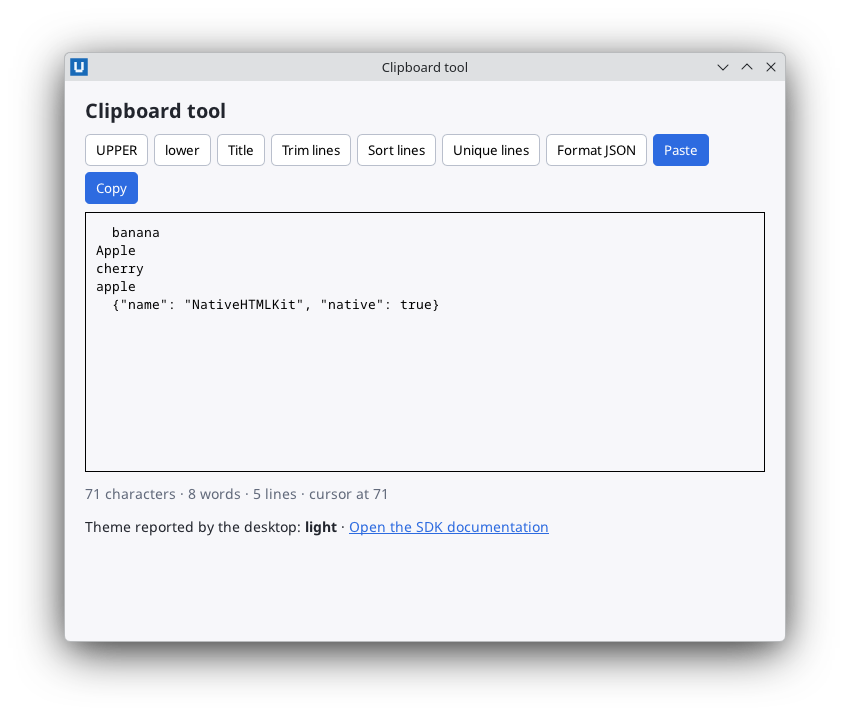
Real capture on KDE Plasma 6.6 Wayland with the released packages.
What it teaches: clipboard; link_activated; open_external; capabilities.
Run it
uv init --app myapp && cd myapp    # once: a uv project for your app
uv add nativehtmlkit
# save the example file(s) in the project folder, then:
uv run text_toolbox.py
Related guide: clipboard and desktop
Source: text_toolbox.py
"""Clipboard tool: transform text and move it through the system clipboard.

What it teaches
  * ``Application.clipboard_text`` / ``set_clipboard_text`` (plain text only)
  * the ``link_activated`` event and ``Application.open_external`` to open a link in the browser
  * ``desktop_preferences`` / ``on_desktop_preferences`` and ``capabilities``
  * checking capabilities and handling RpcError -32001 ("unsupported here") gracefully
  * one delegated click handler for a toolbar of buttons
  * ``get_value`` / ``set_value`` and the UTF-16 based ``control_selection`` offsets

Run:  uv run text_toolbox.py
"""
from __future__ import annotations

import json

from nativehtmlkit import Application, RpcError, Window

DOCS_URL = "https://github.com/nativehtmlkit/nativehtmlkit-python"


def _sorted_lines(text: str) -> str:
    return "\n".join(sorted(text.splitlines(), key=str.casefold))


def _unique_lines(text: str) -> str:
    return "\n".join(dict.fromkeys(text.splitlines()))


def _pretty_json(text: str) -> str:
    return json.dumps(json.loads(text), indent=2, ensure_ascii=False)


TRANSFORMS = {
    "upper": str.upper, "lower": str.lower, "title": str.title,
    "trim": lambda t: "\n".join(line.strip() for line in t.splitlines()),
    "sort": _sorted_lines, "unique": _unique_lines, "json": _pretty_json,
}

PAGE = """<!doctype html>
<html><head><meta charset="utf-8"><style>
  body { margin:0; padding:16px 20px; font:14px sans-serif; background:#f7f7fa; color:#22252d; }
  h1 { font-size:20px; margin:0 0 10px; }
  .toolbar { display:flex; flex-wrap:wrap; gap:6px; margin-bottom:8px; }
  button { padding:6px 10px; border:1px solid #b9bfcc; border-radius:5px; background:#fff; cursor:pointer; }
  button.primary { background:#2d6be0; color:#fff; border-color:#2d6be0; }
  textarea { width:100%; height:260px; box-sizing:border-box; padding:10px; font:13px monospace; }
  footer { display:flex; justify-content:space-between; color:#61697a; margin-top:8px; }
  a { color:#2d6be0; }
</style></head>
<body>
  <h1>Clipboard tool</h1>
  <div class="toolbar" id="toolbar">
    <button id="t-upper">UPPER</button><button id="t-lower">lower</button><button id="t-title">Title</button>
    <button id="t-trim">Trim lines</button><button id="t-sort">Sort lines</button>
    <button id="t-unique">Unique lines</button><button id="t-json">Format JSON</button>
    <button id="paste" class="primary">Paste</button><button id="copy" class="primary">Copy</button>
  </div>
  <textarea id="text" spellcheck="false">  banana
Apple
cherry
apple
  {"name": "NativeHTMLKit", "native": true}</textarea>
  <footer><span id="stats"></span><span id="status"></span></footer>
  <p>Theme reported by the desktop: <b id="scheme">unknown</b> ·
     <a id="docs" href="https://github.com/nativehtmlkit/nativehtmlkit-python">Open the SDK documentation</a></p>
</body></html>"""


class Toolbox:
    def __init__(self, app: Application, window: Window):
        self.app, self.window, self.document = app, window, window.document
        features = app.capabilities().get("features", {})
        # "available" is True/False once observed and None when not known yet.
        self.clipboard_known_unavailable = features.get("clipboard_text", {}).get("available") is False
        doc = self.document
        doc.on("click", self._on_toolbar, element="toolbar")
        # Links never navigate the document: activating one sends a "link_activated" event
        # (with "href" and the resolved "url") and the application decides what to do.
        doc.on("link_activated", lambda event: self.open_link(event.get("url") or DOCS_URL))
        doc.on("input", lambda _e: self.update_stats(), element="text")
        self.show_preferences(app.desktop_preferences())
        app.on_desktop_preferences(self.show_preferences)   # live updates when the desktop changes
        self.update_stats()

    def transform(self, name: str) -> None:
        text = self.document.get_value("text")
        try:
            self.document.set_value("text", TRANSFORMS[name](text))
            self.status(f"Applied “{name}”.")
        except ValueError as error:                         # e.g. invalid JSON
            self.status(f"Cannot apply “{name}”: {error}")
        self.update_stats()

    def copy(self) -> None:
        try:
            self.app.set_clipboard_text(self.document.get_value("text"))
            self.status("Copied to the clipboard.")
        except RpcError as error:
            self.status(self._unsupported("Clipboard", error))

    def paste(self) -> None:
        try:
            self.document.set_value("text", self.app.clipboard_text())
            self.status("Pasted from the clipboard.")
        except RpcError as error:
            self.status(self._unsupported("Clipboard", error))
        self.update_stats()

    def open_link(self, url: str) -> None:
        if not url.startswith("https://"):
            self.status("Only https links are opened.")
            return
        try:
            result = self.app.open_external(url, window=self.window)
            self.status("Opened the documentation." if result.get("accepted") else "Opening was cancelled.")
        except RpcError as error:
            self.status(self._unsupported("Opening links", error))

    def update_stats(self) -> None:
        text = self.document.get_value("text")
        selection = self.document.control_selection("text")    # offsets are UTF-16 code units
        self.document.set_text("stats", f"{len(text)} characters · {len(text.split())} words · "
                                        f"{len(text.splitlines())} lines · cursor at {selection['start']}")

    def show_preferences(self, preferences: dict) -> None:
        self.document.set_text("scheme", preferences.get("color_scheme") or "unknown")

    def status(self, text: str) -> None:
        self.document.set_text("status", text)

    def _unsupported(self, what: str, error: RpcError) -> str:
        if error.code == -32001 or self.clipboard_known_unavailable:
            return f"{what} is not available in this session."
        return f"{what} failed (code {error.code})."

    def _on_toolbar(self, event: dict) -> None:
        element = event["element"]
        if element.startswith("t-"):
            self.transform(element[2:])
        elif element == "copy":
            self.copy()
        elif element == "paste":
            self.paste()


def build(app: Application) -> Toolbox:
    return Toolbox(app, app.open_html(PAGE, title="Clipboard tool", width=720, height=560))


def main() -> None:
    with Application.start(name="Clipboard tool") as app:
        build(app)
        app.run()


if __name__ == "__main__":
    main()