Tutorial: your first wire-v1 client
In this tutorial you run, read and extend a complete NativeHTMLKit application that talks to the native host without an SDK, using only the Python standard library. By the end you will know every step a client performs: launch, handshake, window and document, events, commands, quit.
You need Python 3.10+ and a nativehtmlkit-host 1.0.3 binary (from a Core release archive, or the
one bundled in the nativehtmlkit Python wheel under nativehtmlkit/_bin/). The tutorial uses
headless mode, so no desktop is required; drop --headless to see the real window.
The code lives in examples/wire-v1/:
wire_client.py— ~200 lines: framing, handshake, correlation, host requests, notifications.notes_app.py— a "Quick notes" app built on it.
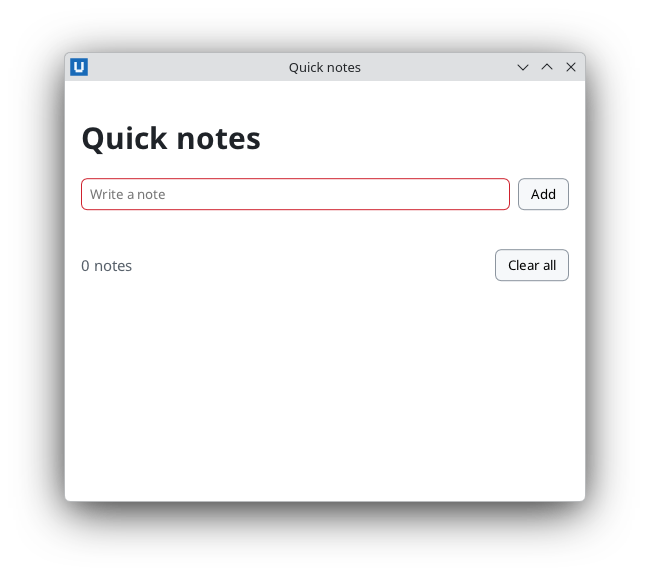
Real capture on KDE Plasma 6.6 Wayland with the released packages.
1. Run it
export NATIVEHTMLKIT_HOST_BINARY=/path/to/nativehtmlkit-host
uv run examples/wire-v1/notes_app.py --headless --self-test --transcript session.jsonl
Expected output (Core 1.0.3, Linux):
PASS empty form is not submitted
PASS invalid event shows an error
PASS valid form is submitted
PASS note is escaped
PASS no <b> element was injected
PASS input was cleared
PASS whitespace note rejected
PASS counter reads 2 notes
SELF-TEST PASS
Headless mode has no synthetic input, so --self-test makes the backend play the user: it fills
the field with set_value and presses "Add" with request_submit, which fires the same submit
(or invalid) events a real click would. session.jsonl now holds every frame (token redacted).
2. Two processes, one script
notes_app.py runs twice. You start it as the launcher: it writes an app.toml manifest whose
backend is the same script with --backend, then runs nativehtmlkit-host run --app app.toml
--headless. The host starts that backend with four variables in its environment:
UI4ME_ENDPOINT=/run/user/1000/nativehtmlkit-host/<key>.sock   (Windows: \\.\pipe\nativehtmlkit-host-<key>)
UI4ME_TOKEN=<64 hex characters>
UI4ME_APP_ID=org.example.QuickNotes
UI4ME_PROTOCOL_VERSION=1
The backend's print() output goes to a pipe the host owns; the host relays each line to its own
stderr as a JSON record with fields.source = "backend", and the launcher turns those back into
plain lines (wire_client.relay_host_stderr). That is why the PASS lines appear on your terminal.
3. Connect and say hello
wire_client.connect_from_environment() pops the four variables (so they cannot leak into child
processes), checks the token shape, connects to the socket or pipe and sends the first request.
From session.jsonl:
{"dir":"send","frame":{"jsonrpc":"2.0","id":"c1","method":"host.hello","params":{"token":"<redacted-token>","protocol_version":1}}}
{"dir":"receive","frame":{"id":"c1","jsonrpc":"2.0","result":{"app_id":"org.example.QuickNotes","capabilities":{"headless":true,"css_profile":"ui4me-desktop-1.0","features":{…},…},"host_version":"1.0.3","protocol_version":1}}}
On the wire each JSON object is preceded by its length as a 4-byte big-endian integer
(struct.pack(">I", len(body))). Ids are strings you choose; correlate responses by id.
4. Window, document, ready
{"dir":"send","frame":{"id":"c2","method":"window.create","params":{"title":"Quick notes","width":520,"height":420},…}}
{"dir":"receive","frame":{"id":"c2","result":{"window_id":"w1","width":520,"height":420,"native":false,…}}}
{"dir":"send","frame":{"id":"c3","method":"document.load","params":{"window_id":"w1","html":"<!doctype html>…"},…}}
{"dir":"receive","frame":{"id":"c3","result":{"document_id":"d1","loaded":true,"renderer":"cpu",…}}}
{"dir":"send","frame":{"id":"c4","method":"app.ready","params":{},…}}
{"dir":"receive","frame":{"id":"c4","result":{"ready":true}}}
app.ready tells the host startup is complete; it must arrive within startup_timeout_ms
(15 s by default) or the host fails the application. Keep the window_id and document_id: every
document.command names both, so a command can never hit a newer document by accident.
5. React to events
The page contains <form id="add"> with a required input. When the form is submitted the host
sends a notification:
{"dir":"receive","frame":{"jsonrpc":"2.0","method":"document.event","params":{"window_id":"w1","document_id":"d1",
  "event":{"type":"submit","element":"add","path":["add"],"cancelable":true,"default_prevented":false,…}}}}
NotesBackend.handle matches on type and on element or path, then reads the value, escapes
it and inserts it:
{"dir":"send","frame":{"id":"c10","method":"document.command","params":{…,"command":{"op":"get_value","element":"note"}}}}
{"dir":"receive","frame":{"id":"c10","result":{"value":"<b>milk</b> & eggs"}}}
{"dir":"send","frame":{"id":"c11","method":"document.command","params":{…,"command":{"op":"insert_html","element":"notes","position":"beforeend","html":"<li><b>milk</b> & eggs</li>"}}}}
insert_html parses markup, so the text is passed through html.escape() first; set_text (used
for the counter and the error line) never parses markup and needs no escaping.
When the field is empty, request_submit runs constraint validation instead: the host sends an
invalid event for the field (with a validity object), focuses it, and answers
{"submitted": false}. The app shows its own message, because the host draws no validation bubble.
6. Quit
{"dir":"send","frame":{"id":"c31","method":"app.request_quit","params":{}}}
{"dir":"receive","frame":{"id":"host:decision:1","method":"app.before_quit","params":{"reason":"backend_request"}}}
{"dir":"send","frame":{"id":"host:decision:1","result":{"allow":true}}}
{"dir":"receive","frame":{"id":"c31","result":{"requested":true}}}
{"dir":"receive","frame":{"method":"app.shutdown","params":{"deadline_ms":5000}}}
app.before_quit is a request from the host: it has an id and expects {"allow": bool}.
Session._dispatch_one answers it (through the decide callback) while waiting for the c31
response — a client must keep reading and answering at all times. After app.shutdown the backend
exits; the host exits with status 0.
The same request arrives with reason: "last_window" when the user closes the window, so this is
also where an app would ask about unsaved notes (answer {"allow": false} to keep running).
7. Extend it
Try these changes, then rerun the self-test (and add a check for each):
- Delete a note. Render each note as
<li><span></span><button class="del">×</button></li>and, on aclickwhosepathcontains no id, use the event'snodewithget_nodeto find the<li>and remove it withnode_batch [{op: "remove_element", node}]. - Persist notes. Ask
desktop.pathsfor thedatadirectory and store the notes as JSON there. - Confirm quit. Answer
app.before_quitwithallow: falsewhen there are unsaved notes, show a<dialog>withshow_dialog, and callapp.request_quitagain from its "Quit" button. - Dark mode. Add
@media (prefers-color-scheme: dark)rules and switch them withset_environment {color_scheme: "dark"}.
Next: live_bitmap.py streams pixels into an <img>; the
SDK authoring guide lists what a production client must add
(Windows overlapped I/O for concurrent readers, cancellation, backpressure, lifetime binding).
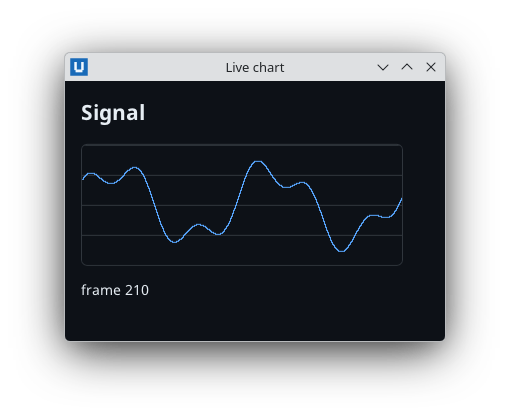
Real capture on KDE Plasma 6.6 Wayland with the released packages.
Source: nativehtmlkit-core/docs/tutorials/first-wire-client.md · edit the page there.