Node
from nativehtmlkit import Node
node = document.node("list")                               # from an element id
node = document.node(reference=event["node"])              # from an event or a query
A Node is an opaque reference to one node of one document generation: elements (with or
without an id), text nodes and the document node. Use nodes to work with elements that have no
id, such as rows rendered from data or markup you did not write.
Attributes
| Attribute | Type | Meaning |
|---|---|---|
document |
Document |
The document the reference belongs to. |
id |
str |
The reference string, e.g. "node:1:43:1". Treat it as opaque. |
Node(document, reference) raises ValueError for an empty reference; prefer
document.node(...). References never resolve in another document: when the document is replaced,
unloaded or closed, every method raises StaleDocumentError
locally. A reference to a node that was removed from a live document fails with RpcError.
Reading
inspect
node.inspect() -> dict: {"node", "type", "name", "id", "attributes", "parent", "previous",
"next", "child_count"} for elements; text nodes have "text" instead of name/attributes;
the document node has type: "document". parent/previous/next are references or None.
children
node.children(*, offset=0, limit=256) -> dict: {"children": [{"node", "type", "name", "id"}],
"total"}, paginated. Whitespace between tags appears as text nodes.
listing = document.node("menu").children()
for child in listing["children"]:
    if child["type"] == "element":
        print(child["name"], child["id"], child["node"])
Changing
Every mutation is a one-operation node_batch.
| Method | Effect |
|---|---|
set_text(text) |
Replace the children with one text node (plain text). |
append_text(text) |
Append a text node. |
set_attribute(name, value) / remove_attribute(name) |
|
add_class(name) / remove_class(name) |
|
insert_html(html, *, position="beforeend") |
Trusted markup; position as in Document.insert_html. |
replace_html(html) |
Replace the children with trusted markup. |
trim_children(keep, *, from_start=True) |
Keep keep children: from_start=True removes the oldest (first) children, False the newest (last). |
remove() |
Remove the node and its subtree. |
focus() / blur() |
Same as document.focus(node) / document.blur(node). |
move_to
node.move_to(target: Node, *, position: str = "beforeend") -> None
Move this node relative to target ("beforebegin", "afterbegin", "beforeend",
"afterend"). Both nodes must belong to the same document (ValueError otherwise).
items = document.query_nodes("#playlist li")["nodes"]
second = document.node(reference=items[1]["node"])
first = document.node(reference=items[0]["node"])
second.move_to(first, position="beforebegin")              # swap the first two entries
Document methods that accept element: str | Node (focus, blur, control_selection,
set_control_selection, replace_control_range, edit, reset_form, request_submit,
form_data, set_custom_validity, computed_style) take nodes too.
The DOM explorer example walks and edits a tree of id-less elements with these methods.
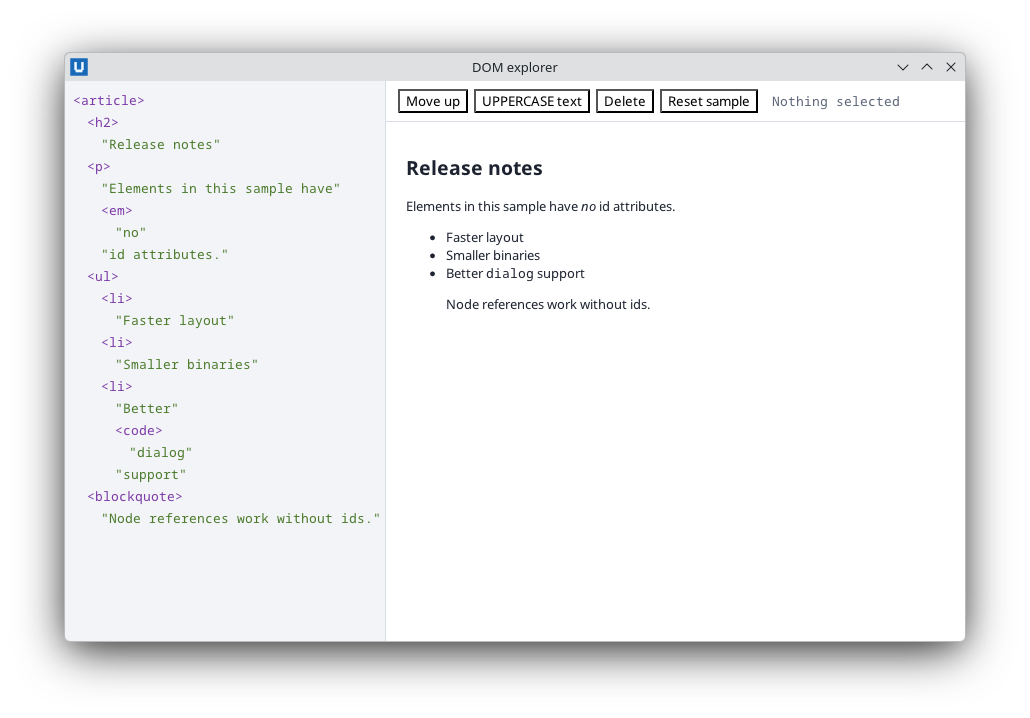
Real capture on KDE Plasma 6.6 Wayland with the released packages.
Source: nativehtmlkit-python/docs/reference/node.md · edit the page there.