Snippet editor
A snippet editor with keyboard shortcuts, Tab indentation and a help popover.
Same example in PowerShell: Snippet editor
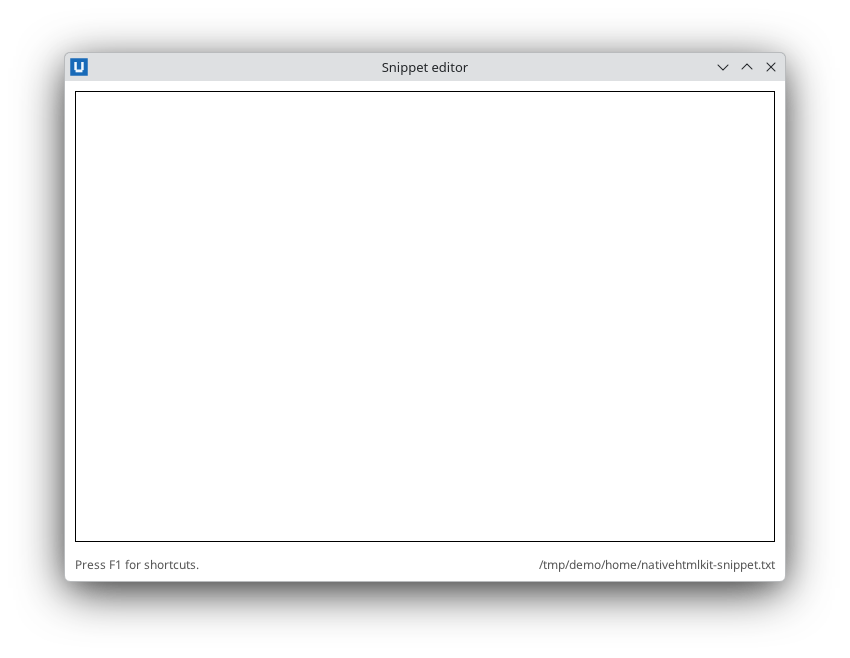
Real capture on KDE Plasma 6.6 Wayland with the released packages.
What it teaches: keydown chords; prevent_default; replace_control_range; control selection.
Run it
uv init --app myapp && cd myapp    # once: a uv project for your app
uv add nativehtmlkit
# save the example file(s) in the project folder, then:
uv run keyboard_shortcuts.py
Related guide: keyboard and focus
Source: keyboard_shortcuts.py
"""Keyboard shortcuts: a snippet editor with keyboard shortcuts.

What it teaches
  * ``keydown`` events (``key``, ``ctrl``, ``shift``, ``alt``, ``meta``) and a shortcut table that
    maps chords such as ``"ctrl+s"`` to actions
  * ``Document.prevent_default`` registered BEFORE the key is pressed (callbacks run after native
    dispatch), so Tab indents instead of moving focus
  * inserting text at the caret with ``replace_control_range``
  * ``control_selection`` / ``set_control_selection`` (UTF-16 offsets)
  * a ``popover`` used as a help panel

Shortcuts: Tab indent, Ctrl+S save, Ctrl+L insert timestamp, Ctrl+Shift+U upper-case the
selection, F1 show/hide help, Escape hide help.

Run:  uv run keyboard_shortcuts.py [FILE]
Default file: ~/Documents/nativehtmlkit-snippet.txt (or ~/nativehtmlkit-snippet.txt without a Documents folder).
"""
from __future__ import annotations

import sys
import time
from pathlib import Path

from nativehtmlkit import Application, Document

PAGE = """<!doctype html>
<html><head><meta charset="utf-8"><style>
  body { font-family: system-ui, sans-serif; margin: 0; display: flex; flex-direction: column; height: 100vh; }
  #editor { flex: 1; margin: 10px; font: 14px/1.45 monospace; padding: 8px; tab-size: 4; }
  footer { display: flex; justify-content: space-between; padding: 4px 10px 8px; font-size: 12px; color: #555; }
  #help { padding: 12px 16px; font-size: 13px; }
  #help kbd { border: 1px solid #aaa; border-radius: 3px; padding: 0 4px; font-family: monospace; }
</style></head>
<body>
  <textarea id="editor" aria-label="Snippet" autofocus></textarea>
  <footer><span id="status" role="status">Press F1 for shortcuts.</span><span id="file"></span></footer>
  <div id="help" popover>
    <strong>Shortcuts</strong><br>
    <kbd>Tab</kbd> indent - <kbd>Ctrl+S</kbd> save - <kbd>Ctrl+L</kbd> timestamp<br>
    <kbd>Ctrl+Shift+U</kbd> upper-case selection - <kbd>F1</kbd>/<kbd>Esc</kbd> help
  </div>
</body></html>"""


def chord(event: dict) -> str:
    """{'key': 'U', 'ctrl': True, 'shift': True} -> 'ctrl+shift+u'."""
    parts = [name for name in ("ctrl", "alt", "shift", "meta") if event.get(name)]
    return "+".join(parts + [str(event.get("key", "")).lower()])


class SnippetEditor:
    def __init__(self, document: Document, path: Path):
        self.document, self.path = document, path
        self.shortcuts = {
            "tab": lambda: self.insert("    "),
            "ctrl+s": self.save,
            "ctrl+l": lambda: self.insert(time.strftime("%Y-%m-%d %H:%M")),
            "ctrl+shift+u": self.upper_case_selection,
            "f1": lambda: self.document.toggle_popover("help"),
            "escape": lambda: self.document.hide_popover("help"),
        }
        document.set_text("file", str(path))
        if path.is_file():
            document.set_value("editor", path.read_text(encoding="utf-8"))
        # Default actions must be cancelled before the key arrives: callbacks only run after
        # native dispatch. Tab (without Shift) in the editor no longer moves focus.
        document.prevent_default("editor", "keydown", key="Tab", shift=False)
        # Without element=, the handler receives every keydown in the document.
        document.on("keydown", self.on_key)

    def on_key(self, event: dict) -> None:
        action = self.shortcuts.get(chord(event))
        if action:
            action()

    def status(self, text: str) -> None:
        self.document.set_text("status", text)

    def insert(self, text: str) -> None:
        # Without start/end, replace_control_range replaces the selection (or inserts at the caret).
        self.document.replace_control_range("editor", text, selection_mode="end")

    def save(self) -> None:
        self.path.parent.mkdir(parents=True, exist_ok=True)
        self.path.write_text(self.document.get_value("editor"), encoding="utf-8")
        self.status("Saved " + time.strftime("%H:%M:%S"))

    def upper_case_selection(self) -> None:
        # start/end are UTF-16 offsets, so slice the UTF-16 encoding, not the Python str.
        selection = self.document.control_selection("editor")
        start, end = selection["start"], selection["end"]
        if end <= start:
            self.status("Select some text first.")
            return
        units = self.document.get_value("editor").encode("utf-16-le")
        selected = units[start * 2:end * 2].decode("utf-16-le")
        self.insert(selected.upper())


def default_path() -> Path:
    documents = Path.home() / "Documents"
    return (documents if documents.is_dir() else Path.home()) / "nativehtmlkit-snippet.txt"


def build(app: Application, path: Path) -> SnippetEditor:
    window = app.open_html(PAGE, title="Snippet editor", width=720, height=500)
    return SnippetEditor(window.document, path)


def main() -> None:
    with Application.start(name="Snippet editor") as app:
        path = Path(sys.argv[1]) if len(sys.argv) > 1 else default_path()
        build(app, path)
        app.run()


if __name__ == "__main__":
    main()