Live bitmaps
Use a live bitmap when Python produces pixels: charts, plots, camera or emulator frames, image previews, generated art.
Set up
<img id="plot" src="ui4me-bitmap://plot" width="480" height="200" alt="Signal plot">
WIDTH, HEIGHT = 480, 200
bitmap = document.create_bitmap("plot", WIDTH, HEIGHT)     # id must match the img URL
Draw a frame
A frame is WIDTH * HEIGHT * 4 bytes of straight-alpha RGBA, row by row from the top:
frame = bytearray(bytes((16, 22, 34, 255)) * (WIDTH * HEIGHT))   # fill the background
def put(x, y, rgba):
    i = (y * WIDTH + x) * 4
    frame[i:i + 4] = bytes(rgba)
for x in range(WIDTH):
    put(x, HEIGHT // 2, (94, 196, 255, 255))                       # a horizontal line
bitmap.present(frame)
present returns once the host copied the frame ({"sequence", "presented_to_engine",
"slot_released"}), so you may reuse the buffer afterwards.
Animate from a thread
import threading, time
from nativehtmlkit import NativeHTMLKitError

stop = threading.Event()
app.on_shutdown(stop.set)

def producer():
    background = draw_grid()                       # bytes, drawn once
    while not stop.is_set():
        frame = bytearray(background)              # fast copy
        draw_line(frame, next_samples())           # only the pixels that change
        try:
            if bitmap.try_present(frame) is None:
                pass                               # previous frame still being presented: skip
        except (NativeHTMLKitError, RuntimeError):
            return                                 # document gone or bitmap closed
        time.sleep(1 / 30)

threading.Thread(target=producer, daemon=True).start()
try_present never queues: it returns None if another present of this bitmap is in progress.
Update text such as counters at a lower rate, in one batch.
Performance tips
- Per-pixel Python loops cost roughly microseconds per pixel: redraw only what changes, copy a pre-rendered background, use slice assignment for rows.
- Larger work (NumPy, Pillow) works too: pass anything that exposes the buffer protocol with exactly
slot_bytesbytes, e.g.numpy_array.tobytes()or amemoryview. - Keep the
<img>width/heightequal to the bitmap size for 1:1 pixels; CSS may scale it.
Lifetime and limits
The bitmap is released by bitmap.close() and automatically when its document is replaced,
unloaded or closed; afterwards present raises. Limits: 1–4096 pixels per side, 8 bitmaps and
64 MiB per document, 256 MiB per host (RpcError -32005 beyond that).
Example: live_chart.py (this process's working set sampled twice per second, drawn from a background thread, with Pause/Resume). Reference: LiveBitmap.
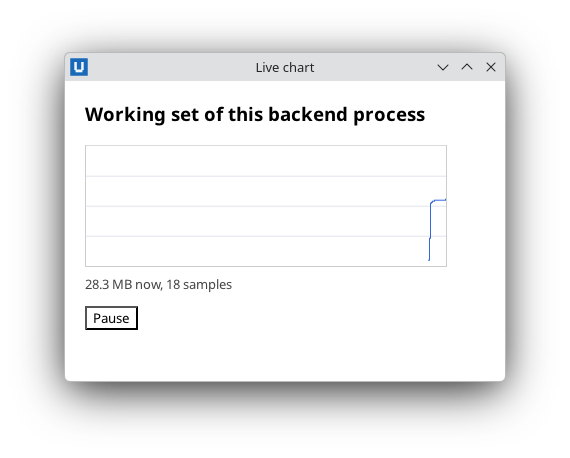
Real capture on KDE Plasma 6.6 Wayland with the released packages.
Source: nativehtmlkit-python/docs/guides/live-bitmaps.md · edit the page there.