How to use several windows
Reference: windows. Example: 08-multi-window.ps1 (a window manager: note windows listed, renamed, resized and closed from a main window).
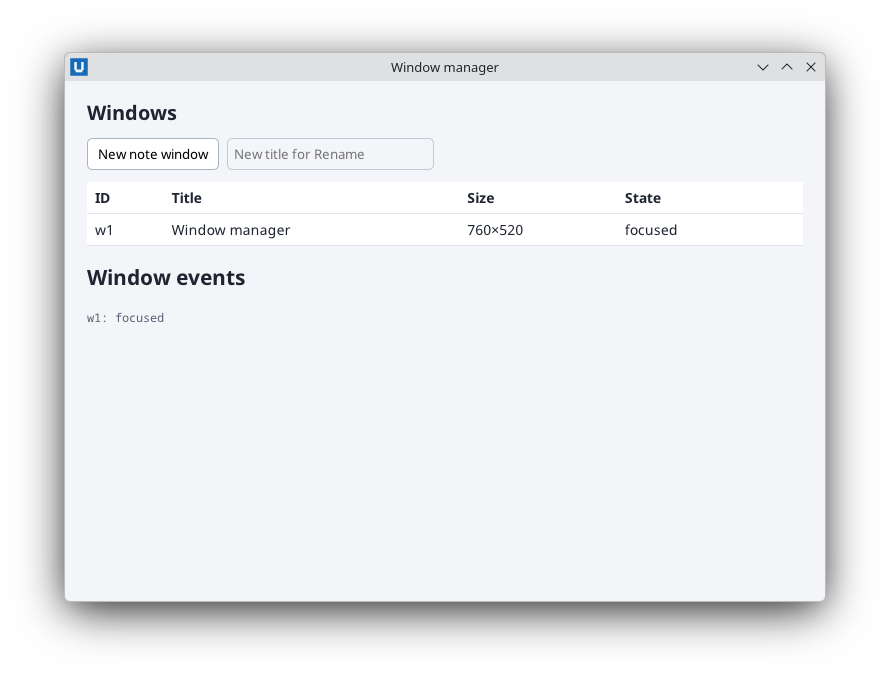
Real capture on KDE Plasma 6.6 Wayland with the released packages.
Each window has its own document
$main = New-NativeHTMLKitWindow -Application $app -Title 'Inventory'
$mainDoc = Open-NativeHTMLKitHtml -Window $main -Html $mainHtml

$details = New-NativeHTMLKitWindow -Application $app -Title 'Details' -Width 480 -Height 360
$detailsDoc = Open-NativeHTMLKitHtml -Window $details -Html $detailsHtml
Event subscriptions, element ids and stylesheets are per document: the same id in two windows is
two different elements. The host limits the number of windows to
Start-NativeHTMLKitScript -MaxWindows (default 16, at most 64).
Keep per-window state in a table
Create windows from a function and keep their state in a hashtable keyed by $window.Id. Because
the callbacks are created inside the function, capture its locals with .GetNewClosure() and share
mutable state through the captured hashtable ($script: does not work inside a closure; see
closures and scope):
$state = @{ Notes = @{} }
function New-NoteWindow($State) {
    $window = New-NativeHTMLKitWindow -Application $app -Title 'Note'
    $document = Open-NativeHTMLKitHtml -Window $window -Html $noteHtml
    $note = @{ Window = $window; Document = $document; Dirty = $false }
    $State.Notes[$window.Id] = $note
    $null = Register-NativeHTMLKitDocumentEvent -Document $document -Type input -Callback { $note.Dirty = $true }.GetNewClosure()
    Set-NativeHTMLKitBeforeClose -Window $window -Callback { -not $note.Dirty }.GetNewClosure()
    return $note
}
Closing windows
Close-NativeHTMLKitWindowasks the window's close policy (afterSet-NativeHTMLKitReady), the same path as the title-bar close button. The policy's last output decides.- The handle's
Closedproperty becomes$trueonce the host confirms; listen to thewindow.eventnotification withtype = 'closed'to update your own lists, because the user can close secondary windows at any time:
Register-NativeHTMLKitNotification -Application $app -Method 'window.event' -Callback {
    param($params)
    if ($params.type -eq 'closed' -and $state.Notes.ContainsKey($params.window_id)) {
        $state.Notes.Remove($params.window_id)
        Update-WindowTable $state
    }
}
- When the user closes the last window, the host shuts the app down. To make one window the
"main" window whose close quits the app even while other windows are open, request a quit
when its
closedevent arrives (the quit closes every remaining window). There is one callback per notification method, so this goes into the samewindow.eventcallback:
Register-NativeHTMLKitNotification -Application $app -Method 'window.event' -Callback {
    param($params)
    if ($params.type -eq 'closed' -and $params.window_id -eq $main.Id) {
        $null = Request-NativeHTMLKitQuit -Application $app
        return
    }
    if ($params.type -eq 'closed' -and $state.Notes.ContainsKey($params.window_id)) {
        $state.Notes.Remove($params.window_id)
        Update-WindowTable $state
    }
}
Listing windows
Get-NativeHTMLKitWindowList returns one array object: assign it first.
$windows = Get-NativeHTMLKitWindowList -Application $app
"$($windows.Count) window(s): " + (($windows | ForEach-Object { $_.title }) -join ', ')
Window state
Set-NativeHTMLKitWindow changes title, size, constraints, minimized/maximized/fullscreen state
and focus; Get-NativeHTMLKitWindow reports what was requested and what the desktop observed.
Positioning with -X/-Y works only where the platform allows it (window_positioning in
Get-NativeHTMLKitCapabilities; not on Wayland). Request-NativeHTMLKitAttention flags a window
that needs the user (for example when a background job finished).
Source: nativehtmlkit-powershell/docs/guides/windows.md · edit the page there.