Process dashboard
Live process monitor that refreshes in the background, with filter, sort, pause and copy.
Same example in PowerShell: Process dashboard
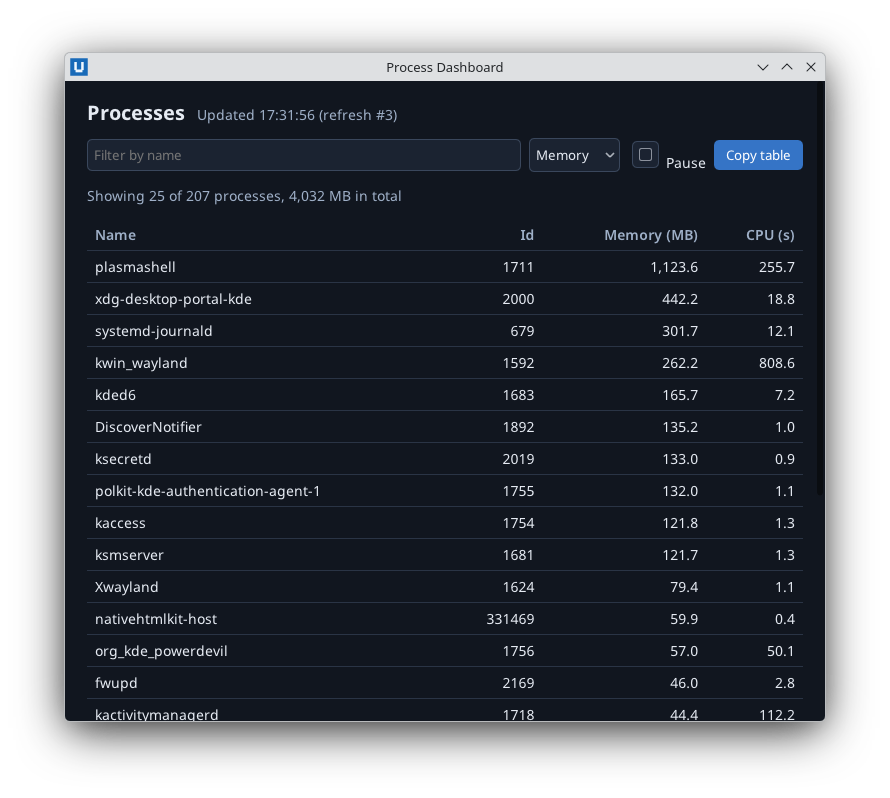
Real capture on KDE Plasma 6.6 Wayland with the released packages.
What it teaches: background thread; thread-safe updates; pause/resume; clipboard.
Run it
uv init --app myapp && cd myapp    # once: a uv project for your app
uv add nativehtmlkit
# save the example file(s) in the project folder, then:
uv run process_dashboard/dashboard.py
Related guide: background work
Source: process_dashboard/dashboard.py
"""Process dashboard: a live process monitor (final code of the process dashboard tutorial).

What it teaches
  * collecting data in a background thread and updating the page from it (SDK calls are
    thread-safe), so slow work never blocks the window's event callbacks
  * a refresh loop that waits on a ``threading.Event`` (wakes early to resume or to quit)
  * pausing with a checkbox (the ``change`` event carries ``checked``)
  * filtering and sorting a cached snapshot under a lock
  * copying the table to the clipboard with ``set_clipboard_text`` (and a fallback without one)
  * stopping the thread from ``app.on_shutdown``

Run:    uv run process_dashboard/dashboard.py [--refresh-seconds 3]
Guide:  docs/tutorials/process-dashboard.md (step 3 of 3)
"""
from __future__ import annotations

import argparse
import html
import threading
import time

from nativehtmlkit import Application, Document, NativeHTMLKitError, RpcError
from processes import list_processes

PAGE = """<!doctype html>
<html><head><meta charset="utf-8"><style>
  body { font: 14px sans-serif; margin: 0; background: #11161f; color: #e6ebf3; }
  main { padding: 18px 22px; }
  header { display: flex; align-items: baseline; gap: 12px; }
  h1 { font-size: 20px; margin: 0 0 12px; }
  #status { color: #9fb0c8; }
  form { display: flex; gap: 8px; align-items: center; margin-bottom: 10px; }
  input, select { background: #1b2331; color: #e6ebf3; border: 1px solid #3a475c; border-radius: 5px; padding: 6px; }
  #filter { flex: 1; }
  button { background: #3574c6; color: white; border: 0; border-radius: 5px; padding: 6px 12px; }
  table { border-collapse: collapse; width: 100%; }
  th, td { text-align: left; padding: 6px 8px; border-bottom: 1px solid #2a3445; }
  th { color: #9fb0c8; font-weight: 600; }
  td.num, th.num { text-align: right; }
  #summary { color: #9fb0c8; }
</style></head>
<body><main>
  <header><h1>Processes</h1><span id="status" role="status">Collecting...</span></header>
  <form id="view-form">
    <input id="filter" type="search" placeholder="Filter by name" aria-label="Filter by name">
    <select id="sort" aria-label="Sort by">
      <option value="memory">Memory</option><option value="cpu">CPU time</option><option value="name">Name</option>
    </select>
    <label><input type="checkbox" id="paused"> Pause</label>
    <button id="copy" type="button">Copy table</button>
  </form>
  <p id="summary"></p>
  <table>
    <thead><tr><th>Name</th><th class="num">Id</th><th class="num">Memory (MB)</th><th class="num">CPU (s)</th></tr></thead>
    <tbody id="rows"></tbody>
  </table>
</main></body></html>"""

SORT_KEYS = {
    "memory": (lambda p: p.memory_mb, True),
    "cpu": (lambda p: p.cpu_seconds, True),
    "name": (lambda p: p.name.lower(), False),
}
SHOWN = 25


class Dashboard:
    def __init__(self, app: Application, document: Document, refresh_seconds: float):
        self.app, self.document, self.refresh_seconds = app, document, refresh_seconds
        self.lock = threading.Lock()          # rows/shown are read by callbacks and the worker
        self.rows: list = []
        self.shown: list = []
        self.refreshes = 0
        self.paused = False
        self.wake = threading.Event()         # set to refresh now (resume) or to stop
        self.stopped = threading.Event()
        doc = document
        doc.on("input", lambda _event: self.update_view(), element="filter")
        doc.on("change", lambda _event: self.update_view(), element="sort")
        doc.on("submit", lambda _event: self.update_view(), element="view-form")
        doc.on("change", self.on_pause, element="paused")
        doc.on("click", lambda _event: self.copy(), element="copy")
        app.on_shutdown(self.stop)

    # ----- the background refresh loop -----
    def start(self) -> threading.Thread:
        thread = threading.Thread(target=self._loop, name="process-refresh", daemon=True)
        thread.start()
        return thread

    def _loop(self) -> None:
        while not self.stopped.is_set():
            if not self.paused:
                try:
                    self.refresh()
                except NativeHTMLKitError:    # the window closed or the app is shutting down
                    return
            self.wake.wait(self.refresh_seconds)
            self.wake.clear()

    def refresh(self) -> None:
        rows = list_processes()               # the slow part: runs on this worker thread
        with self.lock:
            self.rows = rows
            self.refreshes += 1
            count = self.refreshes
        self.update_view()
        if not self.paused:                   # paused while collecting: keep showing "Paused"
            self.document.set_text("status", f"Updated {time.strftime('%H:%M:%S')} (refresh #{count})")

    def stop(self) -> None:
        self.stopped.set()
        self.wake.set()

    # ----- the view -----
    def update_view(self) -> None:
        needle = self.document.get_value("filter").strip().lower()
        key, descending = SORT_KEYS.get(self.document.get_value("sort"), SORT_KEYS["memory"])
        with self.lock:
            matching = [p for p in self.rows if needle in p.name.lower()]
            self.shown = sorted(matching, key=key, reverse=descending)[:SHOWN]
            shown, total = list(self.shown), len(self.rows)
            memory = sum(p.memory_mb for p in self.rows)
        cells = "".join(f'<tr><td>{html.escape(p.name)}</td><td class="num">{p.pid}</td>'
                        f'<td class="num">{p.memory_mb:,.1f}</td><td class="num">{p.cpu_seconds:,.1f}</td></tr>'
                        for p in shown)
        self.document.batch([
            {"op": "replace_children_html", "element": "rows", "html": cells},
            {"op": "set_text", "element": "summary",
             "text": f"Showing {len(shown)} of {total} processes, {memory:,.0f} MB in total"},
        ])

    def on_pause(self, event: dict) -> None:
        self.paused = bool(event.get("checked"))
        if self.paused:
            self.document.set_text("status", "Paused")
        else:
            self.wake.set()                   # refresh at once instead of after the interval

    def copy(self) -> None:
        with self.lock:
            lines = ["Name\tId\tMemoryMB\tCpu"] + [f"{p.name}\t{p.pid}\t{p.memory_mb}\t{p.cpu_seconds}"
                                                  for p in self.shown]
        try:
            self.app.set_clipboard_text("\n".join(lines))
            self.document.set_text("status", f"Copied {len(lines) - 1} rows")
        except RpcError:                      # -32001: no clipboard (for example headless runs)
            self.document.set_text("status", "The clipboard is not available in this session")


def build(app: Application, refresh_seconds: float = 3) -> Dashboard:
    window = app.open_html(PAGE, title="Process Dashboard", width=760, height=640)
    return Dashboard(app, window.document, refresh_seconds)


def main() -> None:
    # Parse inside main(): the host re-runs this script with the same arguments.
    parser = argparse.ArgumentParser(description="Live process dashboard")
    parser.add_argument("--refresh-seconds", type=float, default=3, help="refresh interval (1-3600)")
    args = parser.parse_args()
    if not 1 <= args.refresh_seconds <= 3600:
        parser.error("--refresh-seconds must be between 1 and 3600")
    with Application.start(name="Process Dashboard") as app:
        build(app, args.refresh_seconds).start()
        app.run()


if __name__ == "__main__":
    main()