Process viewer
Sortable, filterable table of running processes.
Same example in Python: Process viewer
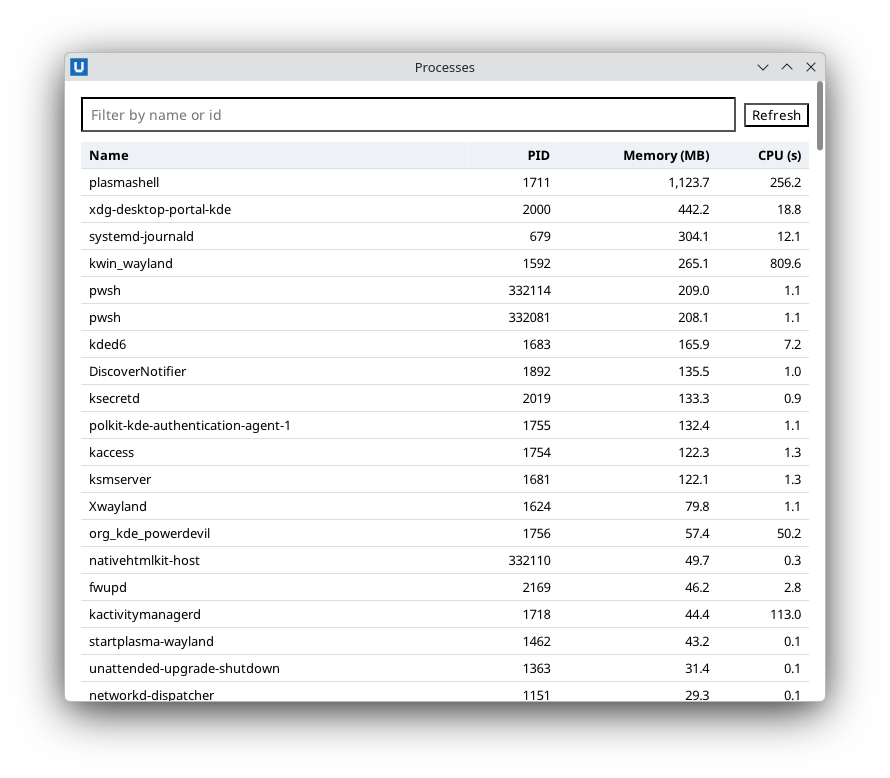
Real capture on KDE Plasma 6.6 Wayland with the released packages.
What it teaches: rendering data as a table; input event value; sortable headers with aria-sort.
Run it
pwsh -File 05-process-viewer.ps1
Related guide: updating the page
Source: 05-process-viewer.ps1
# 05-process-viewer.ps1 - a sortable, filterable table of running processes.
#
# Teaches: rendering PowerShell objects (Get-Process) as an HTML table with encoded
# cells, the input event's value field (no extra round trip while typing), sorting by
# clicking column headers (aria-sort), and a status line with counts.
#
# Run:  pwsh -File ./05-process-viewer.ps1     (or powershell.exe -NoProfile -File .\05-process-viewer.ps1)
# -SelfTest drives the app through the public API and quits.
param([switch]$SelfTest)
$ErrorActionPreference = 'Stop'
Import-Module NativeHTMLKit

$app = Start-NativeHTMLKitScript -Name 'Process viewer'
try {
    $window = New-NativeHTMLKitWindow -Application $app -Title 'Processes' -Width 760 -Height 620
    $doc = Open-NativeHTMLKitHtml -Window $window -Html @'
<!doctype html>
<html><head><style>
  body { font-family: system-ui, sans-serif; margin: 16px; }
  .bar { display: flex; gap: 8px; align-items: center; margin-bottom: 10px; }
  #filter { flex: 1; padding: 6px 8px; font-size: 14px; }
  table { border-collapse: collapse; width: 100%; font-size: 13px; }
  th, td { text-align: left; padding: 4px 8px; border-bottom: 1px solid #ddd; }
  th { background: #eef1f6; }
  th button { all: unset; cursor: default; font-weight: 700; }
  td.num, th.num { text-align: right; }
  #status { color: #555; font-size: 13px; margin-top: 8px; }
</style></head>
<body>
  <div class="bar">
    <input id="filter" placeholder="Filter by name or id" aria-label="Filter">
    <button id="refresh">Refresh</button>
  </div>
  <table>
    <thead><tr id="headers">
      <th aria-sort="none" id="col-Name"><button id="sort-Name">Name</button></th>
      <th class="num" aria-sort="none" id="col-Id"><button id="sort-Id">PID</button></th>
      <th class="num" aria-sort="descending" id="col-MemoryMB"><button id="sort-MemoryMB">Memory (MB)</button></th>
      <th class="num" aria-sort="none" id="col-CpuSeconds"><button id="sort-CpuSeconds">CPU (s)</button></th>
    </tr></thead>
    <tbody id="rows"></tbody>
  </table>
  <p id="status"></p>
</body></html>
'@

    $script:snapshot = @()
    $script:filterText = ''
    $script:sortBy = 'MemoryMB'
    $script:descending = $true
    $script:columns = @('Name', 'Id', 'MemoryMB', 'CpuSeconds')

    function Update-Snapshot {
        # Plain data only: the view never holds live Process objects.
        $script:snapshot = @(Get-Process | ForEach-Object {
            $cpu = $null
            try { $cpu = $_.CPU } catch { $cpu = $null }   # access can be denied for other users' processes
            if ($null -eq $cpu) { $cpu = 0 }
            [pscustomobject]@{ Name = $_.ProcessName; Id = $_.Id
                MemoryMB = [Math]::Round($_.WorkingSet64 / 1MB, 1); CpuSeconds = [Math]::Round([double]$cpu, 1) }
        })
    }

    function Update-Table {
        $rows = @($script:snapshot)
        if ($script:filterText) {
            $needle = $script:filterText
            $rows = @($rows | Where-Object { $_.Name -like "*$needle*" -or [string]$_.Id -eq $needle })
        }
        $rows = @($rows | Sort-Object -Property $script:sortBy -Descending:$script:descending | Select-Object -First 200)
        $html = New-Object System.Text.StringBuilder
        foreach ($p in $rows) {
            [void]$html.Append('<tr><td>' + [Net.WebUtility]::HtmlEncode($p.Name) + '</td><td class="num">' + $p.Id +
                '</td><td class="num">' + $p.MemoryMB.ToString('N1') + '</td><td class="num">' + $p.CpuSeconds.ToString('N1') + '</td></tr>')
        }
        Set-NativeHTMLKitDocumentHtml -Document $doc -Element rows -Html $html.ToString()
        foreach ($column in $script:columns) {
            $sort = 'none'
            if ($column -eq $script:sortBy) { $sort = 'ascending'; if ($script:descending) { $sort = 'descending' } }
            Set-NativeHTMLKitDocumentAttribute -Document $doc -Element "col-$column" -Name 'aria-sort' -Value $sort
        }
        Set-NativeHTMLKitDocumentText -Document $doc -Element status -Text ("Showing $($rows.Count) of $($script:snapshot.Count) processes. Updated " + (Get-Date).ToString('T') + '.')
    }

    # The input event carries the control's current value; no Get-NativeHTMLKitValue needed.
    $null = Register-NativeHTMLKitDocumentEvent -Document $doc -Type input -Element filter -Callback {
        param($evt)
        $script:filterText = ([string]$evt.value).Trim()
        Update-Table
    }
    $null = Register-NativeHTMLKitDocumentEvent -Document $doc -Type click -Element headers -Callback {
        param($evt)
        if ($evt.element -notmatch '^sort-(\w+)$') { return }
        if ($script:sortBy -eq $Matches[1]) { $script:descending = -not $script:descending }
        else { $script:sortBy = $Matches[1]; $script:descending = $Matches[1] -ne 'Name' }
        Update-Table
    }
    $null = Register-NativeHTMLKitDocumentEvent -Document $doc -Type click -Element refresh -Callback { Update-Snapshot; Update-Table }

    Update-Snapshot
    Update-Table
    Set-NativeHTMLKitReady -Application $app

    if ($SelfTest) {
        $total = (Find-NativeHTMLKitElement -Document $doc -Selector '#rows tr').matched_nodes
        if ($total -lt 2) { throw "expected several processes, found $total" }
        $script:filterText = [string]$PID   # this backend's own process id
        Update-Table
        if ((Find-NativeHTMLKitElement -Document $doc -Selector '#rows tr').matched_nodes -ne 1) { throw 'PID filter should match one row' }
        $script:filterText = ''; $script:sortBy = 'Name'; $script:descending = $false
        Update-Table
        if ((Invoke-NativeHTMLKitDocumentCommand -Document $doc -Operation get_attribute -Parameters @{ element = 'col-Name'; name = 'aria-sort' }).value -ne 'ascending') { throw 'aria-sort not updated' }
        [Console]::Out.WriteLine('SELFTEST PASS 05-process-viewer')
        $null = Request-NativeHTMLKitQuit -Application $app
    }

    Wait-NativeHTMLKit -Application $app -UntilShutdown
} finally {
    Close-NativeHTMLKit -Application $app
}